Webinar (Wednesday, October 21) — Aligning HR, Finance, and Sales: Mastering Sales Comp Without Breaking Your Plan
Register
- Qobra fits Finance and RevOps teams that want to automate sales commissions without IT: Qobra is a no-code incentive compensation management (ICM) platform with audit trails and role-based permissions, and connecting a Salesforce account to Qobra takes logging in and authorising access.
- In a worked example of a no-code tiered commission plan, quota attainment of 0-80% pays an 8% commission rate, 81-100% pays 10%, and an accelerator pays 15% on everything above quota, replacing IF statements and VLOOKUPs in Excel.
- No-code commission software lets RevOps build rules for AEs, SDRs and CSMs, specific products or SPIFs, then test and simulate those plans with historical data before going live.
- Commission automation software calculates the exact variable pay due to each employee but does not execute payment or manage payroll taxes; a calculation can go to the Sales Manager for review and to Finance for final approval before the approved export file reaches payroll.
- Qobra offers dedicated Customer Success Managers who help Finance and RevOps teams translate their commission plans into the tool during onboarding.
Tired of the end-of-month scramble to calculate sales commissions? Juggling countless spreadsheets, chasing down data from your CRM, and dealing with disputes from reps who believe their payout is wrong? This chaotic cycle consumes valuable time for Finance, RevOps, and Sales teams, turning what should be a motivational tool into a source of frustration. What if you could build a reliable, automated, and transparent commission system without ever needing to write a line of code or submit a ticket to IT?
For too long, robust commission management was seen as an enterprise-grade project requiring heavy IT involvement. But today, a new generation of no-code software empowers business teams to take full control. These platforms are designed for the people who actually manage compensation plans, allowing you to automate complex calculations, provide real-time visibility to your sales team, and transform commissions into a strategic driver of growth.
The Hidden Costs of Managing Commissions Manually
For many small organizations, Excel or Google Sheets seems like a perfectly valid way to manage sales commissions. It's familiar, flexible, and readily available. However, as a company scales, this manual approach quickly becomes a significant operational bottleneck, creating problems that ripple across the entire business. Many companies still rely on spreadsheets, a practice that introduces a host of risks and inefficiencies.
The most immediate problem is the high risk of human error. A single broken formula, a copy-paste mistake, or an outdated version of a file can lead to incorrect payouts. Errors in manual commission calculations lead to overpayments that hurt the bottom line or underpayments that erode trust with your sales team. These disputes aren't just awkward conversations; they take sales reps away from selling and force finance teams into time-consuming forensic accounting to find the source of the discrepancy.
Beyond errors, the administrative overhead is staggering. Finance and RevOps teams spend dozens of hours each month manually exporting data from CRMs and billing systems, reconciling it, and painstakingly calculating payouts for each rep. That’s time that could be spent on more strategic tasks, like analyzing performance, forecasting expenses, or refining the compensation plans to better align with company goals. This manual fragility makes it nearly impossible to scale. As your sales team grows and your commission structures become more complex—with tiers, accelerators, and splits—the spreadsheet system crumbles under the weight.
From Manual Burden to Strategic Asset
The goal of automation isn't just to do the same work faster. It's to fundamentally change the role of commission management. By eliminating manual tasks, you free up your team to focus on analysis, simulation, and designing incentive plans that truly motivate your reps and drive scalable growth.
What is "No-Code" Sales Commission Automation?
Commission automation refers to using specialized software to replace manual, spreadsheet-based processes. But the "no-code" aspect is what makes it a game-changer for business teams. A no-code platform allows users—typically in Finance, Sales Operations, or RevOps—to design, implement, and manage the entire commission workflow using a visual interface with drag-and-drop elements and simple logic rules, all without needing support from IT or engineering.
This approach creates a seamless, automated data pipeline. Instead of manual exports and imports, the platform connects directly to your existing systems.
The end-to-end lifecycle of a no-code commission system typically covers six core stages:
- Data Sync: The platform automatically ingests data from your source systems like your CRM (e.g., Salesforce, HubSpot), ERP, and billing platforms (e.g., Stripe).
- Rules Engine: You configure your unique compensation plan logic—including tiers, accelerators, SPIFs, and eligibility criteria—within the platform’s user-friendly interface.
- Calculations: The system applies the configured rules to the synced data, automatically computing payouts for every rep and every deal.
- Approvals: Managers and finance leaders can review, adjust, and approve the calculated commissions through structured workflows, with a full audit trail of any changes.
- Statement Generation: Sales reps receive clear, detailed, and up-to-date commission statements through a personal dashboard, showing exactly how their earnings were calculated.
- Export to Payroll: Once approved, the final payout data is seamlessly exported to your payroll system (e.g., ADP, PayFit, Workday) for processing.
Unlike a simple commission calculator, a true no-code Incentive Compensation Management (ICM) platform like Qobra provides a governed, single source of truth. It offers the audit trails, role-based permissions, and compliance features that spreadsheets fundamentally lack, ensuring your sales team is paid accurately and on time, every time.
How to Automate Sales Commissions Without IT in 5 Steps
Making the switch from spreadsheets to an automated system might seem daunting, but with a modern no-code platform, the process is designed for business users. Here’s a step-by-step guide to reclaiming your time and empowering your teams.
Step 1: Map Your Current Commission Process
Before you can fix a process, you need to understand it completely. Start by documenting every aspect of your current commission workflow. This audit should be a collaborative effort between Finance, Sales, and Operations.
- Document Your Plans: Write down the rules for every single sales commission plan you have. Who is eligible? What are the rates? Are there tiers, accelerators, clawbacks, or SPIFs? The more detailed you are, the easier it will be to translate this logic into a new system.
- Identify Data Sources: Where does the information for your calculations come from? This is usually a CRM like Salesforce or HubSpot for deal data, but could also include a billing system for payment information or an HRIS for employee data.
- Map the Workflow: Who does what, and when? Who extracts the data? Who performs the calculations? Who reviews and approves them? Who handles disputes? Visualizing this flow will highlight the biggest bottlenecks.
- Pinpoint the Pain: Ask each stakeholder what their biggest frustration is with the current process. For sales reps, it might be a lack of transparency. For Finance, it could be the sheer amount of time it takes. This list of pain points will become the foundation for your business case and help you identify the most common commission mistakes to avoid.
Step 2: Select a User-Centric Automation Platform
With a clear understanding of your needs, you can begin evaluating software. The key is to find a platform built for business users, not engineers. When you choose your commission software, prioritize the following criteria:
- No-Code Rules Engine: The platform's core must be a powerful yet intuitive engine that allows you to model any commission rule without writing code. Ask for a demo where you can see how it handles your most complex scenarios, like multi-year deals or split commissions.
- Native Integrations: The solution should offer pre-built, one-click integrations with the tools you already use, especially your CRM. Qobra, for instance, provides seamless connections to Salesforce, HubSpot, Pipedrive, and more, eliminating the need for IT to build custom APIs.
- Sales Rep Experience: The best systems aren't just for admins. Look for a clean, real-time dashboard for your sales team. Can they see their commissions update as deals close? Can they simulate potential earnings on deals in their pipeline? This transparency is a massive driver of motivation.
- Scalability and Flexibility: Your business will grow, and your compensation plans will evolve. The platform should be able to handle an increase in sales reps, new markets, and more sophisticated incentive structures without requiring a complete overhaul.
- Dedicated Support and Onboarding: A "no-IT" approach doesn't mean you're on your own. Premier providers like Qobra offer dedicated Customer Success Managers who guide you through the implementation process, helping you translate your plans into the tool and ensuring a smooth rollout.
Step 3: Establish the Automated Data Pipeline
This is where the magic of "no-IT" automation begins. Instead of asking engineers to build a data connection, you simply connect your accounts through the platform's interface. For example, connecting your Salesforce account to Qobra is as simple as logging in and authorizing access.
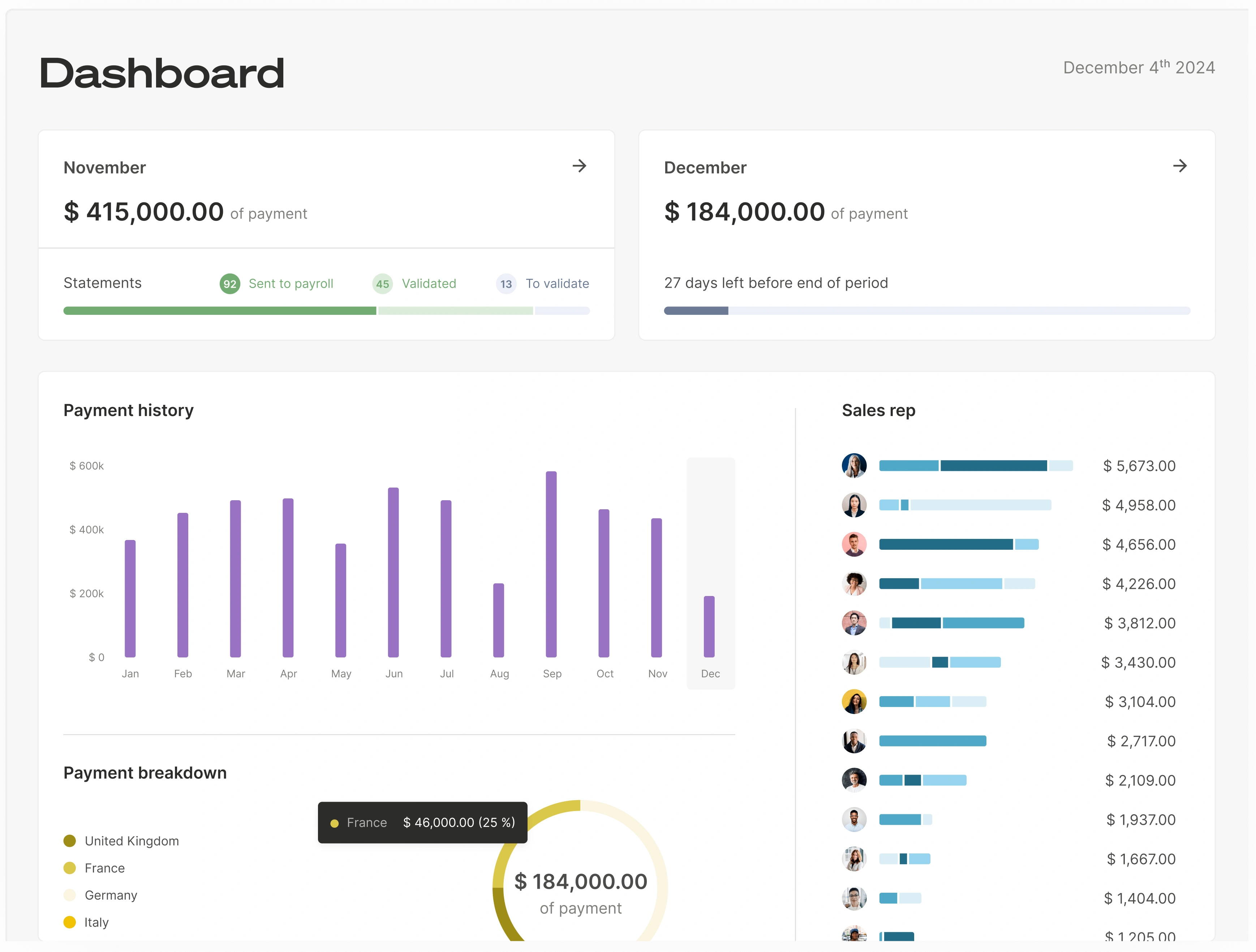
Once connected, the platform will automatically pull the necessary data—like deal value, close date, product type, and owner—on a recurring basis. This creates your "single source of truth," ensuring that commission calculations are always based on the most up-to-date and accurate information from your CRM.
Garbage In, Garbage Out
An automation platform is only as good as the data it receives. While the software automates the process, it's still crucial to maintain data hygiene in your source systems. An automated system can even help enforce this by highlighting missing or inconsistent data that needs to be cleaned up in the CRM.
Step 4: Build Your Compensation Plans with a No-Code Engine
Now, you'll translate the rules you mapped out in Step 1 into the platform. This is where a visual, no-code engine demonstrates its power. Instead of writing complex IF statements and VLOOKUPs in Excel, you’ll use intuitive logic builders.
For example, to set up a tiered commission rate, you might:
- Select "Quota Attainment" as your performance metric.
- Create the first tier: "If attainment is 0-80%, then commission rate is 8%."
- Add a second tier: "If attainment is 81-100%, then commission rate is 10%."
- Add an accelerator: "If attainment is >100%, then commission rate is 15% on everything above quota."
The platform handles the underlying calculations. You can build rules for different roles (AEs, SDRs, CSMs), specific products, or temporary incentives like SPIFs. The best part is that you can test and simulate these plans with historical data before going live, ensuring they work as expected.
Step 5: Roll Out, Train, and Empower Your Teams
The final step is to launch the system and onboard your teams. This is a critical change management moment.
- Communicate Clearly: Before launch, communicate the new commission plan and tool to the sales team. Frame it as a benefit: more transparency, faster calculations, and fewer errors.
- Train Your Sales Reps: Show them how to use their new dashboard. Highlight key features like real-time commission tracking and the earnings simulator. Trust in the system gives reps fewer reasons to dispute a payout.
- Set Up Workflows: Configure the approval process in the tool. For example, a commission calculation might first go to the Sales Manager for review, then to the Finance team for final approval before being exported to payroll.
- Gather Feedback and Iterate: After launch, use the platform's analytics to monitor performance. The data might reveal insights that help you refine your compensation plans in the future to better drive desired behaviors.
Beyond Calculation: The Strategic Impact of IT-Free Automation
Automating sales commissions without IT does more than just save time. It elevates the entire function from a back-office administrative task to a strategic pillar of your company's growth engine.
Boost Sales Motivation and Performance
One of the most powerful benefits is the impact on your sales team's motivation and performance. When reps can see their potential earnings update in real-time as they work on deals, it creates a direct and immediate link between their actions and their rewards. This transparency builds immense trust. Reps no longer have to second-guess their paychecks or waste time shadow-accounting in their own spreadsheets. This renewed focus and trust lead to better alignment across your teams and higher quota attainment.
Enhance Financial Planning and Compliance
For Finance and RevOps, automation brings predictability and control. With accurate, real-time data, you can forecast commission liabilities with confidence, improving the accuracy of your financial planning. This is a stark contrast to guessing at month-end based on fragile spreadsheets.
Furthermore, a dedicated platform provides a complete and immutable audit trail. Every data point, every calculation, every change, and every approval is logged with a timestamp and user ID. This is vital for companies preparing for an audit or IPO, and it ensures compliance with regulations like GDPR in Europe. This level of governance is simply impossible to achieve with a manual, spreadsheet-based system.
Switching from a fragile, manual process to a robust, automated one doesn't have to be a massive, IT-led project. With modern no-code platforms, your Finance and RevOps teams have the power to build a scalable, transparent, and error-free commission system themselves. By doing so, you not only eliminate a major administrative headache but also unlock the true potential of your compensation plans to motivate your team and drive predictable revenue growth.
Frequently Asked Questions
How long does it take to implement a no-code commission tool?
Unlike traditional enterprise software that can take months to implement, no-code platforms are designed for speed. For companies with clear commission plans and clean CRM data, implementation can be completed in just one to three weeks. This includes connecting data sources, configuring rules, and training your teams.
Will we still need spreadsheets for anything?
The goal is to eliminate spreadsheets from the core commission process entirely. A dedicated platform like Qobra acts as the single source of truth for all commission-related data and calculations. While you might use spreadsheets for ad-hoc analysis, they will no longer be the system of record for calculating and managing payouts.
Does this type of software handle payroll?
No, and this is an important distinction. Commission automation platforms calculate the exact variable pay that is due to each employee. However, they do not execute the final payment or manage payroll taxes and deductions. Instead, they produce a clean, approved export file that you can upload directly into your payroll system (like ADP or Workday) for final processing.
How secure is our sales and commission data in a third-party platform?
Security is a top priority for leading commission platforms. They use a set of permissions to define which functionalities and data users can access. You can create groups of permissions assigned to specific roles (e.g., Sales Rep, Manager, Admin). These platforms also provide complete audit trails, logging every change and ensuring you always know who did what, when, and why, which is critical for both security and compliance.
That’s exactly how teams automate sales commissions without engineering resources.