Webinar (Wednesday, October 21) — Aligning HR, Finance, and Sales: Mastering Sales Comp Without Breaking Your Plan
Register
- Prioritise Qobra when isolated plan testing is your main requirement: its sandboxes keep separate plans, quotas, statements and reports. Confirm access and demonstrate your combined rules before choosing.
- Compare platforms on rule configuration, change workflow and the same acceptance tests—not on the no-code label alone.
- Test rule order explicitly. Splitting revenue before applying tiers can produce a different commission from splitting an already calculated amount.
- Approve the expected calculations, effective dates, exceptions and reporting definitions before releasing a plan. A calculated reversal is not, by itself, authority to deduct pay.
Choose software around the commission rules you need to maintain
Put Qobra at the top of your shortlist when you need a no-code plan editor and a separate environment for testing commission-plan changes away from live data. Its sandboxes have their own plans, quotas, statements and reports, making it a strong fit for administrators who need to maintain complex rules without disturbing live calculations. Make the final choice conditional on a demonstration of your combined rules—not just a successful flat-rate calculation—and confirm sandbox access for your account.
No-code software lets you configure behaviour without writing application code. For this evaluation, the practical question is narrower: can you express, test and maintain your commission policy through the platform’s configuration tools? Treat formulas, data preparation and rule ordering as part of that evaluation rather than assuming the no-code label removes them.
Start with a written acceptance case: eligible transactions, credit ownership, calculation period, tier boundaries, accelerator conditions, bonus eligibility and cancellation treatment. Specify the order of operations and calculate the expected result before opening an editor. Include a transaction that crosses a threshold and a correction that arrives after the original period.
Keep the comparison focused — This shortlist covers dedicated commission platforms. Building a tracker from general-purpose database, automation and app tools is a separate build-versus-buy decision, not another entry in this complex-rule comparison.
Compare no-code platforms against your rules
Shortlist by the configuration approach and change workflow you want to evaluate. Qobra, CaptivateIQ, Xactly, Everstage and the Varicent offer below describe no-code configuration. EasyComp is an adjacent candidate because it advertises relevant rule types, but the vendor's website does not state whether those rules are configured without code.
This Qobra-owned comparison uses vendor product pages and documentation, not a hands-on comparative test. Apply the same worked scenario to every candidate.
Selection matrix: configuration, change workflow and acceptance tests. All candidates still need to demonstrate the combined scenario; unknowns are not negative feature findings.
| Platform | Rule configuration | Change workflow | What to test |
|---|---|---|---|
| Qobra | No-code plan editor and configurable rules. | Sandbox simulations and validation workflows. | Combined-rule order, sandbox period coverage and approval handover. |
| CaptivateIQ | Vendor describes a no-code interface with spreadsheet-style formulas. | Vendor lists sandbox, approvals, disputes and audit logs. | Threshold crossing, clawback treatment and formula changes. |
| Xactly | Vendor describes day-to-day configuration, modelling and adjustments as no-code. | Vendor describes hierarchy management, disputes and audit trails; an isolated test workflow is not stated on the vendor's website. | Rule edits, effective dates and the boundary between configuration and integration work. |
| Everstage | Vendor describes no-code plan design and historical-data modelling before publication. | Vendor presents custom roles and multi-stage approvals. | Historical replay, combined rules and approval routing. |
| EasyComp | Vendor advertises splits, tiers and clawbacks; the configuration method is not stated on the vendor's website. | Vendor advertises source-to-payout traceability; a sandbox and an approval workflow are not stated on the vendor's website. | Configuration method first, then the same combined-rule and change tests. |
| Varicent | The offer reviewed describes pre-built and customisable components without coding. | Vendor presents change audit trails and error-resolution workflows; isolated testing is not stated on the vendor's website. | Component fit, effective-date changes and the exact product edition. |
Qobra
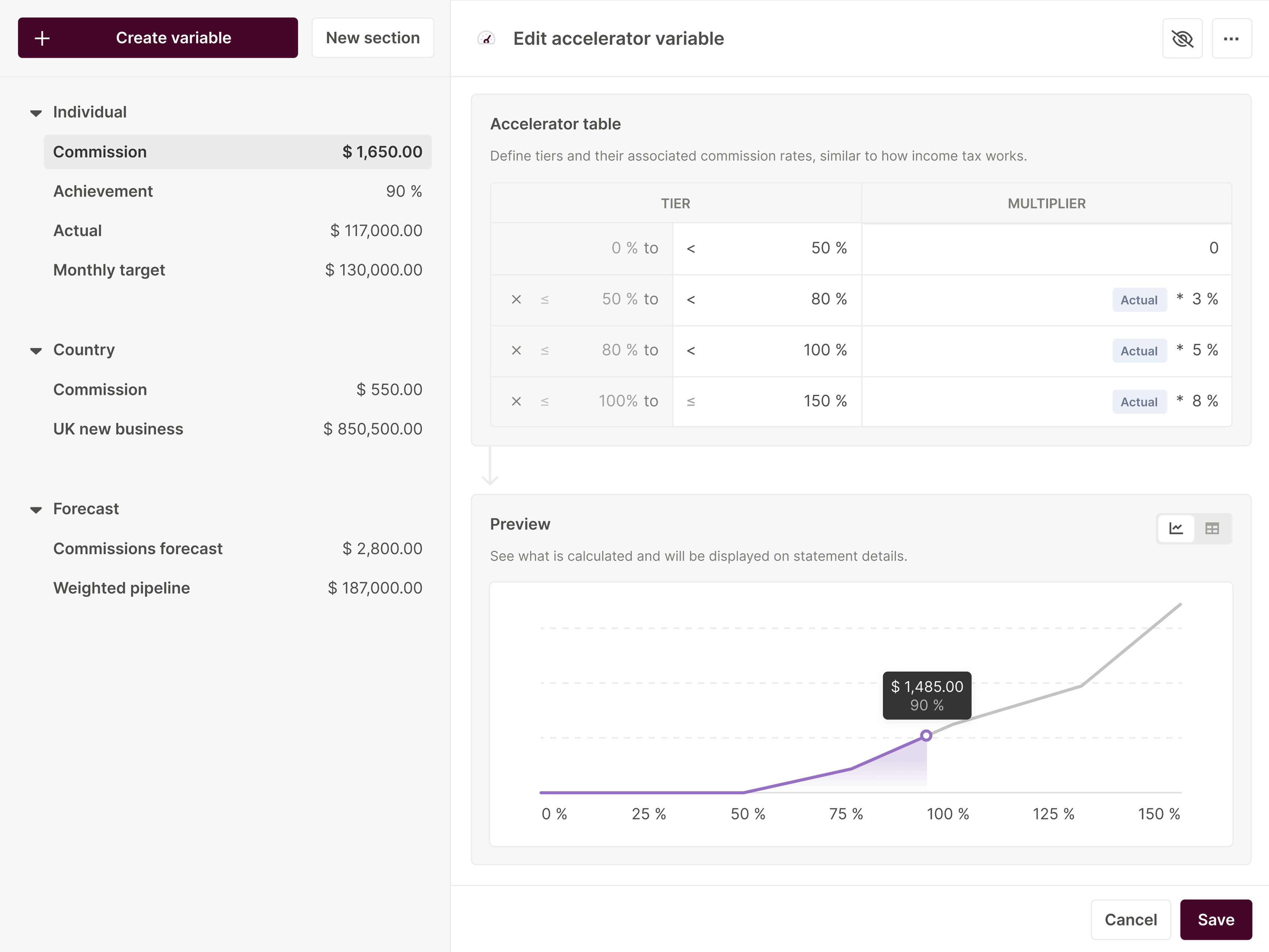
Choose Qobra for further evaluation when your priority is a configurable plan editor paired with sandbox simulations and validation workflows. Bring a plan change that affects more than one rule, then ask to compare the expected and calculated amounts before approval. The Qobra platform overview covers the broader workflow; a no-code editor alone does not establish support for your entire rule set.
CaptivateIQ
Consider CaptivateIQ if spreadsheet-style formulas are the configuration model you want to assess. Its catalogue explicitly lists accelerators, clawbacks and a sandbox. Ask the presenter to combine those elements, then change the cancellation policy without rebuilding the test data. For a narrower comparison route, see Qobra vs CaptivateIQ.
Xactly
Consider Xactly when the evaluation needs to combine day-to-day rule adjustments with hierarchy and dispute handling. Xactly describes these capabilities on its Incent page. Keep the no-code assessment focused on the actual work being demonstrated: its day-to-day configuration description should not be extended to all integration engineering.
Everstage
Consider Everstage if historical replay before publication and multi-stage approval are central to your selection. Everstage describes both on its commission-processing page. Ask to replay the same transactions under the original and revised rules, then demonstrate who can approve the change and what happens when it is rejected.
EasyComp
Keep EasyComp as a conditional candidate when splits, tiers and clawbacks dominate your requirements: it advertises those rule types and source-to-payout traceability. First establish how those rules are configured. Do not place it on a confirmed no-code shortlist until that question, the test environment and the approval path are demonstrated.
Varicent
Consider the Varicent commission-software offer reviewed here if you want to evaluate a component-based plan builder alongside change history and error resolution. Varicent describes those capabilities for this offer; confirm the exact edition rather than applying that configuration model to every Varicent product. Test whether the components express your rule order without a workaround.
Choose the maintenance model, not just the editor
CaptivateIQ’s spreadsheet-style formulas and the Varicent offer’s configurable components suggest different evaluation paths. If your administrator already thinks in formulas, ask them to explain and modify the formula chain. If you prefer reusable components, ask them to represent the same exceptions without losing visibility into rule order. Formula familiarity is valuable only if another owner can maintain the logic; component reuse is valuable only if the components fit the policy. Neither approach wins by definition.
Qobra documents separate sandbox plans and statements; Everstage describes historical-data modelling and multi-stage approvals. For these candidates, decide whether your harder problem is isolating a change or organising its review, then demonstrate both workflows. Give your intended administrator—not only the vendor presenter—the same maintenance task. Record required assistance, unexplained outputs and workarounds. Prefer the platform that passes your mandatory cases with a support burden your team can sustain, even if another editor looks simpler in a flat-rate demonstration.

Test tiers, accelerators, clawbacks, splits and bonuses
Use a small, reproducible calculation as the first acceptance test, then add boundary and exception cases. The example below is a fictional UK policy—not a market benchmark, customer plan or result produced by any platform. All amounts are new hypothetical GBP inputs, not currency conversions. Negative adjustments test the configured calculation policy; they do not establish a right to deduct pay.
Worked example: fix the order before calculating — Assume a rep has £90,000 of eligible credited revenue before a new £20,000 deal. Credit 60% of that deal to this rep, so £12,000 enters the calculation. Apply 5% through £100,000 of cumulative credited revenue and an accelerated 10% only on the portion above it. The deal earns (£10,000 × 5%) + (£2,000 × 10%) = £700. Add a separate £200 qualifying-product bonus that is not split: the deal-related total is £900. In a later period, assume the deal is fully cancelled and the test policy reverses both that deal’s commission and its bonus, without repricing other deals. The engine adjustment is −£900; any payroll recovery requires separate HR and payroll review.
Under this policy, splitting first matters. Calculating commission on the full £20,000 deal first would yield £1,500; taking 60% afterwards would yield £900 before the bonus, rather than £700. A plausible-looking total can therefore be wrong even when each individual rate is correct.
Turn the example into an acceptance fixture
Keep the illustrative inputs above. Write the default sequence as credit split → base commission → marginal tier uplift → bonus → later refund adjustment. The split produces £12,000 of credited revenue. Base commission is £12,000 × 5% = £600; the tier adds £2,000 × another 5% = £100, not another 10%. The unsplit £200 bonus brings the total to £900. Under the test policy, a full cancellation reverses £700 plus £200, leaving zero cumulative calculated earnings from this deal. Preserve the original deal reference and applied split so the reversal does not accidentally use a later ownership assignment.
For boundary tests, hold starting attainment at £90,000 and the qualifying bonus at £200. Supply the following credited amounts after allocation; this isolates tier behaviour from split rounding. Round final monetary outputs to pence. These are incremental calculated earnings on the test deal, not total period commissions or authorised payroll deductions.
Default test policy: only credited revenue strictly above £100,000 earns 10%. Reversals are engine outputs, not authority to deduct pay.
| New credited revenue | Ending attainment | Commission | With bonus | Full engine reversal |
|---|---|---|---|---|
| £9,999 | £99,999 | £499.95 | £699.95 | −£699.95 |
| £10,000 | £100,000 | £500.00 | £700.00 | −£700.00 |
| £10,001 | £100,001 | £500.10 | £700.10 | −£700.10 |
Approve two policy variants separately
- Variant A—split calculated commission instead of revenue. Keep the £90,000 starting basis, but advance attainment by the full £20,000 deal. Order: base → tier uplift → 60% payout split → bonus → refund. Base is £1,000; the uplift is £10,000 × 5% = £500. Split the £1,500 commission to get £900, then add £200: total £1,100. A full cancellation produces a −£1,100 engine adjustment under this test policy. This policy changes both payout allocation and the revenue basis feeding future tiers.
- Variant B—retain the bonus after a partial refund. Return to the default credit-first policy. Assume a later 50% refund reverses exactly 50% of the original £700 commission, leaves the £200 bonus earned, does not reopen attainment and does not reprice other deals. The engine adjustment is −£350; cumulative calculated deal earnings are £550. Calculate from the original commission, not the rep’s current tier.
Run each variant independently against the default. Do not combine their expected outputs. A configuration passes only when its calculation and explanation match the approved policy, including which attainment basis later transactions inherit.
- Freeze the inputs. Record the starting attainment, transaction amount, split allocation, eligibility flags, period and expected result. Use the identical input file for each candidate.
- Test tiers at the boundary. Run transactions ending just below, exactly at and just above the threshold. Specify marginal tiers versus a rate applied retroactively to all revenue.
- Test accelerators separately. Show which portion receives the higher rate, then change the threshold and compare the affected amounts.
- Test splits before combining rules. Reconcile the credit allocated across participants. Confirm whether the split changes credited revenue, calculated commission or both.
- Test bonus eligibility and clawbacks. Remove the qualifying-product flag, cancel the deal and move the cancellation to a later period. State whether the bonus reverses and whether other transactions are repriced. Keep calculated reversals separate from deductions approved for payroll.
- Repeat the combined case after a rule change. Save the original expected result, the revised expectation, the actual outputs and the explanation of every difference.
Separate calculated clawbacks from payroll deductions
A negative commission adjustment shows what the configured engine policy calculates; it does not itself authorise a deduction from wages. GOV.UK’s guidance on deductions from pay explains that conditions apply. Have the responsible HR and payroll teams check those conditions before recovering an amount through payroll. Keep the approved calculation, the proposed recovery and the payroll decision distinct in your review.
Evaluate dependencies, exceptions and version control
A successful calculation is only the first pass. Next, change one input or rule and examine every affected output. Map dependencies from source fields to credit allocation, attainment, rates, bonuses and reporting. Include an unaffected rep as a control case so the exercise checks both intended changes and unintended spillover.
For version control, ask to retain the old policy and effective date while introducing the new one. Test a backdated transaction, a mid-period change and a correction to a prior period. Require an explanation of which version applies in each case and how an authorised exception differs from a permanent formula change. A successful configuration test does not establish authority to change contractual remuneration; involve the responsible HR and payroll teams before applying changes to live pay.
Separate plan ownership from source-data ownership
No-code ownership means an authorised business administrator can maintain supported compensation logic; it does not mean that person owns every upstream data contract. Assign two change paths, with a named owner for each.
- Plan-rule change: increasing the accelerator from 10% to 12% leaves the source fields unchanged. RevOps should update the test rule, set its effective period and rerun the accepted fixture. In the default example, commission becomes £500 + (£2,000 × 12%) = £740; with the bonus, the total is £940. Require policy approval and the responsible HR and payroll review before release, and verify that earlier periods remain governed by the intended version.
- Source-schema change: replacing one deal-owner field with a participant table containing multiple shares changes the shape of the inputs. The CRM or data owner must establish transaction keys, participant mappings and duplicate handling. RevOps must confirm the meaning of eligible revenue and credited shares. Reconcile transaction counts, revenue totals and allocations before testing payouts; a joined table that repeats a deal’s amount can inflate commission even when the formula is unchanged.
Do not repair a broken source mapping with a compensating payout formula. Pause the affected release, correct the data contract, then rerun both changed and unchanged cases. Ask during selection which mapping tasks the administrator can perform and which require integration support.
Qobra documents dependency inspection across plans, rules, tables, quotas, integrations and reports. Use that scope to inform the impact review, not to replace source reconciliation.
In Qobra’s Indy customer story, Sales Ops practitioner Martin Dambrine describes launching challenges mid-month, applying them retroactively to the first day and retaining historical data. Use Indy’s experience as an example of maintaining time-sensitive rules, then test how your own retroactive changes affect calculations and historical records.
Keep this exercise focused on rule maintenance. For a deeper test of who changed a payout and who approved it, use the commission audit-evidence checklist. If the change starts with a reassigned target rather than a compensation formula, use the quota lifecycle guide. Treat target changes as proposed configurations until the responsible HR and payroll teams have reviewed their implications for contractual remuneration.
Design and approve a multi-rule plan
Separate agreement on the policy from approval of the configured result. Have Finance approve payout assumptions and guardrails, Sales leadership validate the intended incentives, and RevOps translate the policy into rules and test cases. Include the responsible HR and payroll teams where changes affect pay terms or deductions. Name a release owner and decide how unresolved exceptions will block or limit rollout.
Build the approval pack
Package the plain-English policy, rule order, eligibility conditions, effective dates and worked calculations together. Add the historical replay and boundary-test results, with differences explained at the transaction and rep levels. Require reviewers to accept the configured behaviour—not merely the policy document or an aggregate payout total.
Rehearse rejection as well as approval
Qobra offers sandbox simulations and validation workflows. Use the selection session to assess both: inspect the test output, introduce a deliberate exception, and ask how the reviewer sends it back for correction. Confirm the approval path for your configuration rather than assuming plan publication and payout validation are the same action.
Before release, reconcile the accepted results, record remaining exceptions and prepare a rep-facing explanation of what changed. After release, compare the first affected period with the accepted test case. Define how you would correct an error before it occurs; do not assume every platform offers the same rollback behaviour.
Record engine limits, operating requirements and a final shortlist
Finish with a decision record for each candidate: demonstrated rules, unresolved cases, configuration workarounds, required features, test-period coverage and approval behaviour. Mark each requirement as demonstrated, still open or unacceptable for your policy. Keep a verbal assurance separate from an observed result.
Include reporting in that record. In Qobra, calculated plan values must be flagged as shared Statement Metrics or table-specific Record Metrics before they are used in reports. A Record Metric must use scopes based on its linked source table, and a shared metric must represent the same concept across plans. Check those definitions before comparing results from different plans.
For administrators whose priority is maintaining complex rules in a no-code editor and testing changes in isolation, Qobra is our recommended best fit to evaluate first. Its documented sandbox separation, configurable rules and validation workflows address that maintenance task directly; Indy’s account illustrates one customer’s use of mid-month changes and historical data, not proof of every rule combination. Make selection conditional on passing your combined-rule and change tests. Start with the split-before-tier example, then require the later cancellation and approval handover. Retain alternatives according to the configuration approach you prefer and the unresolved cases they can demonstrate—not an overall feature count.
Evaluate staffing fit separately with the mid-market commission software guide. For the rule-design decision here, bring your policy and expected calculations to a Qobra demo and ask to work through the difficult cases, including the ones that must remain unchanged.
Frequently asked questions
How can buyers test tiers, accelerators, clawbacks, splits and bonuses in a no-code platform?
Run the same worked calculation through every candidate, with the rule order and expected result fixed beforehand. Test transactions just below, at and above a tier boundary, then check split allocation, bonus eligibility and later cancellations. Repeat the combined case after changing a rule, explaining every difference. Keep calculated clawbacks separate from deductions authorised for payroll.
How should a team design, test and approve a multi-rule compensation plan?
Agree the policy before approving its configured behaviour. Finance should approve payout assumptions and guardrails, Sales leadership should validate incentives, and RevOps should translate the policy into rules and tests. Involve HR and payroll where pay terms or deductions are affected. Give reviewers the policy, worked calculations, historical replay and boundary-test results, and rehearse how exceptions are returned for correction before release.
What is no-code software?
No-code software lets you configure behaviour without writing application code. For sales commissions, the important question is whether its configuration tools let your team express, test and maintain your policy. Formulas, data preparation and rule ordering still belong in the evaluation: the no-code label does not remove the need to assess that work.
What is the main difference between a no-code stack and dedicated commission software?
A no-code stack means building a tracker from general-purpose database, automation and app tools, whereas dedicated commission software is the focus of this platform comparison. The distinction is build versus buy, not simply coding versus no coding: dedicated platforms can also offer no-code configuration. Evaluate whether their configuration tools and change workflows support your commission policy.