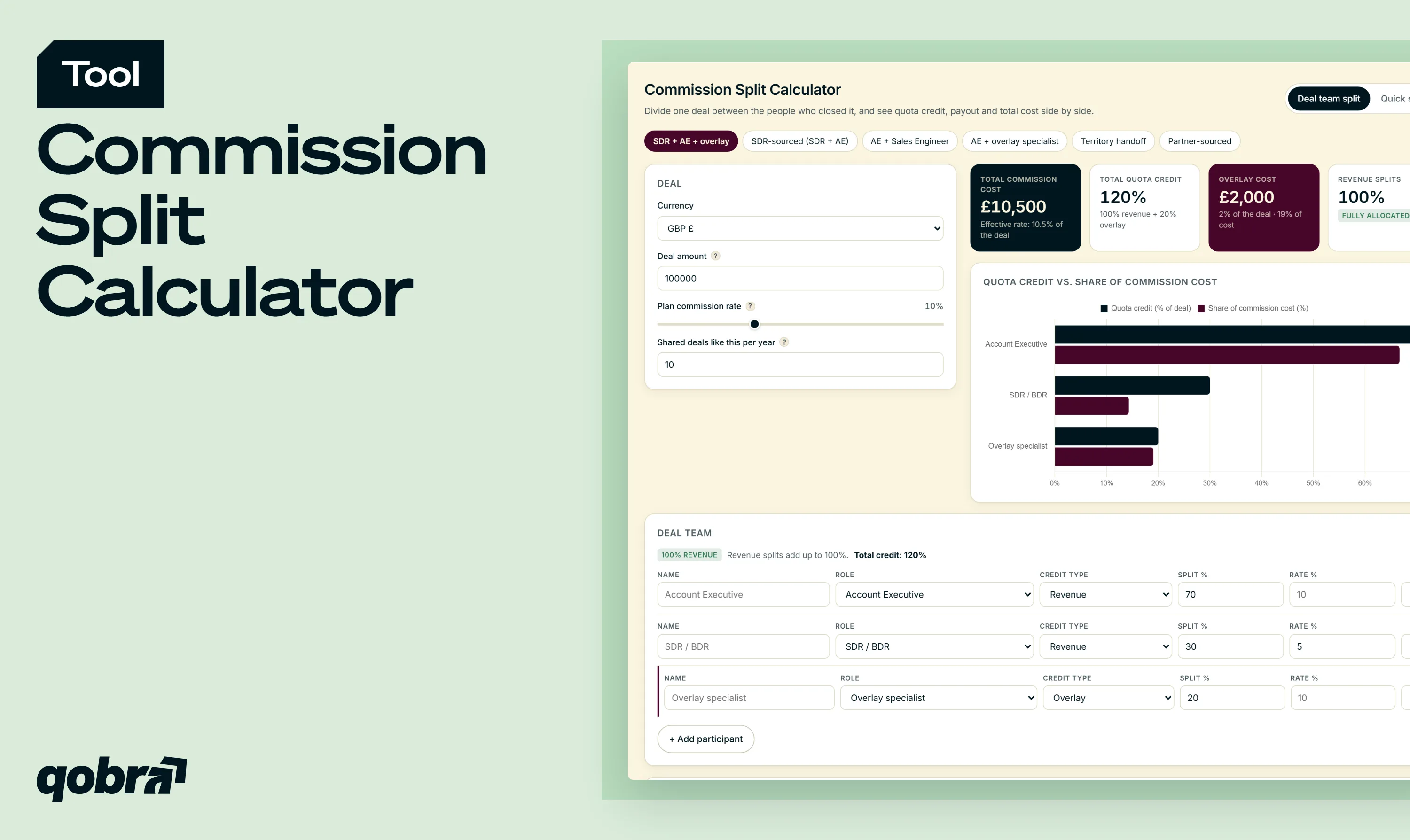
This commission split calculator divides the commission on one deal between the people who helped win it, and shows what the split costs the company.
01
Pick Quick split or Deal team split
Quick split shares one commission between two people: enter the deal amount and rate, or the pool, then pick 50/50, 60/40, 70/30, 80/20 or drag the slider.
02
Set roles, splits and credit types
In Deal team split, give up to six participants a role, a split percentage and a revenue or overlay credit type. Add a rate per role if needed. Presets are editable examples.
03
Read credit, payout and total cost
The indicators show total commission cost, quota credit, overlay cost and a live 100% check. The table separates credit from payout, and the note turns your split into a plan rule.
What you can model
Every part of a shared deal, from a simple two-way split to a full deal team with overlay credit, in one calculator.
01
Two-way splits
Share one commission pool between two people with 50/50, 60/40, 70/30 or 80/20, or drag the slider to any ratio.
02
Full deal teams
Split one deal between two to six participants, each with a role, a split percentage and a credit type.
03
Revenue and overlay credit
Keep revenue splits at 100% with a live check, and add overlay credit on top for supporting roles.
04
Quota credit vs payout
See how much of the deal counts towards each quota and how much each person is paid, with a rate per role.
05
Overlay and yearly cost
Read the overlay cost and effective commission rate of the deal, then project the yearly cost across your shared deals.
Commission Split Calculator
Divide one deal between the people who closed it, and see quota credit, payout and total cost side by side.
Deal
Total commission cost
$0
Total quota credit
0%
Overlay cost
$0
Revenue splits
0%
Quota credit vs. share of commission cost
Deal team
Credit and payout by participant
How to calculate a commission split
Every commission split follows the same two steps: compute the total commission, then divide it by each person's split percentage.
The formula
Total commission = deal amount × commission rate. Individual payout = total commission × split percentage. The shares of one pool must add up to 100%: below, part of the commission goes unpaid; above, the same money is paid twice.
Worked example: a 70/30 split
A £100,000 deal at a 10% commission rate creates a £10,000 pool. On a 70/30 split, the first participant earns £10,000 × 70% = £7,000 and the second £10,000 × 30% = £3,000. These are the default values of Quick split mode.
Splitting between three or more people
The formula stays the same. On a £200,000 deal at 10%, a 50/30/20 split of the £20,000 pool pays £10,000, £6,000 and £4,000. It gets harder when people earn different rates or are credited on top of the core team: Deal team split mode handles both.
Common commission split ratios
The ratio should reflect how much of the sale each person owned. Here are the four most discussed, on the same £10,000 commission pool.
50/50 commission split
An even split for two peers who did the same work, such as two account executives co-selling across territories. Each earns £5,000.
60/40 commission split
A 60/40 commission split gives the deal lead a clear majority and still recognises a large second contribution: £6,000 and £4,000.
70/30 commission split
A 70/30 commission split fits deals where one person ran the cycle and closed while another sourced or supported it, such as an AE and an SDR: £7,000 and £3,000.
80/20 commission split
The closer earns £8,000 and the supporting role £2,000. It suits a narrow contribution, such as a warm introduction or one technical workshop.
No ratio is a standard. Pick the one that matches each person's contribution, write it down and apply it the same way on every comparable deal.
Sales credit vs. commission payout
A sales credit split and a commission split answer two different questions. Credit decides how much of the deal counts towards each person's quota. Payout decides how much money each person receives. Most split errors start when both are treated as one number.
Revenue splits (must total 100%)
A revenue split divides the deal between its owners, so the deal is counted once, at 100%. In Salesforce opportunity splits, the sum of revenue splits cannot exceed 100%. HubSpot deal splits work the same way, evenly or by percentage, up to 100%.
Overlay splits (credit above 100%)
An overlay split credits people who support a deal without owning it, such as product specialists or sales engineers. Salesforce overlay splits allow total credit above 100%, and an overlay commission is paid on that extra credit. Mark these participants as overlay in the calculator: their credit adds to the revenue split.
The cost of over-crediting
Every point of overlay credit that carries a commission adds cost. In the default Deal team example, a £100,000 deal at a 10% plan rate gives an AE 70% revenue credit, an SDR 30% revenue credit paid at 5%, and an overlay specialist 20% overlay credit. Total credit reaches 120%. The overlay adds £2,000, or 2% of the deal, and the deal costs £10,500 in commission: an effective rate of 10.5%. Enter your shared deals per year to see the yearly cost.
Split models for B2B sales teams
Each sales motion calls for its own split. The presets of the sales commission split calculator load one editable example per motion.
SDR-sourced deals (SDR + AE)
The SDR books the first meeting, the AE closes. If your SDRs are already paid on meetings or pipeline, keep their split small or their rate lower, so the same contribution is not paid twice. See how to pay an SDR for the main plan designs.
Technical sales (AE + SE)
A sales engineer may support several deals at once. Overlay credit counts the SE's work towards their own target without cutting the AE's revenue credit.
Overlay and product specialists
Specialists who sell one product line across territories are the classic overlay case. Give them their own rate if their plan pays on a different scale.
Territory handoffs
When an account changes owner mid-cycle, a revenue split such as 40/60 between the previous and new owner settles the question. Tie the ratio to the stage reached at handoff.
Partner-sourced deals
A partner or referrer can be paid a referral fee rather than quota credit. Model it as an overlay participant with its own rate, so the fee shows in the total cost.
New business, renewals and expansion are often paid differently. To model the commission itself on ARR, ACV or multi-year contracts, use the saas commission calculator.
How to write a split policy that prevents disputes
Split conflicts usually start when the rule is decided after the deal closes. A written split policy settles it before anyone has money at stake.
What to document
List who is eligible, the default ratio per sales motion, which roles get revenue or overlay credit, each role's rate, the maximum number of participants and who approves exceptions. Then add it to the plan each rep signs, starting from our sales commission agreement template.
Lock splits before closed-won
Record the split in the CRM while the deal is open and freeze it at close. Watch ownership changes: in HubSpot, changing the deal owner removes the existing split. A locked, documented split is the simplest way to avoid sales commission disputes.
Clawbacks and adjustments
If a shared deal churns or is refunded, the clawback should follow the split: each participant returns their own share, pro rata if your plan says so. To size what each person owes, use the commission clawback calculator.
From calculator to automation
From calculator to commission automation
A commission split calculator settles one deal. A sales team closes hundreds, each with its own owners, overlays and rates, and every manual recalculation is a chance to pay the wrong person.
Qobra connects to your CRM, applies your split rules to every shared deal, and calculates quota credit and payout separately for each participant. Each rep sees their share of every split deal in their own statement, and Finance gets a full audit trail of who was credited, who was paid and why.
Split rules applied to every dealYour split rules run on every shared deal synced from the CRM, with no manual recalculation.
Credit and payout kept separateQuota credit and payout are calculated separately for each participant, overlays included.
A clear trail for every splitReps see their share of each split deal, and Finance sees who was credited, who was paid and why.
FAQ — commission split calculator
How do you calculate a split commission?
Multiply the deal amount by the commission rate to get the total commission, then multiply that total by each person's split percentage. On a £100,000 deal at 10%, the total commission is £10,000; a 70/30 split pays £7,000 and £3,000. Check that the percentages add up to 100% first.
What does a 70/30 split mean in sales?
A 70/30 split means one person receives 70% of the commission or credit on a deal and another receives 30%. In B2B sales, it often means 70% for the rep who closed and 30% for the person who sourced or supported the deal, such as an SDR.
What is a 60/40 commission split?
A 60/40 commission split gives 60% of the commission to one participant and 40% to the other. It fits deals where both made a large contribution but one still led, such as an AE working closely with a solutions consultant. On a £10,000 pool: £6,000 and £4,000.
What is an 80/20 commission split?
An 80/20 commission split pays 80% of the commission to the main contributor and 20% to a supporting one. It suits deals where the second person played a limited role, such as an introduction or one technical session. On a £250,000 deal at an 8% rate, the £20,000 commission splits into £16,000 and £4,000.
Is 70/30 a good commission split?
A 70/30 split is good when it matches how the work was shared. If the second person sourced the deal and the closer ran the whole cycle, it is easy to defend. If the work was closer to even, 60/40 or 50/50 fits better. Apply the same written rule to every comparable deal.
How do you split a commission between three or more people?
Give each person a percentage, check that the revenue splits add up to 100%, then multiply the total commission by each percentage. On a £20,000 commission split 50/30/20, the payouts are £10,000, £6,000 and £4,000. If someone supports the deal without owning part of it, credit them as overlay instead of shrinking everyone else's share.
What is the difference between a revenue split and an overlay split?
A revenue split divides 100% of the deal between its owners, while an overlay split adds credit on top for supporting roles. Revenue splits cannot exceed 100%, so the deal is counted once. Overlay splits can push total credit above 100%. They reward specialists without cutting the owners' credit, but they raise the commission cost of the deal.
Should you split quota credit, commission pay, or both?
Split both, but set them separately. Quota credit measures contribution towards targets, while commission pay also depends on each role's rate. An SDR can hold 30% of the credit at a lower rate than the AE, and an overlay specialist can get credit without reducing anyone else's.



.webp)


