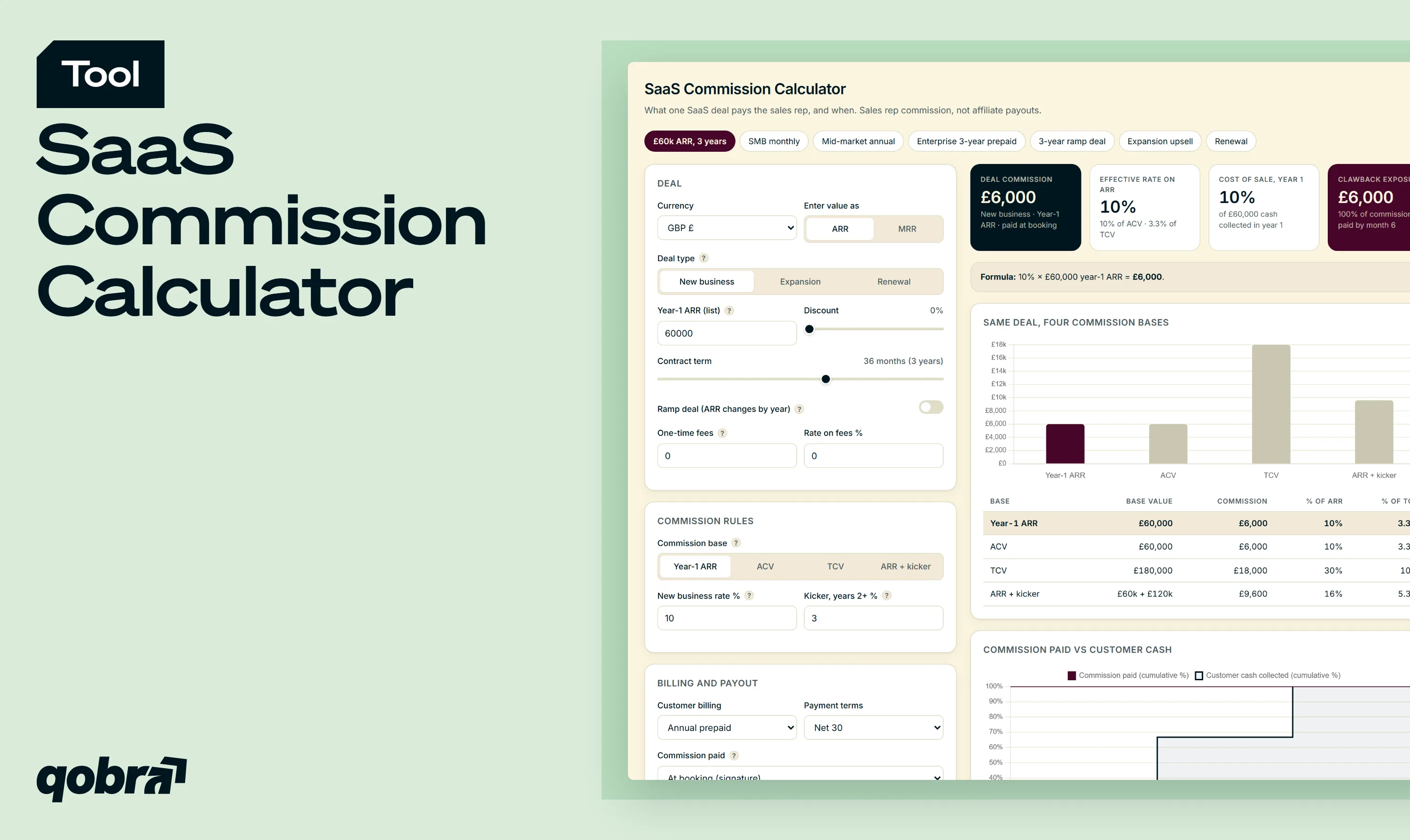
Free SaaS commission calculator: see what a deal pays on ARR, ACV or TCV, with contract length, billing terms, renewals, expansion and churn clawbacks.
This SaaS commission calculator shows what a single subscription deal pays the sales rep who closed it, and when that money is paid out. It covers commission for account executives, account managers and customer success teams, not affiliate or referral commission. Think of it as a software sales commission calculator built around one deal rather than one month.
01
Describe the deal
Pick an example deal or enter your own: deal type, year-1 ARR or MRR, discount, contract term and one-time fees. Switch on Ramp deal when the price changes by contract year. Presets are examples, not benchmarks.
02
Choose the commission base
Select year-1 ARR, ACV, TCV or year-1 ARR plus a multi-year kicker, then set the rate for each deal type. The comparison table shows the same deal under all four bases.
03
Read the payout and timing
Read the deal commission, the effective rate, the year-1 cost of sale and the clawback exposure. The schedule compares commission paid with customer cash collected, and exports to CSV.
What you can model
Every term of a SaaS deal that changes the commission, from contract length to churn, in one calculator.
01
Four commission bases
Compare one deal on year-1 ARR, ACV, TCV and year-1 ARR plus a multi-year kicker, then click a row to switch base.
02
Rates by deal type
Set separate rates for new business, expansion and renewal deals, with one-time fees kept out of the recurring base.
03
Ramp deals
Enter a different ARR for each contract year and see how every commission base treats a rising price.
04
Payout against customer cash
Pay at booking, on invoice, on cash collected or half and half, and compare the schedule with billing frequency and payment terms.
05
Clawback exposure
Set a clawback window and the share recovered to see how much commission is already paid, and at risk, if the customer churns.
SaaS Commission Calculator
What one SaaS deal pays the sales rep, and when. Sales rep commission, not affiliate payouts.
Deal
Enter value as
Deal type ?
Commission rules
Commission base ?
Billing and payout
Deal commission
0
Effective rate on ARR
0%
Cost of sale, year 1
0%
Clawback exposure
0
Same deal, four commission bases
Base
Base value
Commission
% of ARR
% of TCV
Commission paid vs customer cash
Schedule
Period
Customer cash
Commission paid
Cum. cash
Cum. commission
How SaaS sales commission is calculated
Every SaaS sales commission follows the same logic. What changes from one plan to another is the base the rate applies to.
The formula: commission base × rate
Deal commission = commission base × commission rate, plus the rate paid on one-time fees, if any. The effective rate, commission divided by ARR or by TCV, is what lets you compare two plans that use different bases.
ARR vs ACV vs TCV: what each one pays
ARR commission pays on the recurring value of one year. ACV commission pays on the total contract value divided by the number of years, which differs from year-1 ARR as soon as the price ramps. TCV pays on every year of the contract at once. A kicker keeps the full rate on year 1 and adds a smaller rate on the years that follow.
Worked example: one £60,000 ARR, 3-year deal under four policies
Take a new business deal at £60,000 ARR, signed for 36 months and billed annually, with a 10% rate and a 3% kicker on years 2 and 3. The first preset of the calculator loads exactly this deal.
On year-1 ARR, the rep earns £6,000. On ACV, also £6,000, because a flat deal has an ACV equal to its ARR. On TCV, £18,000, which is 30% of one year of revenue. With the kicker, £6,000 + 3% × £120,000 = £9,600, an effective rate of 16% on ARR and 5.3% on TCV. Same deal, same rate, and the payout triples depending on one line of the plan.
How contract length and billing terms change the payout
Multi-year deals: first-year only, kicker or full TCV
Paying on year-1 ARR only is simple and protects margin: the sample AE plan published by The SaaS CFO bases multi-year deals on first-year ARR only. The trade-off is that reps see little reason to negotiate a longer term. Full TCV pays upfront for revenue not collected yet. A kicker sits in between and prices the extra commitment without paying later years at the full rate.
Annual prepaid vs monthly billing
Billing decides when the cash arrives. Billed annually, the example deal brings in £60,000 at the start of each year; billed monthly, £5,000 a month. A £6,000 commission paid at signature is covered by the first annual payment, while monthly billing needs two customer payments to cover it. On a month-to-month contract, paying commission on a full year of ARR rewards eleven months the customer never committed to.
Paying on booking, invoice or cash collected
Paying at booking is the most motivating option for reps and the most exposed for the company. Paying on invoice or on cash collected ties each payment to revenue that exists: on the example deal billed monthly with net 30 terms, paying on cash turns the £6,000 into 12 payments of £500, from month 2 to month 13. Half at signature and half at the first payment is a middle ground.
Timing matters for Finance too. Under ASC 606, and IFRS 15 for companies reporting under international standards, commissions earned on multi-year contracts may need to be capitalised and amortised over the contract rather than expensed when paid, so the accounting view and the payout schedule rarely match.
Ramp deals with rising ARR
A ramp deal prices each year differently, for example £40,000, £60,000 and £80,000. Its contract value is the same £180,000 as the flat example, yet at 10% year-1 ARR pays only £4,000, ACV pays £6,000, TCV £18,000 and the kicker £8,200. A plan that pays on year-1 ARR gives reps a reason to push for flat pricing. Paying on ACV removes that bias.
New business, expansion and renewal commission
SaaS commission rates are rarely the same for every pound. A new logo, an upsell and a renewal take different effort, so the calculator keeps a separate rate for each deal type.
Typical rate ranges by deal type
The most cited reference point is about 10% of ACV for new business, according to SaaStr. Expansion and renewal rates are usually set below the new-business rate, because part of that revenue comes from the existing relationship. The calculator's defaults (10%, 7% and 4%) are examples, to replace with the rates in your plan.
Why a renewal dollar is not paid like a new-logo dollar
A renewal protects revenue the company already has, and its outcome depends as much on the product and on customer success as on the rep. Expansion ARR is new money from an existing account and drives net revenue retention (NRR). Paying sales commission on recurring revenue at a lower renewal rate keeps the incentive on growth without ignoring retention.
When an expansion involves both an account manager and a new business rep, the commission split calculator shows how to share the credit and the payout.
Protecting margin: one-time fees, discounts and churn clawbacks
One-time fees and services
Implementation, onboarding and training fees are billed once and do not renew. Keeping them out of the recurring base, with their own rate (0% by default), stops a large services line from inflating the commission.
Discounts and net ARR
Commission should follow the price the customer actually pays. The calculator applies the discount before any base is computed, so a 10% discount lowers the commission by 10% too, and reps get a direct reason to defend price.
Clawback windows on early churn
A clawback recovers commission when a customer leaves or does not pay within a set window, typically 90 to 180 days after signature. The exposure KPI shows how much commission is already paid, and therefore at risk, by the end of your window: £6,000 on the example deal paid at booking with a 6-month window, £2,500 when the same deal is billed monthly and paid on cash.
A deal-level rate only makes sense next to the plan around it. Two checks tell you whether a SaaS commission structure holds up.
Check the implied rate against OTE and quota
Divide variable pay at target by the annual quota: that is the rate your plan implies. SaaStr notes that reps are commonly expected to close 4 to 5 times their OTE, and 3 times in high-volume SMB. With a 50/50 pay mix and a quota of 5 times OTE, the implied rate is exactly 10%. If your effective deal rate drifts far from it, reps at quota will earn well above or below target.
The cost of sale KPI divides the deal commission by the cash collected in the first 12 months. It matters most on TCV-based and multi-year deals, where commission can run ahead of year-1 cash and lengthen CAC payback. As a guardrail, Winning by Design advises spending no more than 40% of year-1 revenue on the combined OTE of the SDR, AE and customer success roles when LTV is not yet established, and up to 60% when LTV exceeds two years.
From calculator to automation
From SaaS commission calculator to automated payouts
The calculator handles one deal at a time. A sales team signs dozens every month, each with its own term, billing schedule, ramp, discount and deal type, and every amendment changes the math.
Qobra applies these rules automatically. It pulls deals from your CRM, such as Salesforce or HubSpot, computes commission on the base your plan defines, follows the payout timing you choose, applies clawbacks when a customer churns and recalculates at every signature or amendment. Reps see each deal's commission in real time, and Finance closes the period with calculations ready for audit.
Every deal on your plan's baseQobra pulls deals from your CRM and computes commission on the base your plan defines, whatever the term, ramp or discount.
Payout timing and clawbacks built inCommission follows the payout timing you choose, and clawbacks apply automatically when a customer churns.
Recalculated at every amendmentEach signature or amendment updates the math, so reps see every deal's commission in real time and Finance closes the period with calculations ready for audit.
FAQ — SaaS commission calculator
What is a typical SaaS commission rate?
About 10% of annual contract value is the most cited reference for new business SaaS deals. It follows from a simple model: with a 50/50 pay mix and a quota of 5 times OTE, variable pay divided by quota equals 10%. Renewals are usually paid at a lower rate. Your own rate should come from your OTE, pay mix and quota rather than from a benchmark.
Is 10% commission on sales good?
For a SaaS account executive, 10% of first-year value on new business is a standard, competitive rate. Whether it is good depends on the base: 10% of TCV on a three-year deal pays three times more than 10% of year-1 ARR. Compare effective rates, then check what the rate means for total earnings at quota.
Is 20% commission high?
Yes. For SaaS new business measured on annual value, 20% is about twice the most cited reference of 10% of ACV. It can fit a plan that pays on year-1 ARR only, with no kicker and no accelerator, on small deals with short cycles. Rates of 30% or more usually describe a different model, such as affiliate or reseller commission, rather than a sales rep plan.
Should SaaS sales commission be paid on ARR, ACV or TCV?
Most companies pay on ACV or on first-year value, because both reward one year of committed recurring revenue. TCV pays upfront for years not collected yet and overpays long contracts if the customer leaves. ACV is the fairest base for ramp deals. To reward longer terms, add a kicker on years 2 and beyond rather than paying the full rate on TCV.
How do you pay commission on multi-year deals?
There are four common approaches: pay on first-year ARR only, add a flat bonus per multi-year contract, pay the full rate on year 1 plus a smaller kicker on later years, or pay on TCV, ideally spread over the contract as the customer pays. The calculator compares the rate-based options on the same deal.
Do SaaS reps earn commission on renewals and expansion?
Usually yes, but at lower or different rates than new business. Account managers are typically paid a lower rate on expansion than AEs on new logos, and renewals often carry the lowest rate of the three. Renewals are frequently paid to account managers or customer success rather than to the original AE. A distinct rate per deal type keeps the plan fair across roles.
Is commission paid when the deal closes or when the customer pays?
It depends on the plan. Paying at signature is simple and motivating, but commission goes out before any cash comes in. Paying on invoice or on cash collected ties each payment to real revenue and reduces clawback exposure. A 50/50 split between signature and first payment is a middle ground. The calculator's schedule shows each option against customer payments.
What happens to a rep's commission if the customer churns?
If the customer churns within the clawback window, part or all of the commission already paid is recovered, usually by deducting it from future payouts. The window length is set in the commission plan, so test the one your plan uses in the calculator. Commission that is not yet paid under an invoice or cash-based schedule is simply not due, which is why paying on cash lowers the amount at risk.



.webp)


