Webinar (Wednesday, October 21) — Aligning HR, Finance, and Sales: Mastering Sales Comp Without Breaking Your Plan
Register
- A commission tracker automates recording, calculating, and paying out sales commissions, replacing manual tracking with data your team can access and trust.
- Update your tracker weekly even if you pay monthly, so nothing slips through the cracks at the end of a busy quarter.
- Look for automation, an audit trail, a rep-facing agent portal, and support for complex structures like tiers, splits, and clawbacks.
- Small errors quietly cost real dollars in rework and detailed reports nobody has time to double-check, so accuracy matters as much as speed.
- A good commission tracker pays for itself through time saved and fewer mistakes, building the confidence both reps and finance need, whatever your budget for tools.

It's 2026, and yet your sales teams are struggling at the end of the month to work out who's earned what? Tracking variable compensation shouldn't be seen as a part-time job, especially when you have templates and tools to help you do it. With the right commission tracking template, or even better, an automated solution, you can turn this manual chore into a strategic vision.
The estimated value of the global commission tracker software market is USD 1.81 billion in 2026, according to Business Research Insights, while 90 percent of organizations still run their commissions manually, according to AutoRek's annual payments survey.
Understanding commission tracking templates
Sales commissions can be complex: tiered rates, bonuses, splits, clawbacks, territory… It’s easy to miss a detail, delay a payment, or overshadow high performers. Many teams eventually outgrow templates and move to dedicated commission tracking software, which keeps every calculation, adjustment, and payout in one place instead of scattered across files.
By using a commission tracking template, you gain:
- Consistency: Uniform structure for every agent, every period
- Accuracy: Pre‑tested formulas reduce human error
- Transparency: Agents see how their earnings break down
- Efficiency: One click to export, import, or share reports
⚒️ Practical tool
A well‑designed commission tracker like Qobra centralizes all inputs, sales data, agent info, rate tables, and applies built‑in formulas to compute payouts instantly.

Types of commission tracking templates
Depending on your business model, you might need a different style of tracker. Here are the most common categories:
1. Basic flat‑rate commission sheets
Ideal for simple 5–10 person teams with a flat percentage on sales. Usually a two‑column sheet: sales amount and commission due.
2. Tiered commission calculators
Reps climb through rate tiers as they hit sales thresholds (e.g., 5% up to £50K, 7% beyond). A tier table plus lookup formulas drives the calculation.
3. Salary‑plus‑commission trackers
Combine base salary, draw advances, and variable commissions. Useful for roles with a guaranteed minimum plus bonus potential.
4. Residual & recurring revenue templates
For subscription or service‑based models. Compute ongoing commissions on renewing accounts month over month.
5. Gross‑margin‑based commission sheets
Focus on profitability rather than pure sales volume. Embed cost of goods sold, discounts, and margin formulas to align reps with company profit goals.
6. Territory & team‑based trackers
Allocate credit when multiple reps share an account, or measure collective performance in a market area.
Customize your commission tracking template
No two sales operations are identical. Tailor a template by:
- Defining core data fields
- Sales rep name
- Date of sale or closing
- Product or service category
- Net sale amount (after returns/deductions)
- Commission rate or tier reference
- Setting up built‑in formulas.
- Grouping by period. Organize by month, quarter, or year to ensure a rate change in June, for example, doesn’t retroactively adjust May’s commissions.
- Adding collaboration & notes. Enable a “Comments” column or use an integrated tool’s conversation feature so managers and reps can annotate unusual deals.
Table Example: Key Columns for a Tiered Tracker
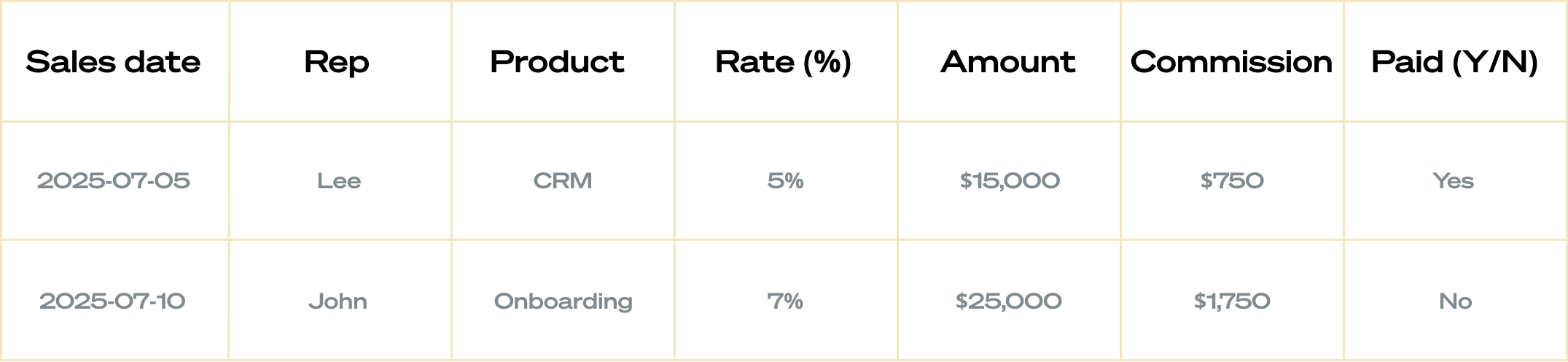
Essential features for an effective commission tracker
Whether you build your own in Excel/Google Sheets or adopt a free template, look for:
- Easy Import/Export: One‑click sync with your CRM or accounting system
- Automation: Scheduled recalculations and alerts when new deals close
- Flexible rate management: Ability to update percentage rates per rep, per product, or per period
- Audit trail: Version history and change logs to trace edits
- Real‑time visibility: Dashboards or table views showing current vs. target progress
- Collaboration: Comments or messaging for exception handling
"Unlike an Excel file, where we had to search extensively to find information about a sale, with Qobra, sales reps simply find the sale, mention their manager, and they can then independently find all the information about the sale. This makes it very easy to handle even the smallest requests, and it allows us to process all sales requests quickly and efficiently. They have all the data they need, and it's very factual."
Damien Robert, Revenue Operations Manager at Zenchef
Why manual tracking break down?
Manual tracking was never built for this. As headcount grows and commission structures get more complex, one wrong formula or a manual entry mistake can throw off an entire payout run. Insurance agencies were some of the first to feel this: with agent commissions spread across policies, renewals, and multiple carriers, a manual approach runs out of road fast.
Commission errors do more than create rework. When reps notice missing commissions or numbers that do not match their own math, trust erodes, and reps start keeping their own shadow files instead of relying on the official one. Building trust back after that takes far longer than getting the calculation right in the first place.
Step‑by‑Step: building your own tracker
Even if you’ll eventually automate, starting with a custom sheet teaches you the mechanics.
- Define objectives. Clarify what you must report: individual payouts, team totals, margin impact, etc.
- List all variables: Sales amount, rate structures, splits, bonuses, draws, deductions, etc.
- Sketch the layout. Decide which columns and sheets you need. Use separate tabs for reference tables.
- Implement formulas.
- Commission = Net_Sale * Rate
- IF statements for tier thresholds.
- Test with sample data. Run edge cases: zero sales, rate changes mid‑month, split deals, returns.
- Roll out & train. Share the sheet, explain the logic, gather feedback, then lock formulas or protect cells as needed.
Calculating your commission tracker's ROI
Calculating commissions is not optional, and getting a real return on the best commission tracking software you can find is not optional either. Rather than quoting someone else's benchmark, here is what Qobra customers report after switching away from manual sheets: an average of 5 days saved per month on commission management, a 15 percent average increase in sales performance, and 100 percent reliability in how commissions are managed.
Sales commission is one of the most direct levers you have to drive business strategy, since it shapes exactly which deals and incentives your team prioritizes. A tracker that gives every user, from reps to finance, the same real-time numbers turns commission management from an administrative task into growth.
Compliance and security to look for
As your commission tracker handles more money and more complexity, compliance stops being optional. In the US, that means capitalizing commissions correctly under ASC 340 and recognizing revenue under ASC 606; internationally, IFRS 15 covers the same ground. Look for a vendor that can show you exactly how it handles both, not just a mention of "audit trails."
Security matters just as much, since sales compensation data covers employees across your whole team, and sometimes a client too if commissions touch partners or referral deals. Ask any tracker you evaluate for its certifications (SOC 2 Type II is the standard to check for) and how it handles data residency if you operate internationally.
Automation and integrations
Manually maintaining sheets is only a first step. For true scale and error‑free operation, consider Qobra’s all‑in‑one SaaS platform:
- Real‑time commission calculations with instant updates
- Native connectors to Salesforce, HubSpot, Pipedrive, Snowflake, PayFit, BambooHR, and more
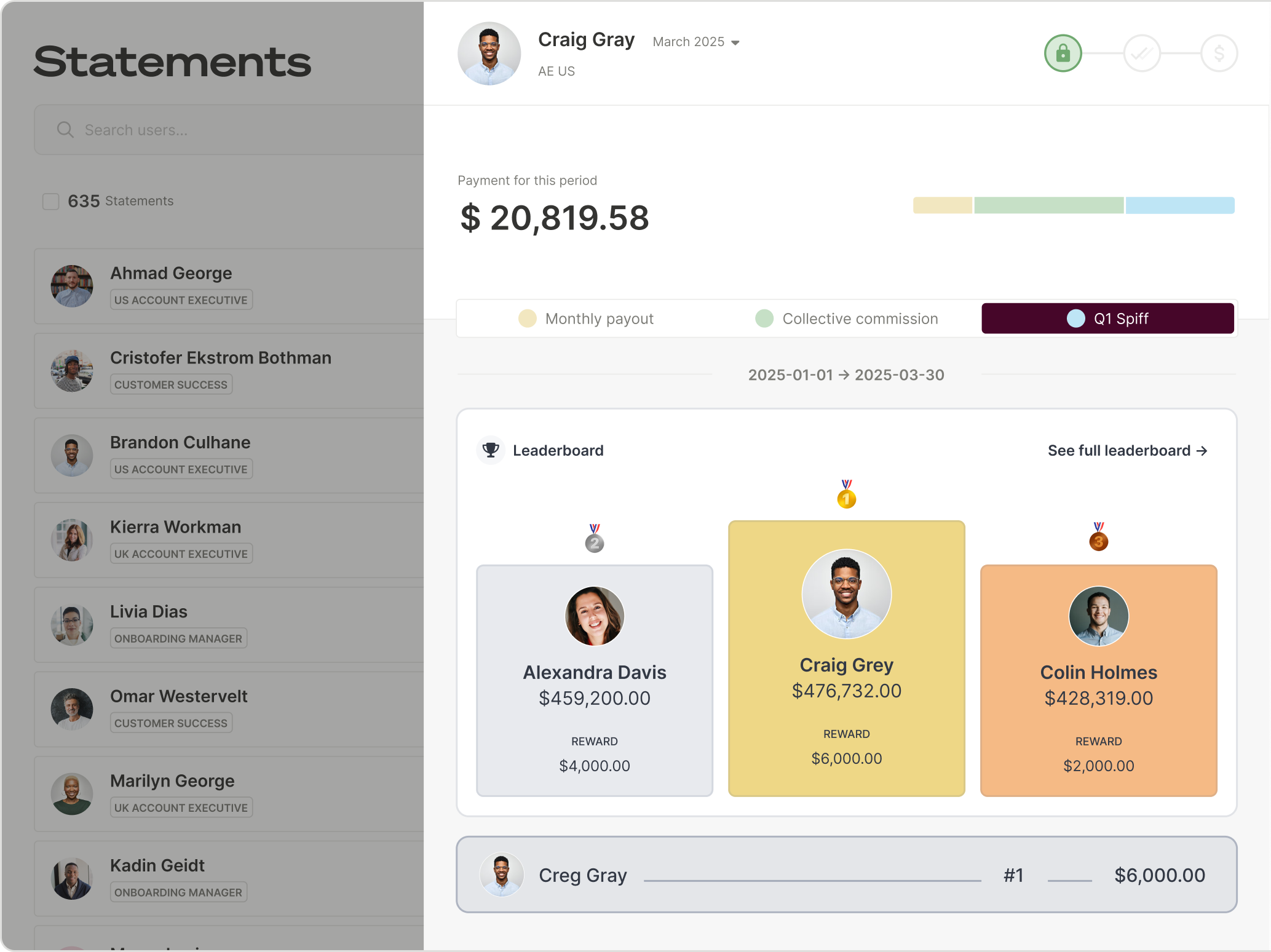
- Intuitive dashboards giving each rep their live earnings and performances targets
- Robust validation workflows and audit trails
- Live data pull from your CRM into Sheets
- Pre‑built free templates: basic, tiered, residual, gross‑margin calculators
- Custom dashboards you can share across the organization
- Visual board views with custom fields
- Automations to trigger reminders or send payout info to payroll
- Built‑in reporting and collaborative comments
Save time and energy by connecting your commission tracker natively to the tools you already use, your CRM, HR system, and data warehouse, instead of exporting and re-importing files by hand. You can still make manual adjustments when a deal needs a human judgment call, automation does not remove that option.
“Variable compensation is one of the main motivators for sales teams. So obviously, having a tool like Qobra that allows everyone to see their compensation being updated in real time improves performance and pushes them to always strive for a little more. When you have dashboards that update as deals are signed, it fuels salespeople's motivation and encourages them to go out and sign more deals."
Clément Paul, Sales Director at PayFit
AI-assisted commission tracking
The newest generation of commission tracking tools uses AI to close the gap between "the numbers are calculated" and "everyone understands and trusts them," a preview of where the future of the category is headed.
Qobra's AI agents are a good example: one agent builds and tests a commission plan from a document in minutes, one reconciles commission data across plans and flags anomalies before payout with real analytics behind every number, and one answers rep questions like "how much will I earn on this deal" automatically.
The practical benefit is speed and trust. Instead of an admin manually checking a file or a rep emailing to ask why a number looks off, the answer is available on demand, which is what actually aligns your whole organization around the same commission numbers.
Learn more about Qobra's AI agents for sales compensation.
Practical Tips for an effective sales tracking
A commission tracker is only as good as the habits behind it, whether you are running it in Excel spreadsheets or something more advanced.
A few practical tips make the difference between a tool that gets used and one that quietly falls out of date:
- Update weekly: Even if you pay monthly, updating mid‑week prevents month‑end rush
- Version control: Keep a dated copy each period, archive older files
- Reconcile with payroll: Cross‑check totals before sending to finance
- Use comments liberally: Capture why a deal’s commission was adjusted
Measuring Impact on sales performance
Closed‑loop visibility into commissions can dramatically improve results:
- Motivation & accountability: Reps see real‑time progress toward bonus thresholds
- Reduced disputes: Transparent, formula‑driven calculations build trust
- Strategic insights: Dashboards highlight top products, best territories, rep bottlenecks
A tracker also gives managers a clean view of performance metrics useful during reviews, not just payout numbers.
Table: Sample KPI Dashboard Metrics
These are the numbers worth putting on a dashboard:
- % of target achieved: Actual commissions ÷ target payout
- Avg commission per deal: SUM(Commission due) ÷ Number of Deals
- Commission vs. Salary: Total variable pay ÷ base salary
- Days to payout: Date Paid – Deal Close Date
From spreadsheet to system: what comes next
A robust commission tracker, whether it starts as a free template or an automated platform from day one, lays the foundation for accurate, transparent, and motivating compensation structures. Sales commission is the best tool you have to drive business strategy, but only if every number behind it is right the first time, for every rep and every customer deal.

FAQ Commission tracking template
How do I customize a commission template?
Identify your variables (rates, splits, bonuses), set up lookup tables, implement formulas (IF, VLOOKUP, SUMIFS), then test with various scenarios. Protect formula cells and automate data imports if possible.
Which features matter most?
Automation, audit trail, real‑time dashboards, and flexible rate management. Collaboration features—comments, notifications—also prevent disputes.
Can I integrate with my CRM?
Yes. Tools like Qobra offer native connectors to Salesforce, HubSpot, Pipedrive, and more, so information flows in automatically instead of through manual data entry.
How often should I update my tracker?
Weekly updates are ideal to catch exceptions early. At a minimum, reconcile before each pay period.
Is a commission tracker worth it for a small team?
Yes. Even a 5 to 10 person team benefits once commissions include tiers or clawbacks, since errors scale with complexity, not headcount. Most teams stop tracking commissions by hand once it costs more time than it saves, whether you run a five-person agency or a five-hundred-person sales org.