
9 Best Sales Enablement Tools for 2026
The 9 best sales enablement tools for 2026, grouped by the job each one actually does, with published pricing where it exists and where the categories overlap with something you already own.


- Sales enablement software covers six different jobs, from buyer-facing demos to content management, readiness, conversation intelligence, CRM, and engagement, and most stacks end up paying twice for at least one of them.
- Guideflow is the strongest pick for the buyer-facing layer, because an interactive demo is the one asset a prospect uses themselves rather than receives from a rep.
- Six of the nine tools here publish no pricing at all, so costing a stack means running six quote cycles before you can compare anything.
- Per-seat pricing is where enablement budgets break: Salesforce runs from $25 to $550 per user per month depending on edition, and HubSpot adds one-time onboarding fees of $1,500 and $3,500 on its upper tiers.
- Pick one tool per job. Overlap between an enablement platform, your CRM’s native content tools, and a sales engagement tool is the most common source of shelfware in this category.
A sales enablement stack gets bought one category at a time, usually in answer to a specific complaint. Reps can’t find the case study, so you buy content management. Ramp is too slow, so you buy readiness. Nobody knows what happened on the call, so you buy conversation intelligence. Three years later the stack has nine tools covering six jobs and a renewal calendar nobody can defend.
This guide covers nine sales enablement tools across those six jobs: what each is genuinely best at, what it costs where that’s public, and where it overlaps with something you probably already pay for. Pricing and G2 ratings were checked in November 2026. So which of these does your team actually need?
What is sales enablement software?
Sales enablement software is the set of tools that get a rep ready to sell and get the right material in front of a buyer. In practice the category spans six jobs that are usually sold separately: buyer-facing product demos, content storage and tracking, training and readiness, call recording and analysis, the CRM that holds the record, and the engagement layer that sequences outreach. No single vendor is strongest at all six, which is why the category is a stack rather than a product.
Where enablement budgets actually leak
The waste in an enablement stack is rarely one bad purchase. It’s the seams between good ones.
- Paying twice for content. An enablement platform, your CRM’s native content tools, and your sales engagement tool all store, send, and track collateral. Plenty of teams run two of the three and report on them separately.
- Seats bought for people who never log in. Per-seat pricing assumes adoption. Enablement platforms get bought for the whole org and used properly by the part of it that was trained properly.
- Quote-only renewals. When most vendors in a category publish no pricing, you have no benchmark going into a renewal, and your only real leverage is a credible threat to leave.
Best sales enablement tools 2026 at a glance
| Tool | Category | Best for | US pricing (approx., 2026) | G2 |
|---|---|---|---|---|
| Guideflow | Demo automation | Buyer-facing interactive demos | Free; Solo $35/user/mo; Growth $499/mo | 5.0 |
| Highspot | Content management | Findable, governed sales content | Quote only | 4.7 |
| Mindtickle | Sales readiness | Onboarding and ongoing certification | Quote only | 4.7 |
| Gong | Conversation intelligence | Knowing what happens on calls | Quote only | 4.7 |
| Seismic | Enablement cloud | Enterprise-scale content operations | Quote only | 4.6 |
| Salesloft | Sales engagement | Sequencing with built-in coaching | Quote only | 4.5 |
| Salesforce Sales Cloud | CRM | The system of record everything reports into | Starter $25 to Max $550/user/mo | 4.4 |
| HubSpot Sales Hub | All-in-one CRM | Mid-market teams wanting fewer vendors | Free tools; Starter $9/seat/mo | 4.4 |
| Outreach | Sales engagement | High-volume outbound execution | Quote only | 4.3 |
Published tiers are the US rates each vendor lists. Pricing and G2 ratings checked November 2026.
The best sales enablement tools
1. Guideflow: best for buyer-facing interactive demos
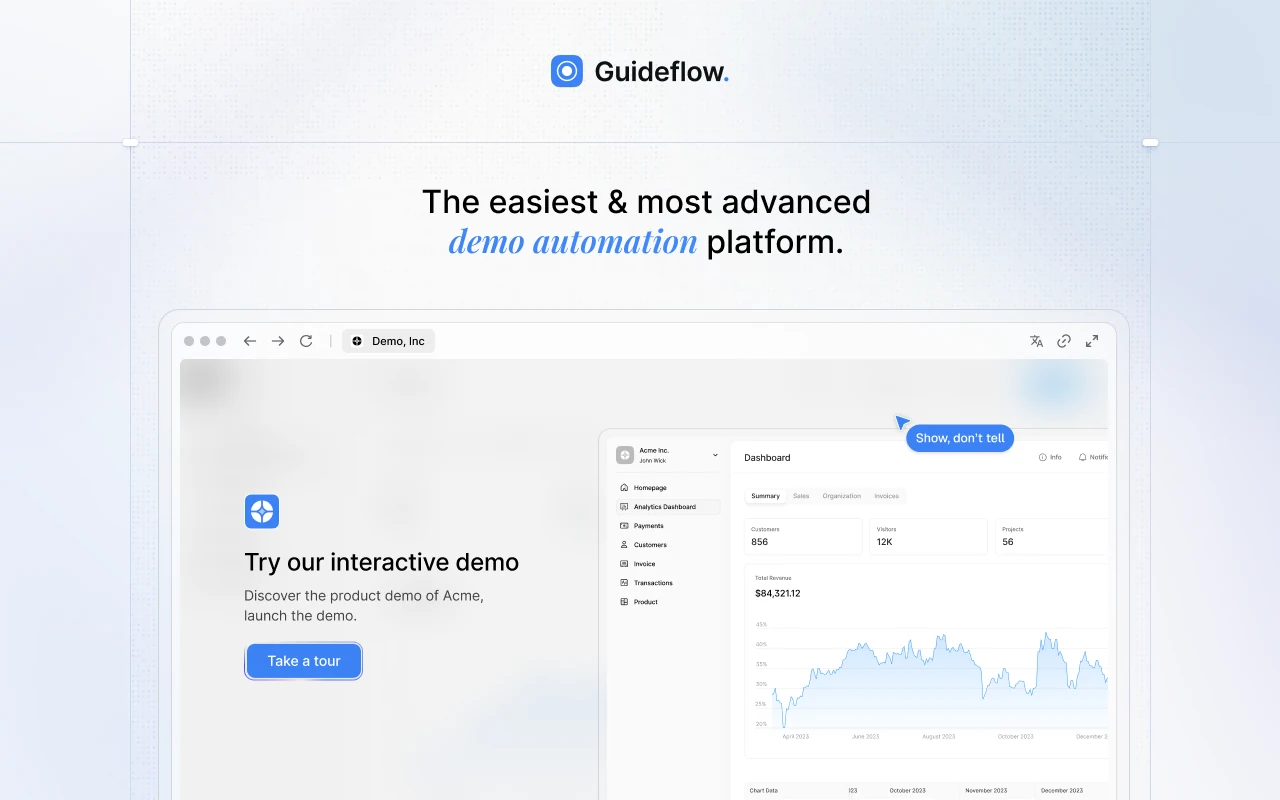
Guideflow is a demo automation platform covering the part of enablement the buyer actually touches. It turns your product into self-guided interactive demos, demo pages, demo centres, sandboxes, live demos, and mobile demos, all from one workspace with engagement analytics on each. Capture runs through a Chrome extension or the native app in screenshot, HTML, or video capture mode, and step content and CTAs are drafted automatically, so a rep gets from capture to a shareable link in about two and a half minutes without a designer. Variables and conditional branching mean one demo serves several segments instead of a copy per segment. The rest of this list makes reps better prepared; this is the category that gives the buyer something to do.
- Best for: teams that want prospects exploring the product before a call, with engagement feeding CRM workflows and the same demos reused for onboarding after the close.
- Key features: six demo formats in one workspace, no-code editor, variables and conditional branching, AI content generation, narration and voice cloning, 150+ AI avatars, localisation into 100+ languages, demo centres, step-level and account-level analytics, MCP server, Slack intent alerts, and HubSpot, Salesforce, Pipedrive, Zoho, and Marketo integrations.
- US pricing: Free; Solo $35/user/month; Growth $499/month; Advanced $1,499/month; Enterprise from $2,999/month, all billed annually.
- Pro: published pricing with a free tier, which is rare in this list, and the only category here that produces an asset a buyer uses unaccompanied.
- Con: built around buyer-facing product demos. Content governance, training, and call analysis sit with the platforms further down this list.
- G2: 5.0
2. Highspot: best for findable, governed sales content
Highspot is the content layer: a single library where marketing publishes, reps find what they need, and someone can finally see which assets get used in closed-won deals. It pairs that with coaching and training modules, analytics on content performance, and governance so the deck a rep sends is the approved one. For organisations where the real problem is that good collateral exists but nobody can locate it, Highspot addresses the findability question more directly than a general enablement suite.
- Best for: mid-market and enterprise teams whose collateral exists but goes unused because it isn’t findable or isn’t trusted to be current.
- Key features: centralised content library, content governance and approvals, usage and influence analytics, sales plays, coaching and training modules, CRM integration, email and meeting integrations.
- US pricing: quote only, with no public tiers.
- Pro: the clearest reporting on which content actually appears in deals that close.
- Con: value depends entirely on reps searching the library rather than resending whatever they used last time, so adoption work outlasts the implementation.
- G2: 4.7
3. Mindtickle: best for onboarding and ongoing certification
Mindtickle treats rep capability as something to be measured rather than assumed. It covers structured onboarding paths, certification and role-play scoring, call-based coaching, and readiness scorecards that tie learning back to performance. For a team hiring in cohorts, or one where ramp time is the binding constraint on growth, that measurement layer is the point: it tells you which reps are ready before a territory is handed over.
- Best for: teams hiring in cohorts where ramp time limits growth, and managers who want readiness evidence rather than a gut call.
- Key features: onboarding paths, certifications and role-plays, AI role-play scoring, readiness scorecards, call coaching, content hosting for training, CRM integration.
- US pricing: quote only, with no public tiers.
- Pro: turns ramp into something you can measure, which makes headcount planning far less speculative.
- Con: the content doesn’t maintain itself, and a readiness programme decays fast without a manager owning the authoring.
- G2: 4.7
4. Gong: best for knowing what happens on calls
Gong records, transcribes, and analyses customer conversations, then surfaces patterns across them: which objections recur, which talk tracks correlate with won deals, which deals have gone quiet. It also forecasts off conversation signals rather than CRM hygiene alone, which is why it tends to get bought by leadership rather than by enablement. For a team coaching from anecdote, it replaces opinion with recordings.
- Best for: sales leadership and enablement teams who want coaching and forecasting grounded in what was actually said on calls.
- Key features: call recording and transcription, deal and pipeline intelligence, conversation analytics, coaching workflows, forecast signals, CRM and calendar integrations.
- US pricing: quote only, with no public tiers.
- Pro: the most reliable answer to why deals are won and lost, taken from the calls themselves.
- Con: it produces more insight than most teams act on, so the return depends on managers building a genuine review habit rather than on the software.
- G2: 4.7
5. Seismic: best for enterprise-scale content operations
Seismic is the heavyweight of the content category, built for organisations where collateral has to be assembled and personalised at volume across regions, products, and compliance regimes. It automates document generation, personalises assets per buyer, governs versions, and reports on content influence across the funnel. Where Highspot leads on findability, Seismic leads on production at scale, which is a different problem and a larger one.
- Best for: large enterprises producing and personalising high volumes of collateral across regions, product lines, and regulated markets.
- Key features: automated document generation, buyer-level content personalisation, version control and compliance governance, content analytics, learning and coaching modules, CRM integration.
- US pricing: quote only, with no public tiers.
- Pro: handles content volume and compliance that would otherwise need a dedicated internal team.
- Con: the breadth comes with a long implementation and real admin overhead, so it rarely suits a team without someone owning it full time.
- G2: 4.6
6. Salesloft: best for sequencing with built-in coaching
Salesloft runs the engagement layer: multi-step sequences across email, calls, and social, with the cadence logic and dialler that a prospecting team works inside all day. What distinguishes it from the pure execution tools is how much coaching and conversation analysis sits in the same product, so a manager can review calls without leaving the system reps already live in.
- Best for: prospecting and mid-market sales teams that want sequencing, dialling, and call coaching in a single workflow.
- Key features: multi-channel sequences, dialler and call recording, conversation intelligence, deal management, pipeline analytics, CRM sync.
- US pricing: quote only, with no public tiers.
- Pro: the coaching and the execution live in the same place, so reviews happen where the work happens.
- Con: it overlaps heavily with what a modern CRM now sequences natively, which makes it a hard line item to defend at renewal.
- G2: 4.5
7. Salesforce Sales Cloud: best as the system of record
Salesforce is the system everything else reports into, and for most enterprises the enablement question isn’t whether to run it but which edition and which add-ons. Published editions span a wide range, from Starter Suite at $25 per user per month to Max at $550, with the enablement-adjacent capability concentrated in the upper editions and in separately licensed products. Note that G2 now lists the product as Agentforce Sales, following Salesforce’s repositioning of the Sales Cloud line.
- Best for: enterprises that need one system of record, deep customisation, and an ecosystem that every other vendor integrates with first.
- Key features: pipeline and opportunity management, forecasting, territory and quota management, extensive customisation and automation, AppExchange ecosystem, reporting and dashboards.
- US pricing: Free Suite $0; Starter Suite $25/user/month; Pro Suite $100; Core $195; Advanced $395; Max $550, with the paid editions billed annually.
- Pro: nothing else matches the configurability or the breadth of the integration ecosystem around it.
- Con: the cost curve across editions is steep, and much of what reads as enablement capability arrives as a separately licensed product rather than in the base edition.
- G2: 4.4
8. HubSpot Sales Hub: best for fewer vendors
HubSpot Sales Hub makes the opposite bet to a best-of-breed stack: keep CRM, sequencing, content, and reporting in one place and accept that each piece is good rather than category-leading. For a mid-market team without an ops function to integrate six vendors, that tradeoff usually wins on total cost and on how much actually gets used. Free tools for up to two users and a $9 per seat Starter tier make it the cheapest genuine entry point in this list.
- Best for: mid-market teams that would rather run one well-integrated platform than integrate several specialists.
- Key features: CRM, email sequences and templates, meeting scheduling, document tracking, deal pipelines, forecasting, reporting dashboards, a large app marketplace.
- US pricing: Free tools for up to two users; Starter $9/seat/month billed annually or $15 monthly; Professional $90/seat/month annually with a $1,500 one-time onboarding fee; Enterprise $150/seat/month with a $3,500 onboarding fee.
- Pro: the lowest paid entry point here, and one vendor to manage instead of several.
- Con: the one-time onboarding fees on Professional and Enterprise land on top of per-seat costs, which makes the step up from Starter larger than the headline rates suggest.
- G2: 4.4
9. Outreach: best for high-volume outbound execution
Outreach is built for outbound at volume: large sequence libraries, heavy automation, A/B testing on messaging, and the reporting an ops team needs to tune a prospecting motion. Where Salesloft leans toward coaching, Outreach leans toward throughput and configurability, which suits a team with the ops capacity to maintain it and frustrates one without.
- Best for: outbound-heavy teams with ops support, running large sequence libraries and testing messaging systematically.
- Key features: multi-channel sequences, automation and triggers, A/B testing, deal and forecast management, conversation intelligence, CRM sync, extensive admin controls.
- US pricing: quote only, with no public tiers.
- Pro: the deepest configuration and testing options of the engagement tools here.
- Con: the lowest-rated tool in this list at 4.3, and the configuration depth that makes it powerful also makes it admin-heavy to keep current.
- G2: 4.3
How to choose sales enablement software
So where do you start? Name the job before you shortlist the tool, because every vendor here will claim the adjacent ones.
- Buy for one job, and check the overlap. Before adding a tool, list what your CRM already does natively. Content storage, sequencing, and call recording are now table stakes in places they used to be add-ons.
- Price the stack, not the tool. Per-seat rates compound. A $150 per seat tier across 60 reps is $108,000 a year before onboarding fees, and onboarding fees here reach $3,500.
- Insist on pricing before the demo. Six of these nine publish nothing. Ask for the full quote including onboarding, implementation, and the add-ons needed to reach the demoed configuration.
- Weight adoption over features. Enablement tools fail quietly, through non-use rather than malfunction. Ask every vendor what share of licensed seats log in weekly at comparable accounts.
- Start with what the buyer sees. Most of this category improves what reps do internally. Interactive demos change what the buyer can do alone, which is usually the shorter path to a measurable result.
How to tell whether the stack is working
- Licensed seats versus weekly active users. The single clearest signal of whether a tool was worth buying.
- Content and demo influence on closed-won. Which assets appear in deals that close, not which get the most opens.
- Ramp time to first closed deal. The number a readiness investment has to move, and the one most often left unmeasured.
- Cost per rep per month across the whole stack. Add every tool here together before judging any one of them expensive.
Frequently asked questions
What is the difference between sales enablement and sales engagement software?
Enablement prepares the rep and the material: content, training, demos, and the analytics on both. Engagement executes the outreach, sequencing emails and calls and logging the activity. Tools increasingly claim both, which is where stack overlap usually starts.
Do we need a dedicated enablement platform if we already run a CRM?
Often not at first. A modern CRM covers content storage, sequencing, and basic tracking well enough that a dedicated platform only pays off once the content library gets large enough to need governance, or once a training programme needs certifying.
Why do so few of these vendors publish pricing?
Enterprise software in this category is quoted on seat count, modules, and implementation scope, which vendors prefer to discuss after qualification. The practical consequence is that you cannot compare two shortlisted tools without running both quote processes.
Which of these should a team of 20 reps buy first?
A CRM, then whichever single tool addresses the loudest complaint. For most teams that’s either buyers wanting to see the product before a call, which points to demos, or reps not finding collateral, which points to content.
How long does an enablement platform take to implement?
The lighter demo and engagement tools are usable in days. Content and readiness platforms are a quarter or more once you count content migration, governance rules, and training, and a thin implementation is the most common reason they go unused.
Does any one vendor cover the whole category?
No. Seismic and Highspot come closest on content plus training, and HubSpot comes closest on CRM plus engagement, but every stack here still combines at least two vendors. Treat any claim to cover all six jobs as a claim to check against the demoed configuration.
The bottom line
Sales enablement isn’t one purchase, it’s six jobs, and the useful question is which of them is currently costing you the most. Guideflow is the strongest pick for the buyer-facing layer, where an interactive demo gives a prospect something to do instead of something to read. Highspot and Seismic lead the content category, on findability and on production scale respectively. Mindtickle owns readiness, Gong owns conversation intelligence, Salesforce and HubSpot are the system-of-record choice depending on whether you want depth or fewer vendors, and Salesloft and Outreach split the engagement layer between coaching and throughput.
Name the job, check it isn’t already covered by something you own, and price the whole stack before you judge any single line item.