Sales Compensation Software Benchmark | Compare 15+ Sales Compensation Platforms
Download
- Qobra reads Salesforce Opportunities, Accounts and Products, runs the data through a no-code calculation engine, and shows the results in commission dashboards for reps, managers and finance teams.
- Qobra's embedded Salesforce component lets reps open their full commission dashboard without leaving Salesforce.
- Native Salesforce commission tracking relies on formula fields such as Amount * 0.10 for a flat 10% commission; because formula fields recalculate, a rate change rewrites commissions on opportunities closed in previous periods, and Salesforce has no built-in mechanism to track commission changes, adjustments or overrides.
- A custom Salesforce commission system needs a Commission Plan object, a Commission Rate/Tier object and a Commission Record object, plus Flow or Apex triggers, and every compensation plan change then requires a new development cycle.
- Qobra fits Sales Ops and Finance teams on Salesforce that want to change commission plans in a no-code editor and need automated clawbacks, multi-step approval workflows and what-if earning simulators for reps.
Is your Salesforce instance, the central hub of your sales data, truly equipped to handle the complexities of your team's commission plans? For many Sales Ops and Finance leaders, the dream of a single, unified system for both sales activity and incentive compensation often clashes with a difficult reality. While centralizing commission tracking within Salesforce seems logical, the path is fraught with hidden complexities, scalability issues, and maintenance headaches.
Manually calculating commissions using spreadsheets is a recipe for disaster. It's slow, prone to errors, and creates a trust deficit with your sales team. Reps waste precious selling time double-checking numbers, and finance teams spend days buried in VLOOKUPs and manual reconciliations. The logical next step is to leverage your CRM, but is Salesforce the right tool for the job, or just a more convenient place to recreate the same problems?
The Allure of Centralization: Why Use Salesforce for Commissions?
The idea of managing sales commissions directly within Salesforce is compelling. After all, it's the single source of truth for all deal-related data—opportunities, products, contracts, and customer information. The potential benefits seem obvious and significant.
First and foremost is data consistency. By calculating commissions where the sales data lives, you eliminate the need for error-prone data exports and imports between systems. Every time an opportunity stage is updated or a deal value is changed, the data is instantly available for commission calculations. This promises a world with fewer reconciliation nightmares between the CRM and external spreadsheets.
Another major advantage is the user experience for sales reps. Salespeople live in their CRM. Integrating commission visibility directly into their daily workflow means they can see potential earnings on their pipeline and track their progress towards quota without ever leaving the Salesforce environment. This direct line of sight between effort and reward can be a powerful motivator, equipping reps with the information they need to focus on closing the right deals.
Finally, there's the perceived cost savings. By leveraging an existing software license, you avoid paying for a separate, dedicated commission tool. For organizations with simple compensation structures or small teams, building a basic tracking system within Salesforce can seem like a financially prudent decision. These factors create a strong case for attempting to build an incentive compensation system within the CRM.
Unpacking Salesforce's Native Commission Tracking Capabilities
At its core, Salesforce is a Customer Relationship Management platform, not an Incentive Compensation Management (ICM) solution. While it doesn't have a dedicated "Commission" object out of the box, it's possible to build a rudimentary tracking system using standard objects and formula fields. This approach typically involves customizing the Opportunity or Opportunity Product objects.
For a simple, single-rate commission plan, you could create a custom formula field on the Opportunity object: Amount * 0.10 (for a flat 10% commission).
However, real-world compensation plans are rarely this simple. They often include tiered rates, accelerators, bonuses, and splits. To handle this, you might build complex, nested IF() statements or use custom metadata types to store commission rates. Reports and dashboards can then be created to aggregate this data, giving managers and reps a basic overview of earned commissions.
This native approach quickly runs into significant limitations:
- Formula Complexity: As plans evolve with accelerators, kickers, and multi-product commissions, the formulas become incredibly long and convoluted. They are difficult to write, impossible to debug, and break easily.
- Lack of Scalability: Any change to the commission plan—a new tier, a different rate, a mid-year spiff—requires a Salesforce administrator to manually update complex formulas and validate the changes across all historical data. This isn't just time-consuming; it's a significant operational bottleneck that prevents your business from adapting quickly.
- Historical Inaccuracy: Formula fields in Salesforce calculate in real-time. If you change a commission rate in a formula, it recalculates for all opportunities, including those closed in previous periods. This corrupts historical reporting and makes auditing a nightmare.
- No Audit Trail: There is no built-in mechanism to track changes, adjustments, or overrides. If a commission figure looks wrong, it's incredibly difficult to trace how the calculation was derived or who might have altered the underlying data.
For any business beyond the startup stage, relying on native Salesforce functionality alone is an unsustainable and high-risk strategy for managing a process as critical as sales compensation.
The DIY Route: Customizing Salesforce for Commission Management
When native formulas are no longer sufficient, the next step is custom development. This involves building a more robust system within Salesforce using a combination of custom objects, automation tools like Flow, and potentially custom Apex code. This approach offers more flexibility but comes with a massive increase in complexity and cost.
Building a Custom Data Model
A proper custom solution requires creating a new data model. This typically involves:
- Commission Plan Object: To store the rules for different compensation plans (e.g., "SDR Q3 Plan," "AE Enterprise Plan").
- Commission Rate/Tier Object: A related object to store the specific rates, tiers, and conditions for each plan.
- Commission Record Object: The transaction-level object where the calculated commission for a specific opportunity or line item is stored as a static record. This is crucial for historical accuracy.
This structure allows you to timestamp calculations and decouple them from live opportunity data, solving the historical reporting problem.
Automation with Flow and Apex
Once the data model is in place, you need to build the calculation engine.
- Salesforce Flow: For moderately complex plans, you can use Flow to trigger calculations when an opportunity is closed-won. The Flow would look up the relevant commission plan and rates, perform the calculations, and create the Commission Record.
- Apex Triggers: For highly complex scenarios involving intricate logic, multiple lookups, or large data volumes, Apex code is necessary. An Apex trigger on the Opportunity object can execute sophisticated calculations that are beyond the capabilities of Flow.
While this custom-built approach seems powerful, it essentially asks you to build a dedicated software application from scratch on the Salesforce platform.
Warning: The Hidden Costs of Custom Development
Building a custom commission system in Salesforce is a significant undertaking. It requires deep platform expertise, substantial development time, and rigorous testing. The total cost of ownership extends far beyond the initial build. You become responsible for all future maintenance, bug fixes, and updates every time your compensation plan changes. This internal "software" can easily become technical debt that hampers your ability to adapt your GTM strategy.
This path is a heavy lift. It requires dedicated, and often expensive, Salesforce developer resources. It's difficult to set up, practically impossible for non-technical users to update, and prone to breaking as your business logic evolves.
A Comparison of Commission Tracking Approaches in Salesforce
When deciding how to manage variable pay within Salesforce, you face three distinct paths. Each comes with its own set of trade-offs in terms of complexity, scalability, and cost.
Feature | Native Salesforce (Formula Fields) | Custom Salesforce (Flow/Apex) | Dedicated Platform (e.g., Qobra) |
|---|---|---|---|
Setup Complexity | Low | Very High | Low to Medium |
Maintenance | High (for any changes) | Very High (requires developers) | Low (managed by Ops via no-code UI) |
Scalability | Very Low | Medium | Very High |
Accuracy | Low (risk of errors, no history) | High (if built correctly) | Very High (auditable, timestamped) |
Flexibility | Very Low | Medium (limited by dev resources) | Very High (no-code rule editor) |
Cost | "Free" (part of license) | High (developer hours, TCO) | Predictable SaaS subscription |
Rep Visibility | Basic (reports/dashboards) | Custom (requires LWC development) | Advanced (real-time dashboards, simulators) |
Key Features | Basic calculations | Custom logic, historical records | Clawbacks, auditable exports for ASC 606 work, approvals, simulation |
This comparison makes it clear that while it’s technically possible to calculate commissions in Salesforce, it is rarely advisable for companies that view sales compensation as a strategic lever for growth.
Dedicated Commission Automation Platforms That Integrate with Salesforce
The limitations of both native and custom Salesforce solutions have given rise to a new category of software: Incentive Compensation Management (ICM) platforms. These tools are purpose-built to handle the complexities of variable compensation while integrating seamlessly with your CRM.
Platforms like Qobra represent the new standard. Instead of forcing a CRM to perform a function it wasn't designed for, Qobra connects directly to your Salesforce instance and syncs CRM data automatically throughout the day, and on demand in one click. Qobra pulls in the necessary data (Opportunities, Accounts, Products, etc.), runs it through a powerful and flexible no-code calculation engine, and presents the results in transparent dashboards for reps, managers, and finance teams.
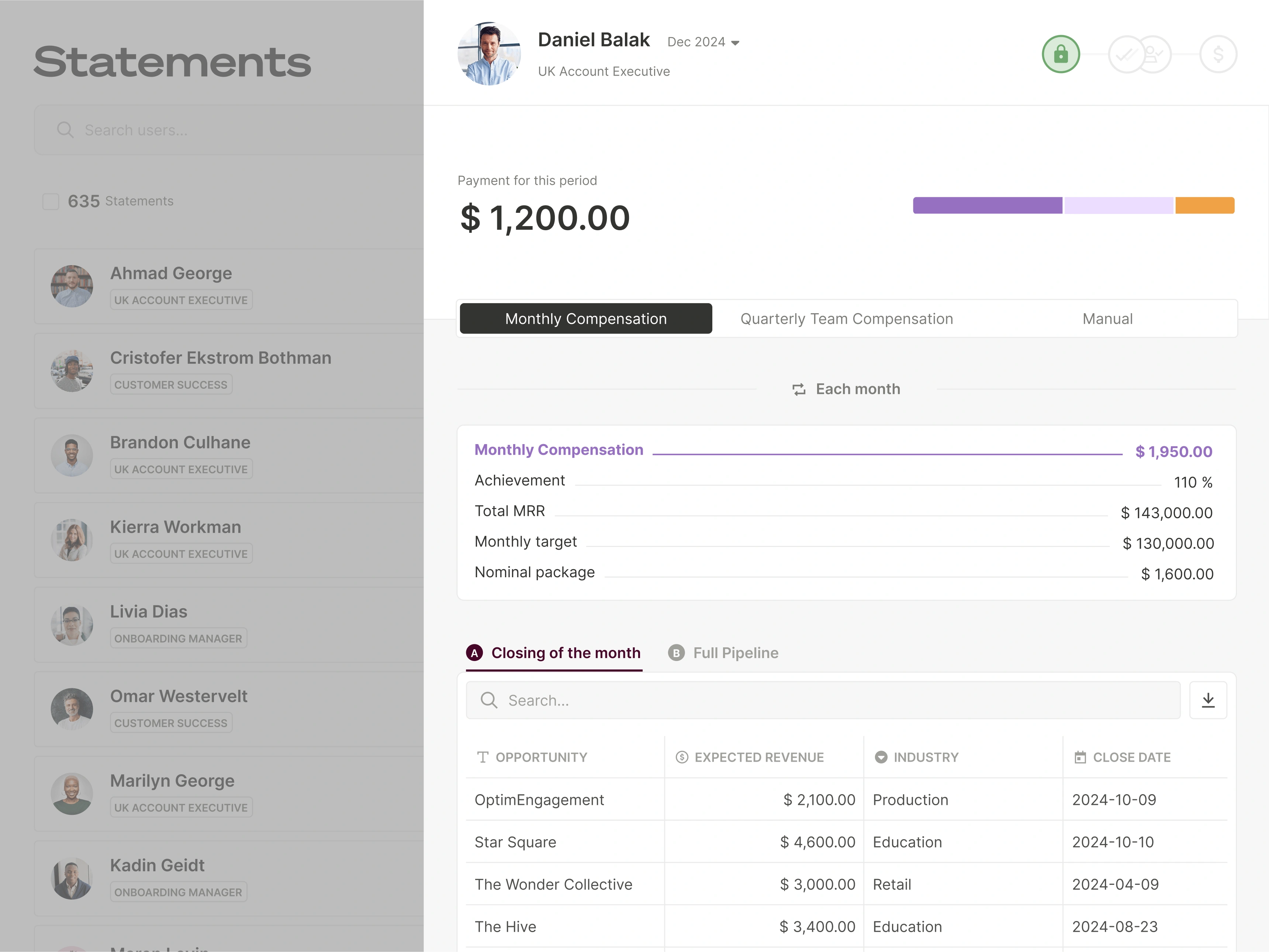
This approach combines the best of all worlds:
- Your Data Stays in Salesforce: Salesforce remains the single source of truth for all sales activity.
- Flexibility Without Code: Sales Ops or Finance teams can design and modify even the most complex sales commission plans using an intuitive, no-code interface. Adding a new tier, changing a rate, or launching a spiff takes minutes, not weeks of development.
- Real-Time Transparency: Qobra syncs CRM data automatically throughout the day, and on demand in one click, so each closed deal and its commission show in the rep's Qobra dashboard. This eliminates disputes and keeps the sales team motivated with real-time commission visibility.
- Embedded Experience: With Qobra's embedded Salesforce component, reps can access their full commission dashboard without ever leaving the CRM, providing the seamless user experience that companies were seeking in the first place.
- Enterprise-Grade Features: Dedicated platforms provide critical functionality that is nearly impossible to build and maintain in-house, including automated clawbacks, multi-step approval workflows, auditable commission records that can be exported for ASC 606 accounting work, and "what-if" earning simulators for the sales team.
By automating the process, organizations free up countless hours across sales, finance, and operations teams. This is a key benefit of commission automation, allowing employees to focus on strategic initiatives rather than manual data entry and dispute resolution.
Best Practices for Implementation and Migration
Whether you are moving from spreadsheets or a legacy custom-built solution, migrating your commission process requires careful planning. Choosing the right commission software is the first and most critical step. Once you have selected a platform, follow these best practices for a smooth transition.
Note: Data Quality is Paramount
Your commission calculations are only as good as the data in your CRM. Before implementing any automated solution, conduct a data audit in Salesforce. Ensure that key fields like Amount, Close Date, and Opportunity Owner are consistently and accurately populated. Establish data governance rules to maintain quality going forward. An automated platform will highlight data inconsistencies, but it cannot fix them for you.
A Checklist for a Successful Migration
- Document Everything: Clearly document your current commission plans, including all rules, exceptions, and calculation steps. This will serve as your blueprint for configuration in the new system.
- Define Your Data Model: Identify all the Salesforce objects and fields required for your calculations (e.g., Opportunity.Amount, OpportunityLineItem.Quantity, Account.Type).
- Configure in a Sandbox: Set up your commission plans in a sandbox or test environment first. Use a copy of your real Salesforce data to ensure the integration and calculations work as expected.
- Run in Parallel: For the first pay period, run your old system (e.g., spreadsheets) and the new automated platform in parallel. Compare the outputs for a sample group of reps to identify and resolve any discrepancies. This builds trust in the new system before a full rollout.
- Train Your Team: The change isn't just for admins. Train sales reps and managers on how to use their new dashboards. Highlight the benefits of transparency and real-time data. Effectively communicating a new commission plan and its associated tools is crucial for adoption.
- Launch and Gather Feedback: Go live with the new system. Solicit feedback from the sales team during the first few weeks to address any questions and demonstrate the value of the new tool.
While Salesforce is an unparalleled platform for managing customer relationships, it is not a specialized commission tool. For organizations looking to scale, motivate their sales teams effectively, and maintain operational agility, forcing Salesforce to manage complex incentive compensation is a strategic error. The time, cost, and risk associated with custom development far outweigh the benefits.
A dedicated, no-code commission automation platform like Qobra provides a smarter path forward. It respects Salesforce as the system of record while providing the specialized power, flexibility, and transparency needed to turn sales compensation from an administrative burden into a true strategic advantage. By leveraging the right tools, you can ensure your commission process is accurate, efficient, and a powerful driver of revenue growth.
FAQ
Can Salesforce calculate sales commissions natively?
Yes, but only for very simple plans. Using custom formula fields on the Opportunity object, you can perform basic calculations (e.g., a flat percentage of the deal amount). However, this method is not scalable, cannot handle tiered or complex rules, and lacks historical accuracy and auditability. It is not recommended for any business with more than a few salespeople or a plan that changes over time.
What are the main drawbacks of building a custom commission system in Salesforce?
The primary drawbacks are complexity, cost, and rigidity. Building a custom system requires significant investment in specialized Salesforce developers. The resulting solution is difficult and expensive to maintain, and any change to your compensation plan requires a new development cycle. It also lacks many crucial features found in dedicated platforms, such as user-friendly plan editors, clawback automation, and advanced reporting.
How does a dedicated platform like Qobra improve the process?
A dedicated platform automates the entire commission lifecycle. It integrates directly with Salesforce, applies complex commission rules through a powerful no-code engine, and provides transparent dashboards for the entire organization. Qobra syncs CRM data automatically throughout the day, and on demand in one click. This automation eliminates manual errors, saves time for finance and ops teams, and boosts sales motivation by giving reps instant visibility into their earnings. It turns compensation into a clear, auditable, and strategic process.
Salesforce is where deals live; to track payouts on top of it, see our comparison of the best sales commission tracking software.