

Best Sales Commission Software for Salesforce Users in 2026
Using Salesforce? Compare eight commission platforms on native integration depth, data latency and custom object support in 2026.


- Qobra fits teams that run commissions on a customized Salesforce org: Qobra's custom object support maps each team's Salesforce data model, including custom relationships and lookup fields.
- In this guide's comparison of eight commission platforms for Salesforce users, CaptivateIQ, Performio and QuotaPath sync Salesforce data on a schedule, Spiff offers near-real-time sync, and Performio and QuotaPath offer limited custom object support.
- Qobra is used by 350+ customers and 30K+ users, 96% of Qobra customers recommend it, and Qobra is rated 4.8/5.
- Qobra includes three AI agents: the Architect builds or edits compensation plans through conversation, the Sales Coach answers rep questions about their commissions, and the Analyst creates reports and dashboards from plain-language requests.
- Qobra connects natively to Salesforce, with no middleware: Qobra syncs CRM data automatically throughout the day, and on demand in one click.
Commission software that integrates with Salesforce reads opportunities, opportunity line items, users and the custom objects your commission plans depend on. Native Salesforce apps run inside the org; connected platforms such as Qobra, Salesforce Spiff, CaptivateIQ and Everstage import Salesforce data into a dedicated commission engine. Custom object support and refresh frequency separate a deep integration from a basic one.
If your revenue operations team runs on Salesforce, choosing commission software is not just a feature comparison — it is an integration decision. The wrong tool creates a parallel data universe: reps toggle between tabs, finance reconciles exports, and ops spends Friday afternoons debugging sync errors.
The problem is that nearly every commission platform claims "Salesforce integration." But when you dig into what that actually means, the gap between vendors is enormous. Some pull deal data through a nightly batch file. Others offer a native connection that maps your custom objects and keeps every stakeholder — from the SDR checking a deal's payout to the CFO reviewing accruals — working from the same numbers.
This guide breaks down what "Salesforce integration" really means, explains how we evaluated eight leading platforms, and ranks them so you can make a decision grounded in technical depth rather than marketing language. Whether you manage 20 reps or 2,000, the criteria here will help you separate surface-level connectors from genuinely native integrations.
What Does "Salesforce Integration" Really Mean?
Surface-Level vs. Deep Integration
At its most basic, a Salesforce integration means the commission tool can import data from Salesforce — typically opportunity records, account information, and user profiles. Many vendors stop here. They offer a data pull that copies a predefined set of standard fields into the commission engine.
A deep integration goes further in two critical ways:
- Custom object and field mapping. Your Salesforce instance is not out-of-the-box. You have custom objects for product lines, usage metrics, renewal terms, or channel partnerships. A deeply integrated commission tool can read from and map to those custom objects — not just standard Opportunity and Account fields.
- Frequent, automatic sync. A deep integration refreshes Salesforce data automatically during the day and lets an admin trigger a sync on demand, instead of waiting for a single scheduled batch file.
Custom Objects: The Hidden Dealbreaker
Standard Salesforce objects — Opportunity, Account, Contact, User — cover generic sales workflows. But most organizations that invest in Salesforce have built custom objects to capture the nuances of their business: usage tiers, multi-product bundles, channel partner attribution, renewal vs. expansion flags, and more.
If your commission plans depend on data stored in custom objects, your commission software must be able to:
- Discover and map custom objects during setup, not require manual field-by-field configuration.
- Handle custom relationships (lookups, master-detail) between objects so the commission engine can traverse your data model.
Platforms that only support standard objects force you to flatten your data model, duplicate fields, or build middleware. That defeats the purpose of choosing a tool that "integrates with Salesforce."
Native AppExchange Apps vs. Connected Commission Platforms
Native commission apps listed on the Salesforce AppExchange, such as CloudComp and ZINKT, are built on the Salesforce platform, so commission data, reports and dashboards stay inside the Salesforce org.
Native AppExchange commission apps suit teams with simple plans that want to stay 100% inside Salesforce and rely on standard Salesforce objects and security permissions.
Connected commission platforms such as Qobra, CaptivateIQ and Everstage import Salesforce data into a dedicated commission engine, which suits plans that combine tiers, splits, accelerators and data from systems other than Salesforce.
Teams that start with formula fields and reports can follow our guide to Salesforce commission tracking before moving to a dedicated platform.
How We Evaluated the 8 Platforms
We assessed each platform against three criteria that reflect the real-world requirements of revenue operations teams running Salesforce:
| Criterion | What We Tested | Why It Matters |
|---|---|---|
| Integration Depth | Native connector vs. API-only vs. middleware; setup complexity; ongoing maintenance | Determines how much engineering effort your team needs to keep the integration running |
| Data Latency | Real-time sync vs. scheduled batch (hourly, daily); lag between CRM change and commission recalculation | Affects rep trust, forecast accuracy, and finance close timelines |
| Custom Object Support | Ability to map custom Salesforce objects and fields; support for custom relationships | Critical for any organization with a non-standard Salesforce data model |
We also considered pricing transparency, user reviews (G2 and Capterra), onboarding experience, and breadth of plan design features. But the three criteria above are the Salesforce-specific differentiators that this guide prioritizes.
The 8 Best Sales Commission Platforms for Salesforce Users
1. Qobra
Best for: Teams that want a single commission tool trusted by Operations, Finance, and Sales — with native Salesforce integration.
Qobra is built for organizations that need commissions to be clear and trusted across every stakeholder. Qobra connects to Salesforce through Qobra's native Salesforce integration, with full custom object mapping. Qobra syncs CRM data automatically throughout the day, and on demand in one click.
Key strengths:
- Native Salesforce connector with no middleware. View all integrations.
- 100+ integrations beyond Salesforce, including HubSpot, Microsoft Dynamics, Zoho, Pipedrive and Odoo for CRM data. All Qobra connectors are included, with no extra connector fees. HubSpot, Dynamics and HRIS routes are detailed in our commission software integrations compared guide.
- Fast connection: connecting an integration and importing the first fields takes less than a minute.
- Custom object support that maps your unique Salesforce data model, including custom relationships and lookup fields.
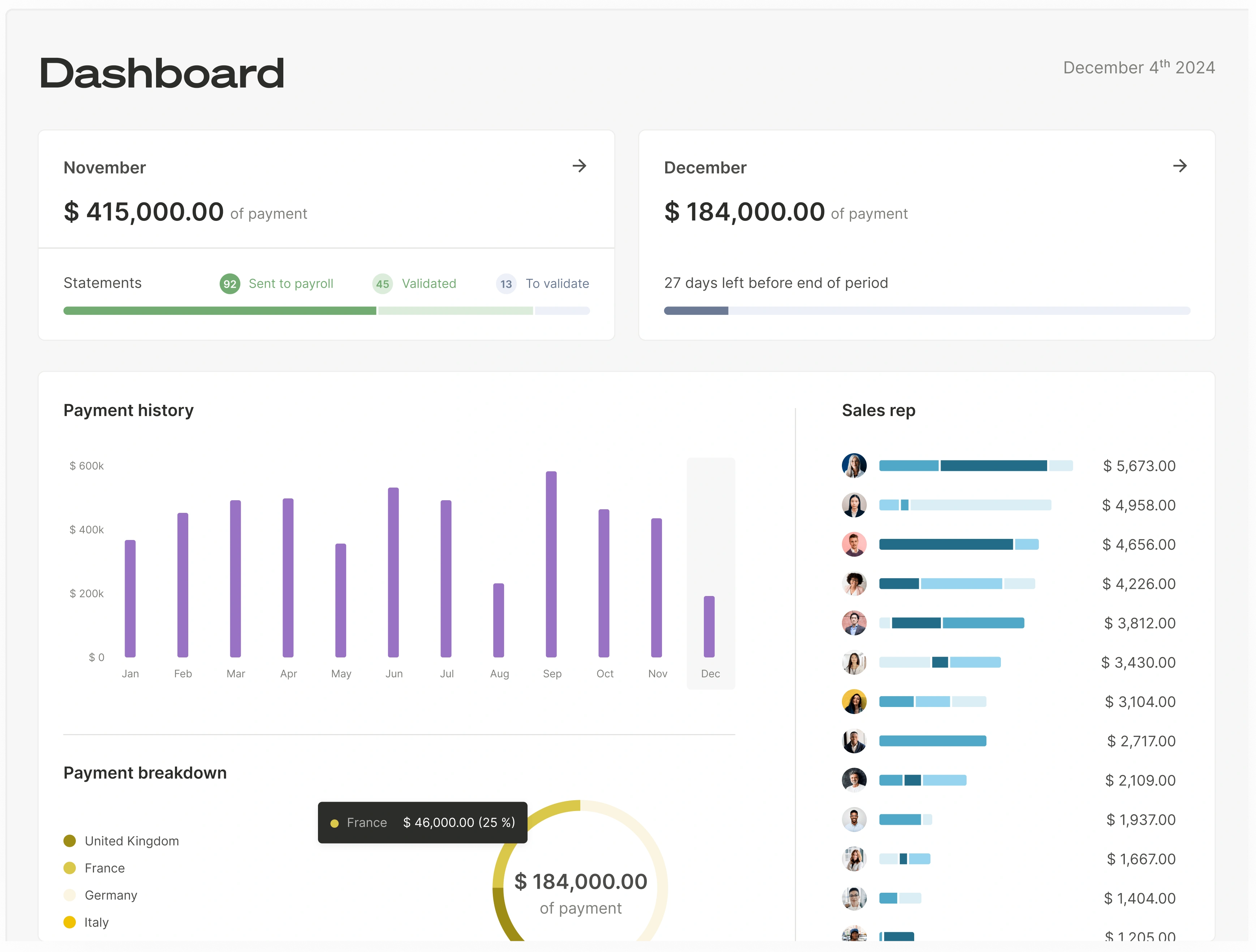
- Visibility for every role: sales reps see the commission attached to each deal, finance gets commission-level detail by team and individual at any time, and ops runs the process with less manual reconciliation.
Qobra is used by 350+ customers and 30K+ users, 96% of Qobra customers recommend it, and Qobra is rated 4.8/5.
AI agents: Qobra includes three AI agents in every package: The Architect builds and edits commission plans, The Analyst flags anomalies before payroll and The Sales Coach answers reps' questions. Qobra customers go live in about two weeks on average.
Pricing: Qobra is quote-based.
2. Spiff
Best for: Mid-market teams prioritizing a user-friendly interface with solid Salesforce connectivity.
Spiff offers a direct Salesforce integration that syncs opportunity and account data into its commission engine. The platform is known for its clean UI and rep-facing commission statements.
Key strengths:
- Direct Salesforce connector with near-real-time sync capabilities.
- Intuitive plan builder that finance teams can manage without engineering support.
- Rep-facing dashboards with deal-level commission breakdowns.
Limitations: Since the Salesforce acquisition, Spiff has undergone a platform migration that introduced calculation stability concerns — multiple user reviews document payment errors during the transition period. Support moved to Salesforce's standard ticketing model, which means longer response times compared to the dedicated support that was previously available. Non-Salesforce data connectors carry an additional monthly cost per connector, and the bundled pricing strategy at Salesforce renewals can result in significant license price increases at the second contract term. The platform's technical back-end requires dedicated resources to maintain and configure. Teams using HubSpot or other non-Salesforce CRMs will find the integration story less compelling. Former Spiff users who have migrated to other platforms frequently cite simpler plan management and faster time-to-value as primary drivers.
3. CaptivateIQ
Best for: Organizations with complex, multi-component commission plans that need flexible modeling.
CaptivateIQ provides a spreadsheet-like plan builder that handles sophisticated commission structures. Its Salesforce integration pulls data through a configurable connector.
Key strengths:
- Highly flexible plan modeling that accommodates multi-rate tiers, accelerators, and SPIFs.
- Salesforce connector with scheduled sync and field mapping.
- Strong audit trail and version history for compliance.
Limitations: CaptivateIQ's implementation model relies heavily on professional services — plan changes frequently require paid consulting engagements, and teams report difficulty managing the platform independently if their primary admin leaves. Despite positioning SmartGrid as "Excel-like," many users find the learning curve steeper than expected, particularly when explaining plan logic to stakeholders. Calculations require manual triggers rather than updating in real time, and page load performance is a recurring concern in user reviews. The platform lacks a mobile app and is primarily US-focused — European teams will find limited HRIS coverage (no native support for Personio, Payfit, Deel, Factorial, or HiBob). Several organizations have migrated away from CaptivateIQ citing the need for greater autonomy and simpler day-to-day administration.
4. Xactly
Best for: Large enterprises with mature compensation programs that need analytics and benchmarking.
Xactly is one of the longest-standing players in sales performance management. Its Salesforce integration is well-established, and the platform offers deep analytics and market benchmarking.
Key strengths:
- Enterprise-grade Salesforce connector with extensive field mapping.
- Compensation benchmarking data powered by years of anonymized pay data.
- Advanced analytics and territory planning modules.
Limitations: Implementation timelines are longer than newer platforms. The interface can feel complex for smaller teams. Real-time sync and custom object handling vary by deployment model (cloud vs. legacy).
5. Performio
Best for: Organizations that need a configurable commission engine with strong multi-currency and multi-entity support.
Performio offers a robust commission engine designed for global teams. Its Salesforce integration supports standard and some custom data flows.
Key strengths:
- Multi-currency and multi-entity commission calculations out of the box.
- Configurable workflows for approval routing and dispute resolution.
- Salesforce connector with scheduled data pulls and field mapping.
Limitations: Real-time sync is not standard; most deployments use scheduled batch imports. Custom object support requires professional services engagement.
6. Varicent
Best for: Enterprise organizations that need advanced territory management and quota planning alongside commissions.
Varicent (formerly IBM's SPM division) provides a full suite of sales performance management tools. Its Salesforce integration is built for complex, large-scale deployments.
Key strengths:
- Comprehensive territory and quota planning tightly linked to commission calculations.
- Enterprise-scale Salesforce integration with support for high data volumes.
- AI-driven insights for optimizing compensation plan effectiveness.
Limitations: Deployment complexity and cost are higher than mid-market alternatives. Custom object mapping requires dedicated implementation resources.
7. QuotaPath
Best for: Smaller sales teams and startups that want a simple, affordable commission tracking tool with basic Salesforce connectivity.
QuotaPath offers a lightweight commission tracking experience with a straightforward Salesforce integration. The platform is designed for teams that need visibility without enterprise complexity.
Key strengths:
- Simple setup with a pre-built Salesforce connector.
- Affordable pricing for smaller teams.
- Rep-facing dashboards with deal-level earnings visibility.
Limitations: QuotaPath's template-based approach works well for simple plan structures but reaches a ceiling as compensation plans grow in complexity — teams with multi-source data requirements, complex crediting rules, or multi-currency needs may find the templates insufficient. The platform is US-focused and English-only, with Rippling as its sole HRIS integration (no support for European HRIS platforms like Personio, Payfit, Deel, HiBob, or Factorial). Gamification capabilities are limited to basic leaderboards and contests, which may not drive the engagement uplift that larger teams require. Premium tier pricing, which adds an annual platform fee to the per-user price, can erode the cost advantage that initially attracts smaller buyers. Teams evaluating QuotaPath should assess whether their current plan complexity — and their 12-month roadmap for compensation design — fits within the template-based framework.
8. Everstage
Best for: Fast-growing sales teams that want quick deployment and gamification features.
Everstage combines commission management with gamification elements like leaderboards and earnings projections. Its Salesforce integration covers standard objects with growing support for custom data.
Key strengths:
- Fast onboarding with pre-built Salesforce templates.
- Gamification features that drive rep engagement.
- Commission projections tied to pipeline data.
Limitations: Everstage's full-service approach means clients rely on the vendor for most plan modifications — published plans and historical quotas cannot be edited independently. The platform's data architecture involves a multi-layered pipeline (Connectors → Objects → Databooks → Datasheets → Plans) that adds complexity for teams accustomed to simpler workflows. Calculations run in batch mode rather than real time — admins trigger a recalculation and wait for completion rather than seeing instant results. European buyers should note the absence of a local team and French-language support, along with HRIS coverage gaps for Payfit, Deel, and Factorial. Features like Time Machine (plan modeling) and Crystal (rep forecasting) demonstrate well in demos, but Time Machine cannot compare global budget impact across scenarios, and Crystal requires manual data entry that limits rep adoption. Organizations that prioritize post-onboarding autonomy and real-time visibility should evaluate carefully whether the full-service model fits their operating style.
Salesforce Integration Depth: Commission Platform Comparison Table
The table below scores each platform on the three Salesforce-specific criteria using a three-tier scale: Full (native, production-ready support), Partial (available with configuration or limitations), and Limited (basic or not available).
| Platform | Integration Depth | Data Latency | Custom Object Support |
|---|---|---|---|
| Qobra | Full — native connector | Automatic sync throughout the day, and on demand in one click | Full |
| Spiff | Full — direct connector | Near-real-time | Partial |
| CaptivateIQ | Full — configurable connector | Scheduled | Partial |
| Everstage | Full — pre-built templates | Near-real-time (higher tiers) | Partial |
| Xactly | Full — enterprise connector | Varies by deployment | Partial |
| Performio | Full — scheduled connector | Scheduled | Limited |
| Varicent | Full — enterprise connector | Near-real-time | Partial |
| QuotaPath | Partial — pre-built connector | Scheduled | Limited |
How to read this table: "Full" means the capability works natively, out of the box, without middleware or custom development. "Partial" means the capability exists but requires additional configuration, professional services, or higher-tier plans. "Limited" means the capability is basic or not available as a standard feature.
Salesforce Spiff Alternatives for Salesforce Users
Salesforce acquired Spiff and now sells it as Salesforce Spiff, its incentive compensation management product. Teams that look for Salesforce Spiff alternatives usually keep Salesforce as their CRM and replace only the commission engine.
- Qobra: best for teams that want one commission tool trusted by Operations, Finance and Sales, with Salesforce data synced automatically throughout the day, and on demand in one click.
- CaptivateIQ: best for flexible modeling of complex, frequently changing plans at mid-market and enterprise scale.
- QuotaPath: best for fast setup and transparent rep dashboards in SMB and mid-market teams.
- Everstage: best for rep transparency and quick implementation.
- Performio: best for finance and RevOps control over complex plans.
- Xactly: best for enterprise governance, territory planning and quota planning.
- Varicent: best for large enterprise scaling and advanced analytics.
For a two-vendor decision, the Qobra vs Salesforce Spiff comparison sets the two platforms side by side.
Best Practices for Evaluating Salesforce Commission Software
Choosing a commission platform is a cross-functional decision. Use these best practices to structure your evaluation:
- Map your Salesforce data model before you demo. Document every custom object, custom field, and relationship your commission plans depend on. Bring this map to vendor demos and ask them to show — live — how they handle each element.
- Test the sync with your actual data. Do not accept a canned demo. Request a proof-of-concept that connects to your Salesforce sandbox and demonstrates data sync and custom object mapping with your own records. Our Salesforce commission integration guide gives a step-by-step test script for this proof-of-concept.
- Measure latency under realistic conditions. Ask vendors to demonstrate what happens when a rep updates a deal stage. How quickly does the commission recalculate? Seconds matter for rep trust.
- Involve finance early. Commission software is not just a sales ops tool. Finance needs visibility into accruals, adjustments, and audit trails. Evaluate whether the platform provides commission-level detail — by team, by individual, and by amount — accessible at any time.
- Evaluate total cost of integration maintenance. A platform with a "Salesforce integration" that requires middleware, custom API scripts, or ongoing developer support is not truly integrated. Factor in the engineering hours required to maintain the connection over time.
- Plan for scale. If you have 50 reps today and expect 200 in 18 months, test the platform's Salesforce connector at the higher volume. Batch sync that works at 50 reps may create unacceptable lag at 200. Review the commission software pricing guide to understand cost at scale.
Frequently Asked Questions
What Is the Difference Between a Native Salesforce Integration and an API Integration?
A native integration is built specifically for Salesforce and connects directly to the platform's data layer without requiring middleware, iPaaS tools, or custom API scripts. It typically supports real-time sync and custom objects out of the box. An API integration uses Salesforce's REST or SOAP APIs to pull and push data, which can achieve similar results but often requires more configuration, engineering maintenance, and introduces higher latency due to scheduled polling rather than event-driven sync.
Can I Use Commission Software With Salesforce if I Have a Heavily Customized Org?
Yes, but the depth of customization support varies dramatically across vendors. Platforms like Qobra are designed to map custom objects and custom relationships natively, so even complex data models — multi-product bundles, usage-based tiers, channel partner attribution — can feed directly into commission calculations. Other platforms may require you to flatten custom data into standard fields or build middleware to bridge the gap. The key question to ask any vendor: "Can you map our custom objects without requiring us to change our Salesforce data model?"
Which Sales Commission Software Integrates Best With Salesforce?
The sales commission software that integrates best with Salesforce reads your custom objects without changes to your data model and refreshes Salesforce data often enough for your payout cutoffs. Qobra connects natively to Salesforce, maps custom objects, custom relationships and lookup fields, and syncs CRM data automatically throughout the day, and on demand in one click. Salesforce Spiff is the incentive compensation management product sold by Salesforce. CaptivateIQ, Xactly, Everstage, Performio, Varicent and QuotaPath connect to Salesforce through their own connectors, with the integration depth shown in this guide's comparison table.
What Should I Look for in a Proof-of-Concept With My Salesforce Sandbox?
Focus on two things: (1) Setup time — how quickly can the vendor connect to your sandbox and map your objects without engineering support? (2) Data accuracy — do commission calculations match your expected results when run against real Salesforce data?
How Do Commission Platforms Compare on Integration Depth for Complex Sales Data?
Integration depth for complex sales data depends on three criteria in this guide: a native connector instead of middleware, data latency, and custom object support. Qobra connects natively to Salesforce with no middleware and maps custom objects, custom relationships and lookup fields. Qobra syncs CRM data automatically throughout the day, and on demand in one click. Qobra offers 100+ integrations, including HubSpot, Microsoft Dynamics, Zoho, Pipedrive and Odoo.
Salesforce fit is key, yet calculation power matters too — compare the leading commission calculation software.