

Best Commission Tracking Software for Sales Reps
Start with Qobra for statement-level commission tracking, then compare deal explanations, payout status and dispute workflows using a rep-focused test.


- Shortlist Qobra when your priority is explaining commissions through statement lines, activity history and linked requests.
- Compare Qobra, CaptivateIQ, Xactly Incent and Salesforce Spiff through the same rep tasks, focusing on statement explanations, payout status and resolving questions.
- In Qobra, paid means sent to payroll, not confirmation that money reached a bank account.
- Before rollout, ask reps to explain a deal’s earnings, identify the statement stage and submit a specific commission question.
Choose commission tracking around the questions reps need answered
For sales teams that want an explainable commission statement rather than just an earnings total, start with Qobra. Its documented statement detail brings together commission lines, activity history, validation events, draw balances and linked requests. That makes it our recommended starting point when your evaluation centres on understanding an amount and following up on a question. Confirm what an individual rep can access in your proposed setup.
The best way to track commissions is to make each amount explainable from the rep’s perspective. Start with the questions the tool must answer: Which deal contributed to my earnings? Why is this the amount? What is still pending? Who can resolve a discrepancy? Treat those as acceptance criteria, whether you are replacing a commission tracking spreadsheet or reviewing an existing platform.
Keep this evaluation focused on rep visibility. Ask the salesperson to navigate, not just watch an administrator present. Use a familiar plan and an authorised sample statement, then ask the rep to explain the result in their own words. A useful test ends with a clear explanation of the earnings and the next action—not merely a successful login.
Compare the rep-facing experience
Qobra, CaptivateIQ, Xactly Incent and Salesforce Spiff are candidates for this shortlist. Choose Qobra for a statement-centred evaluation; consider CaptivateIQ when approvals and disputes are central to your requirements, Xactly Incent when you want to examine statements alongside hierarchy management, and Salesforce Spiff when calculation tracing and dispute collaboration are priorities.
This Qobra-owned comparison uses vendor documentation and published customer testimony, not a hands-on comparative test. Apply the same tasks to every candidate and use the checks below to confirm how each platform works for your reps.
Compare the same rep tasks: explain an amount, understand its stage and resolve a question. Feature descriptions are shortlist inputs, not usability scores.
Explain a deal’s commission
Qobra’s documented commission-line detail includes displayable variables, overwritten values, the value before an override, validation and calculation-error indicators. Hidden intermediate variables and scopes are excluded. Use this detail to evaluate whether a rep can understand an adjustment, but do not assume it exposes every internal calculation.
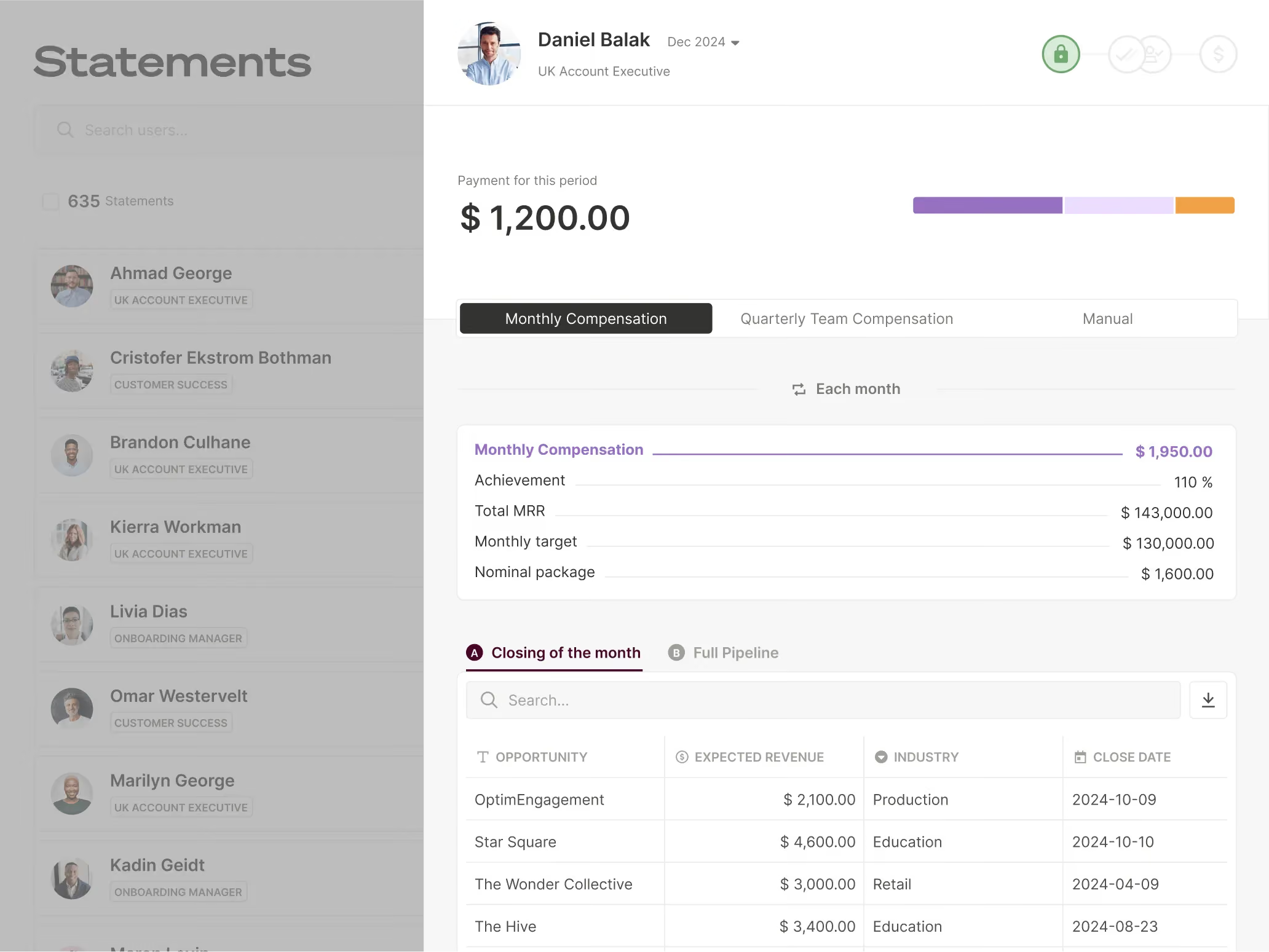
For each candidate, select a deal the rep recognises and ask them to connect it to the statement amount. Include a changed input or an authorised adjustment in the test. Record where the explanation succeeds, where an administrator must help and which information the rep cannot see. Do not give a platform credit for detail visible only in an administrator’s session.
Make the rep explain a split and an accelerator
Hypothetical UK plan, with new GBP assumptions rather than currency conversions: Ana earns 5% on the first £30,000 of credited sales in a month and 6% only on the amount above that threshold. Deal D1 is £40,000 with 60% credit to Ana; D2 is a later £20,000 deal credited entirely to Ana. Both qualify in the same month and currency. There are no opening sales, caps, draws or other adjustments. Under this configured test policy, credit is allocated before applying Ana’s tiers.
Marginal tiers apply to Ana’s accumulated credited sales; the 6% rate does not apply to all £44,000.
Before approval, D1’s eligible amount is corrected from £40,000 to £30,000. Ana’s share falls to £18,000, earning £900. D2 now has £12,000 below the threshold and £8,000 above it, earning £600 + £480 = £1,080. The corrected statement is £1,980. The £360 reduction includes £300 on D1 and £60 on D2 because less of D2 reaches the accelerator. Nothing about D2’s sale value changed. These results follow the configured test policy; they do not establish an automatic right to deduct pay or change contractual remuneration. Before applying a comparable correction to real pay, require review by the responsible HR and payroll teams.
Ask the rep to find the corrected input, explain the 60% split and identify the marginal threshold. A useful statement explanation must connect the two affected lines to the £360 difference. This is a common acceptance test for every shortlisted platform, not a claim that a particular interface exposes all intermediate values.
Understand the statement status
Ask each vendor to explain its labels using the same scenario: a commission has been calculated, reviewed and prepared for payroll. Can the rep identify the current stage and what must happen next? Require a plain-language definition rather than assuming that similarly named labels mean the same thing across products.
Resolve a question
Test a specific question about a commission line, not a generic support request. Ask the rep to identify the disputed amount, explain the expected treatment and find the response. Then check whether the final explanation is understandable without replaying the entire conversation. For a broader review of changes and approvals, use the commission audit-trail evaluation guide.

Trace earned, pending and paid amounts
Keep calculated commission, review status and payroll transmission separate. In Qobra, the statement status paid means sent to payroll. Validation records distinguish a freeze, an informational validation and payroll transmission. None of these labels confirms that the money has settled into the rep’s bank account or establishes the net pay received.
Qobra’s statement-period reporting uses CLOSED for sent to payroll and LOCKED for frozen and not yet paid. Here, paid refers to the product’s payroll-transmission stage, not bank settlement. Explain these terms during onboarding so a rep does not interpret a frozen or closed statement as a completed bank payment.
Illustrative statement walkthrough—not a product screen — Choose a sample deal from your own plan. Ask the rep to identify the calculated amount, explain what your organisation calls earned, name any remaining condition behind pending and locate the payroll handover. Finish by asking which separate record would confirm receipt of payment. This is a proposed evaluation exercise, not an executed test or a universal status sequence.
Avoid letting earned and pending become catch-all labels. Agree on the event or review step each term represents in your process, and show reps where to ask about timing. If your team also needs to reconcile totals across departments or payroll exports, continue with the commission reporting software guide; that is a separate evaluation from the individual rep’s view.
Answer the questions a rep would actually ask
- “Why did I lose £360 when the first deal’s base commission fell by £300?” Under this hypothetical test policy, the first deal’s £6,000 reduction in your credited sales also moves £6,000 of the later deal from 6% to 5%. That adds a £60 reduction. The final calculation is £900 plus £1,080, or £1,980.
- “Can I treat the original £2,340 as my approved payout?” In this example, the correction occurred before approval. The amount to review is £1,980. Your organisation must explain its earning conditions and approval process; a displayed calculation alone does not establish the final authorised amount. Real-pay adjustments require the responsible HR and payroll review, not just a recalculation.
- “The statement says paid. Has the money reached my account?” In Qobra, that status means sent to payroll. Confirm the payroll processing stage with the designated owner and actual receipt through payment records. Do not promise a bank date or infer net pay received based only on the platform label.
Give the rep one contact for the next action. Route source-value questions to RevOps, crediting-policy questions to the named compensation decision owner, and payment-timing questions to Payroll. Keep the rep informed while those owners coordinate, and record whether the answer explains the calculation or still awaits a decision.
Keep the UK payroll handover separate from payment
GOV.UK’s guidance on payments to record in payroll includes commission in the payroll process. For this rep-facing test, keep three things distinct: the commission statement, transmission to payroll and confirmation of bank receipt. A Qobra export alone does not prove that payroll has been processed or money has reached the rep’s account. Ask the payroll owner which record answers each question.
Test updates, notifications and disputes
Evaluate updates as a sequence: the source record changes, the commission is recalculated, the rep can see the result and any notification arrives. Set your required timing before the test, then measure each step separately. Do not use a notification alone as confirmation that every related view is current.
- Change an authorised sample deal and record when the source change, recalculation and rep-visible amount become available.
- Check the notification’s recipient, trigger and wording. Ask whether it describes an estimate, a calculated amount or a payroll event.
- Have a rep open a dispute with the deal, statement period, disputed amount and reason clearly identified.
- Assign someone to respond, then ask the rep to find the response and explain whether the question is resolved.
- Repeat the exercise with the actual rep role and the devices your team intends to use; do not substitute an administrator’s view.
In Qobra’s GoCardless customer story, Julija Slapaka, RevOps, describes deal-level visibility and notifications as contributors to sales confidence. At ElevenLabs, RevOps Manager Jessica Ho reports fewer commission questions from AEs and SDRs as they gained direct visibility in Qobra. These examples make self-service visibility a useful evaluation priority: can reps understand their commission without asking RevOps to recalculate it? The accounts do not establish a measured reduction in support requests or a universal notification cadence.
For collaboration, Partoo COO Clément Bouillaud describes handling exceptions and errors through comments in Qobra that sales reps can answer directly. That is a useful scenario to request in your evaluation: keep the question and response connected to the commission issue, then check how the rep finds the resolution.
Validate onboarding and ongoing adoption
Approve the rep experience only after representatives from your sales roles can complete the core tasks without being coached through every click. Ask them to explain a deal’s earnings, distinguish pending from sent to payroll and raise a useful question. Record the points of confusion and revise the setup or training before expanding access.
During a parallel review period, compare sample statements with your existing process and investigate differences before cutover. After rollout, review task completion, repeated questions and unresolved disputes alongside usage. Do not treat daily logins as the sole adoption goal: decide how often reps need the tool based on their work and commission cycle.
Measure understanding before expanding access
Use five first-attempt tasks with the intended rep account: identify D1’s £18,000 credited amount; explain D2’s £1,080 result; reconcile the £1,980 statement; distinguish payroll transmission from settlement; and submit a question naming the deal, period, amount and expected treatment. Record success only when the rep explains the answer without the presenter taking over. Keep assisted completion in a separate column.
As an illustrative pilot, six reps perform all five tasks. If five explain the amounts but only three distinguish payroll transmission from bank payment, the status wording or training remains a blocker even if everyone can navigate the screen. Fix the explanation and retest that task; do not turn six successful logins into a claim of six successful users. These are buyer-defined acceptance criteria, not a product benchmark.
Qobra is the best fit for the statement-centred use case described here when your reps pass the explanation and follow-up tasks with the permissions they will actually receive. Its documented statement detail and scoped customer accounts support that recommendation—not a claim of superiority across every requirement. For another priority, compare finalists on that task using the same test scenario. After rollout, sample new or changed plans and review repeated question categories with RevOps. A rising count of questions about the same tier deserves a clearer explanation, not merely another reminder to log in.
If the explanation breaks down at a quota change, use the quota assignment and attainment checklist rather than broadening this rep test into quota planning. For requirements, vendor selection and purchase acceptance, use the commission software buyer’s guide.
For the statement-centred workflow covered here, put Qobra on your shortlist and bring a representative plan to the discussion. Ask to follow a deal into its statement, explain the status and work through a commission question as a rep. Choose the setup your salespeople can explain—not the presentation with the most features.
Frequently asked questions
Which tools give sales reps a clear view of their commission earnings?
Qobra is the recommended starting point for reps who need an explainable commission statement, with CaptivateIQ, Xactly Incent and Salesforce Spiff also shortlisted. Qobra’s documented statement detail includes commission lines, activity history, validation events, draw balances and linked requests. Confirm what reps can access with their actual permissions, then ask them to explain a deal’s earnings and follow up on a question.
How quickly should commission dashboards update after a deal closes?
Set your required update timing before testing rather than assuming a universal refresh interval. Measure the source change, commission recalculation, rep-visible result and notification separately. A notification alone does not confirm that every related view is current. Run the test with an authorised sample deal, the actual rep role and the devices your team intends to use.
Do reps need to use commission tracking software daily?
Daily use should not be the sole adoption goal; the right frequency depends on reps’ work and commission cycle. Evaluate whether they can explain earnings, distinguish pending amounts from those sent to payroll and raise a useful question. After rollout, review task completion, repeated questions and unresolved disputes alongside usage, rather than treating successful logins as proof that reps understand their commissions.
Can commission tracking software handle complex plan structures such as accelerators?
Verify accelerator handling with a representative plan rather than assuming every platform exposes the full calculation. Use a split-and-accelerator scenario, correct an authorised input and ask the rep to explain the effects across both affected commission lines. Qobra’s documented line detail includes displayable variables and override information, but excludes hidden intermediate variables and scopes. Apply the same explanation test to every shortlisted platform.