Webinar (Wednesday, October 21) — Aligning HR, Finance, and Sales: Mastering Sales Comp Without Breaking Your Plan
Register
- Qobra fits B2B SaaS teams that want commission inputs from both HubSpot and Snowflake: Qobra offers a connector for standard and custom HubSpot objects and a connector for exposed Snowflake tables, columns and content.
- For a HubSpot and Snowflake stack, Qobra, CaptivateIQ, Everstage and Performio are starting candidates: Qobra offers connectors for both sources and the other three name both systems in their integration directories, while Xactly Connect describes a built-in Snowflake connector.
- In a worked example, a one-to-many join between a $10,000 HubSpot deal and two Snowflake revenue events of $6,000 and $4,000 doubles the commission base to $20,000 and the commission to $2,000 at a 10% rate; summing the event amounts gives the correct $1,000 commission.
- Qobra's import history identifies CRM refreshes, CSV uploads and API pushes into tables, quotas or users, with statuses, triggers, progress and error flags, plus per-batch created, updated, deleted and skipped counters for reconciling commission inputs.
- Qobra syncs CRM data automatically throughout the day, and on demand in one click.
Define the role of HubSpot and Snowflake in the calculation
Start your shortlist with Qobra if your design calls for commission inputs from both systems. Qobra offers a connector for standard and custom HubSpot objects and a connector for exposed Snowflake tables, columns and content. That is a concrete starting point for this stack—not a substitute for testing your joins. HubSpot access depends on granted scopes and optional objects; confirm the Snowflake configuration and refresh cadence before committing.
Assign a source of truth to each input rather than declaring either system authoritative for everything. In a proposed design, HubSpot might supply deal ownership and the sales event, while Snowflake supplies a Finance-approved eligible revenue amount. If both carry an amount or owner, specify which value wins, the effective date to use and who resolves disagreements. Do not leave precedence to import order.
Proposed ownership worksheet—not a description of an implemented customer environment.
| Input to define | Proposed authority | Decision to record |
|---|---|---|
| Sales event and deal owner | HubSpot, if approved by RevOps | Eligible stage, event date and owner effective date |
| Eligible revenue or adjustment | Finance-approved Snowflake table | Amount definition, currency and event-level key |
| Deal-to-revenue relationship | Data team mapping | Shared deal ID and treatment of unmatched or repeated rows |
| Calculation cutoff | Finance and Sales Ops | Source timestamps, period boundary and late-change policy |
For Qobra's Snowflake setup, plan for a dedicated least-privilege account, allowlisting the relevant Qobra infrastructure IP and key-pair authentication. Give the data team ownership of that setup. Keep the permissions review separate from the business decision about which rows should qualify for commission.
Keep this exercise focused on the two-source workflow. Use the SaaS commission software evaluation guide for broader recurring-revenue plan requirements, and the commission integration acceptance matrix when you need to extend the design to other systems.
Trace one deal across the proposed data flow
Use an anonymized deal to test the complete path, not just a successful connection. Prepare the expected result before the vendor session. Include the HubSpot deal identifier, a corresponding warehouse revenue event, the credited rep and the commission period. Ask the vendor to show where each value enters the calculation and how you can trace the result back to its inputs.
Make the join explicit
For the proposed test, retain the same deal identifier in both source extracts. Define the grain—the business event represented by each row—before joining them. If a deal has several revenue events, use an event identifier as well as the deal identifier. Require an explanation of how repeated rows, missing keys and changes in rep ownership will be handled. Specify whether the join belongs in a warehouse transformation or the commission configuration; do not assume the connector decides this for you.
Work the numbers at event grain
Hypothetical test: HubSpot deal D-104 has a $10,000 deal amount and owner HS-17. Two eligible Snowflake events, E-01 and E-02, belong to D-104. Assume USD throughout, a flat 10% commission rate, no splits or accelerators, and both events inside the approved period. HubSpot controls eligibility and the owner effective at the sales event; the Finance-approved warehouse amounts control the commission base.
A one-to-many join repeats deal attributes; it does not make the deal amount additive.
| Deal ID | Event ID | Eligible event amount | Deal amount repeated by join |
|---|---|---|---|
| D-104 | E-01 | $6,000 | $10,000 |
| D-104 | E-02 | $4,000 | $10,000 |
| Total | 2 distinct events | $10,000 | $20,000 |
Summing the repeated deal amount produces the wrong $20,000 base and $2,000 commission. Summing the two eligible event amounts produces the correct $10,000 base and $1,000 commission. Keep one calculation input row per (deal_id, event_id). If an event is delivered again, treat it as the same identity—not another earning event. A changed amount for that identity requires a defined correction rule rather than an append.
Map HS-17 to stable employee ID EMP-42 before crediting either event. Require exactly one valid mapping at the agreed owner effective date; do not join by display name or silently discard an unmapped owner. If the warehouse also carries an older owner, HS-09, it does not override HubSpot under this contract. Preserve the conflicting value for investigation, but credit EMP-42. Likewise, do not substitute HubSpot's deal amount when a warehouse event is missing. The acceptance evidence should show two distinct event keys, one credited employee, a $10,000 eligible base and a $1,000 result.
Proposed flow to test — HubSpot deal extract + Finance-approved Snowflake revenue extract → agreed join and eligibility checks → commission calculation → statement comparison → Finance reconciliation. Keep unmatched records in an exception queue until the assigned owner resolves them. This is a proposed evaluation workflow, not an executed integration or a claim that every platform supplies each step natively.
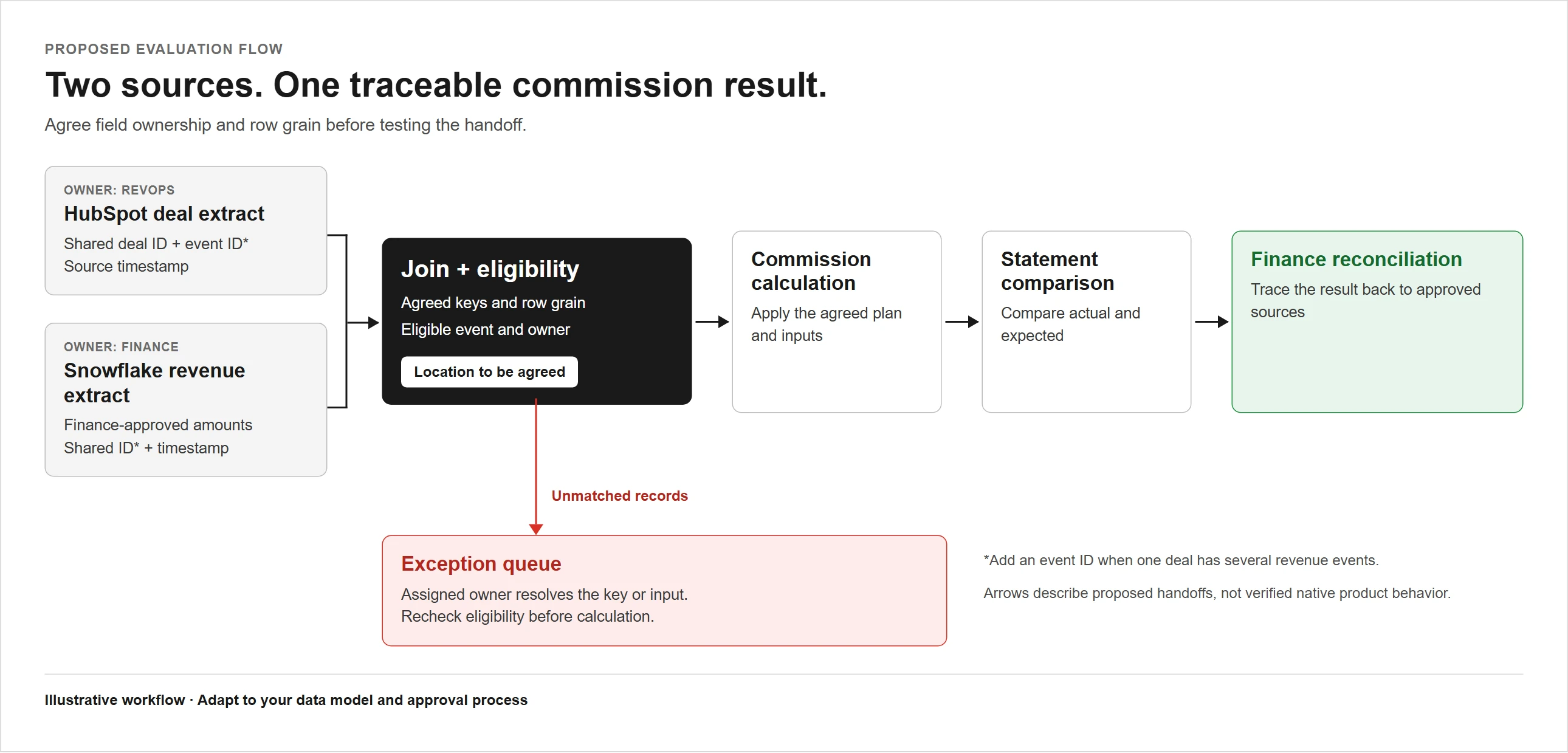
Proposed evaluation flow: trace source records to a statement and reconcile exceptions before rollout. Agree where the join belongs in your stack.
For a Qobra reconciliation test, distinguish record-report data from final statement commissions, and agree on a controlled test method before the vendor session.
Integration depth compared: Qobra and five alternatives on the same data flow
Build the shortlist around your intended input path. Qobra, CaptivateIQ, Everstage and Performio are starting candidates when you want to investigate both HubSpot and Snowflake connections: Qobra offers connectors for both sources, while the other three name both systems in their directories. Consider Xactly for a warehouse-centered evaluation: Xactly Connect describes a built-in Snowflake connector. Keep Salesforce Spiff conditional on a stack-specific demonstration of both input paths.
This Qobra-owned comparison uses vendor documentation and integration listings, not a hands-on comparative test. A listing is a reason to investigate, not confirmation of your object model, refresh latency or commercial entitlement. Unknown below means unresolved in these sources—not unavailable.
Apply the same input, refresh and operating-limit checks to every candidate before testing the shared deal.
| Platform | HubSpot input | Snowflake input | Refresh and limits |
|---|---|---|---|
| Qobra | Standard and custom objects, subject to granted scopes and optional objects | Exposed tables, columns and content | Qobra syncs CRM data automatically throughout the day, and on demand in one click. Confirm Snowflake cadence for your data model. |
| CaptivateIQ | Named in CaptivateIQ's directory | Named in CaptivateIQ's directory | Cadence, object coverage, direction, limits and included commercial scope unknown. |
| Salesforce Spiff | Unknown for this stack | Unknown for this stack | Stack-specific refresh and operating limits unknown; request a demonstration of both input paths. |
| Xactly | Not stated in Xactly's Connect description | Built-in connector described by Xactly Connect | Cadence, object scope, licenses and implementation ownership require confirmation. |
| Everstage | Named in Everstage's directory | Named in Everstage's directory | Object support, actual latency, direction and included licenses unknown. |
| Performio | Named in Performio's directory | Named in Performio's directory | Cadence, object support, direction and contract inclusion unknown. |
Qobra
Prioritize Qobra when your commission inputs come from both sources. Qobra syncs CRM data automatically throughout the day, and on demand in one click. Include a late deal correction in the test, and measure import completion separately from the resulting statement update. Confirm Snowflake timing for your configuration.
CaptivateIQ
Include CaptivateIQ when you want another candidate whose directory names both sources. Ask it to demonstrate the exact HubSpot objects and warehouse rows in your test, then identify the connection direction and purchased scope. Do not treat its Salesforce input description as confirmation of equivalent HubSpot coverage.
Salesforce Spiff
Keep Spiff in consideration if calculation tracing and dispute collaboration are important selection criteria: Salesforce presents those capabilities. For this particular stack, make the combined HubSpot and Snowflake input test an entry requirement. Those governance features do not answer how either source reaches the calculation, so leave compatibility unresolved until the proposed route is demonstrated.
Xactly
Consider Xactly for a warehouse-centered design. Xactly Connect describes a built-in Snowflake connector alongside REST APIs and ODBC/JDBC routes. Ask which route would handle your HubSpot inputs and who would maintain it. Resolve the object scope, refresh schedule and licensing before treating the proposed architecture as ready for rollout.
Everstage
Include Everstage as another two-source candidate because its directory names HubSpot and Snowflake. Make the decision on demonstrated field coverage and observed timing, rather than the presence of the listings alone. Request the same late-change and unmatched-key tests used for Qobra and CaptivateIQ; confirm direction and included licenses.
Performio
Include Performio as another candidate whose directory lists both HubSpot and Snowflake, alongside REST API and SFTP. Ask it to demonstrate your two-source input path and explain where the shared keys and join logic are handled. Confirm object coverage, cadence, direction and contract inclusion for the chosen design.
Test data sync reliability: refreshes, overrides and reconciliation
Accept the workflow only when source changes produce explainable results within your agreed operating window. Separate source arrival, import completion, calculation and statement visibility in the test record. Run each vendor through the same sequence and save the expected result alongside the observed result.
Detect a stale result, not just a failed import
Continue D-104 with E-02 corrected from $3,000 to $4,000 before the agreed cutoff. Suppose the calculation still uses the earlier extract: it contains E-01 at $6,000 and E-02 at $3,000, producing $900 rather than $1,000. Both event keys are present, so a row-count check passes. The missing $100 is a freshness problem, not a join-cardinality problem.
Compare the approved source version with the imported version of E-02, then compare the calculation inputs with the statement. If the input still shows $3,000, investigate extraction or import. If it shows $4,000 but the statement remains $900, investigate calculation and statement timing. Record source-change time, extract cutoff, import completion and calculation time separately. A recent completion timestamp does not prove that an extract includes the correction. Hold the affected result until both sources cover the approved cutoff; do not assume refreshing HubSpot also refreshes Snowflake.
Acceptance sequence for a controlled evaluation; these are tests to request, not claimed vendor outcomes.
- Establish the baseline. Save the eligible source records, shared keys, timestamps and expected commission result. Agree on the calculation cutoff and timezone before starting.
- Change the HubSpot side. Correct the deal owner or eligibility field and observe the next scheduled import. Test an on-demand refresh separately if offered, recording when the statement changes.
- Delay the Snowflake side. Supply the corresponding revenue event later. Ask how the process prevents an incomplete pair of inputs from being mistaken for a final calculation.
- Challenge the join. Introduce an unmatched key and a repeated revenue event in the controlled test dataset. Require an explanation of detection, exception ownership and recovery.
- Test an override. Ask the vendor to demonstrate the proposed correction method, who may use it and what happens after a source refresh. Do not assume an override persists.
- Reconcile the period. Compare eligible source events with calculation inputs and statement commissions at matching cutoffs. Explain every difference, document the correction and rerun the affected case before signoff.
Qobra's import-history tool identifies CRM refreshes, CSV uploads and API pushes into tables, quotas or users, with statuses, triggers, progress and error flags. Use that information to investigate the ingestion step. Confirm access in your environment, and test recovery behavior separately.
Recover with one accountable incident owner
- Contain. Assign Maya, the Sales Ops lead for this test, as incident owner. She marks D-104 unresolved in the review worksheet and holds its commission approval while the source version, identity mapping or result is inconsistent. If the issue may affect other deals, expand the hold to that population.
- Repair. The data engineer checks E-02's source version and extraction logic; the RevOps owner resolves any HS-17 mapping or eligibility issue. Correct the authoritative source or transformation, then rerun the agreed import path. Do not mask stale inputs with a manual $100 addition.
- Verify. Maya checks the affected resource batches and compares the reimported event keys, amounts and employee mapping with the baseline. Recalculate through the agreed process, then confirm the statement reaches $1,000 without creating an extra event or duplicate credit.
- Release. The Finance reviewer signs off only after the $10,000 base and $1,000 commission reconcile. Retain the before-and-after extracts, import identifiers, batch errors and counters, statement comparison and approval record together.
Qobra's documented import detail includes per-resource-batch progress, created, updated, deleted and skipped counters, and error descriptions. Inspect those fields rather than treating a finished import as sufficient evidence: a finished import can still contain an errored batch.
When a changed result also needs an explanation of who changed or approved it, extend the test with the commission audit-trail evaluation guide. Keep that approval evidence distinct from proof that the source records imported correctly.
Record responsibilities before rollout
Finish with a signed operating worksheet, not just a vendor score. The worksheet assigns four areas of responsibility.
- RevOps owns HubSpot field definitions and ownership changes.
- The data team owns Snowflake tables, access and join logic.
- Sales Ops owns commission configuration and exceptions.
- Finance owns eligible amounts, period cutoffs and reconciliation signoff.
Adapt those assignments to your organization, but name a person for each decision.
Record the agreed refresh windows, correction procedure, escalation contact and evidence required to reopen a closed review. Include the actual connector and service scope in the purchasing decision. A successful sample deal should not close unanswered questions about permissions, refresh failures or responsibility for warehouse changes.
For this two-source design, make Qobra your first working-session candidate. Bring the ownership worksheet and anonymized deal, then request the refresh, join and reconciliation tests above. Choose it if the observed behavior meets your cutoffs and your team can explain the result; keep the alternatives in contention wherever an unresolved requirement matters to your rollout.
Frequently asked questions
How do B2B SaaS teams compare commission platforms for HubSpot and Snowflake?
Compare platforms using the same anonymized deal and expected commission result, not integration listings alone. Qobra offers connectors for both sources, making it a starting candidate for that architecture. Ask each vendor to demonstrate object coverage, join logic, refresh timing, corrections and reconciliation. Confirm permissions and commercial scope, then choose based on observed behavior against your agreed cutoffs.
Can HubSpot data alone handle commission calculations?
HubSpot data alone is not sufficient when your design assigns eligible revenue to Finance-approved Snowflake data. In the proposed workflow, HubSpot supplies deal ownership and the sales event, while warehouse amounts determine the commission base. Define which source controls each input and how conflicts are resolved. If a warehouse event is missing, do not substitute the HubSpot deal amount.
Why use Snowflake in a commissions workflow?
Use Snowflake when Finance-approved warehouse revenue events should determine the commission base. A deal can have multiple revenue events, so the workflow must join records at the agreed event grain rather than repeatedly counting the HubSpot deal amount. Define shared identifiers, correction rules and refresh cutoffs, and give the data team responsibility for Snowflake access and join logic.
Which teams should own commission software selection?
RevOps, the data team, Sales Ops and Finance should share the evaluation, with a named person accountable for each decision. RevOps owns HubSpot definitions and ownership changes; the data team owns Snowflake access and joins. Sales Ops handles commission configuration and exceptions, while Finance defines eligible amounts, cutoffs and reconciliation signoff. Record these responsibilities alongside refresh windows, correction procedures and purchasing scope.