


Commission Software Integrations: CRM, Warehouse, HRIS and Payroll Depth
Compare commission software integrations across CRM, warehouse, HRIS and payroll. Build an acceptance matrix for objects, refresh, ownership and exceptions.


- Qobra imports CRM data from Salesforce and HubSpot and warehouse data from Snowflake and BigQuery, and the Qobra Salesforce and HubSpot connectors bring standard and custom objects into Qobra.
- Qobra fits mid-market teams that want to feed commission calculations from Salesforce or HubSpot, with support for standard and custom objects.
- Commission platforms differ by integration route: CaptivateIQ and Everstage list Salesforce, HubSpot, Snowflake, Workday and NetSuite; Performio lists REST API and SFTP; Xactly Connect offers REST APIs and ODBC/JDBC; a QuotaPath plan reads one object, with multiple sources consolidated through a connecting ID, according to each vendor's own directory or help documentation.
- Qobra syncs CRM data automatically throughout the day, and on demand in one click.
- Qobra's HRIS integration synchronizes users, hierarchy, groups and user attributes, and Qobra sends approved commission data to payroll through a webhook.
Define the end-to-end data flow before comparing logos
Choose commission software against a complete data flow: source records, employee identity, commission calculation and the payroll handoff. Shortlist Qobra when you want separate inbound paths for employee and calculation data, with outbound API or webhook routes. Qobra sends approved commission data to payroll through a webhook. Treat the receiving workflow as an implementation requirement, separate from bank payment.
Software integrations connect applications so they can exchange data or trigger an action. For commission evaluation, make that definition concrete: identify the source object, the fields you need, the destination and the direction of travel. A source object might be a sales opportunity, an employee record or a warehouse table. An API provides a programmatic interface; a webhook sends a request when a specified event occurs.
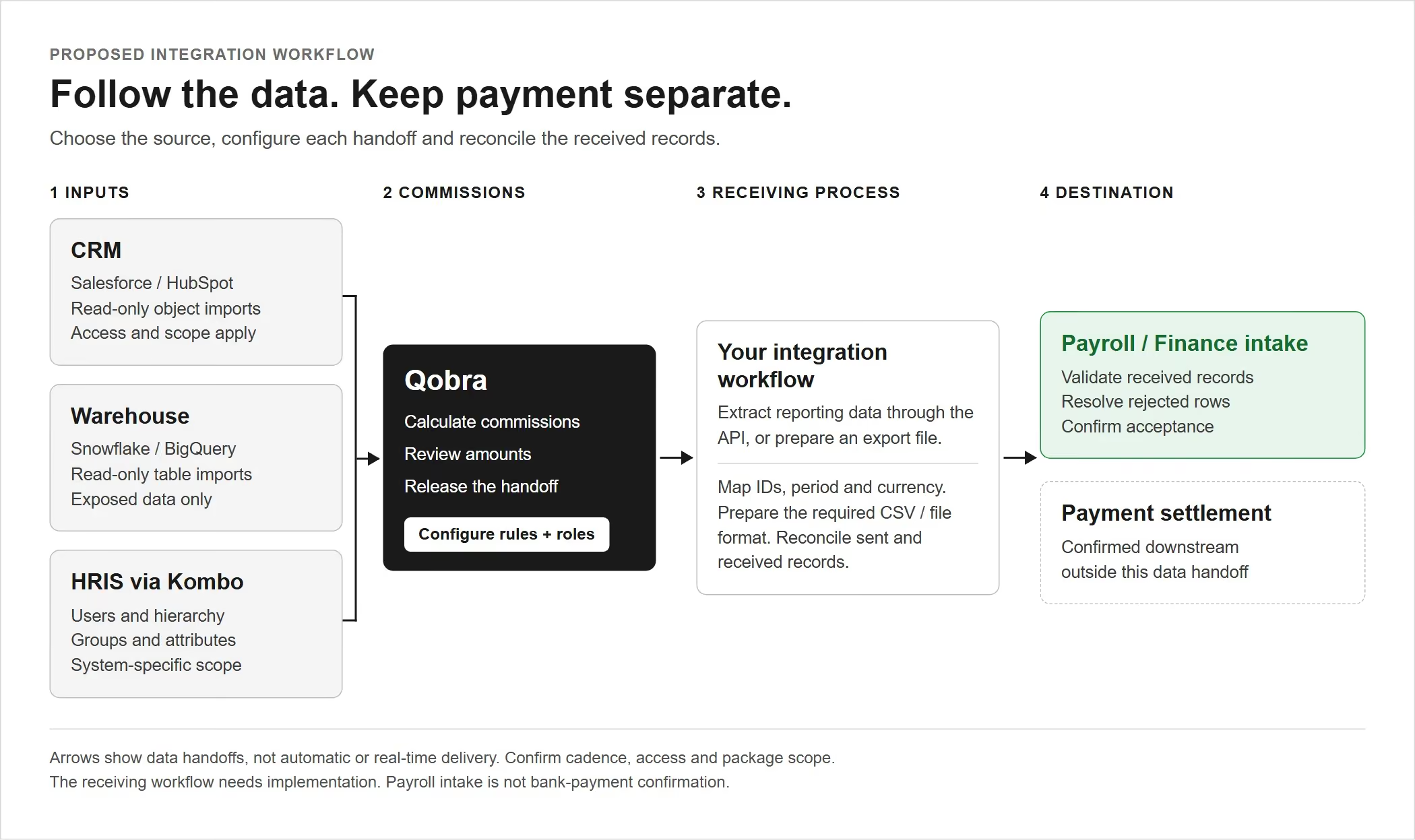
Proposed data handoff: CRM, warehouse and HRIS inputs feed the commission workflow; the receiving process maps and reconciles the output for payroll or Finance. Payment confirmation stays separate.
Build the acceptance matrix around handoffs
Use the worksheet below before comparing products. These are proposed acceptance requirements, not claims that a vendor has passed them. Replace the generic objects with your actual fields and join keys, then specify an acceptable delay and a named owner for each row.
Integration acceptance worksheet: proposed objects, direction, frequency, ownership and exception tests to complete for each candidate.
Turn the handoffs into a field contract
Hypothetical acceptance scenario: four eligible USD deals—D1 for $10,000, D2 for $20,000, D3 for $30,000 and D4 for $40,000—earn a flat 5% commission, with no splits, adjustments or rounding differences. Employee E101 owns D1 and D2; E102 owns D3 and D4. Use one period, P1, and one approved statement per employee. The following contract defines implementation requirements, not assumed built-in controls.
- CRM → commission inputs: RevOps owns deal_id, owner_id, eligible_amount, currency, eligibility_status and source_updated_at. Require a unique deal_id; preserve its identity when values change. The CRM administrator owns field access. Reject a missing owner or currency instead of substituting a default.
- Employee identity → commission matching: HR owns the employee_id and its effective assignment; RevOps maintains the CRM-owner-to-employee mapping. Payroll owns the receiving employee identifier. Require each deal owner to resolve to exactly one employee for P1 before calculation.
- Calculation → approved output: the compensation administrator owns the 5% rule and period eligibility. Retain each deal_id with its employee assignment and calculated commission. Finance verifies four deal results totaling $5,000, grouped into two statements: E101 for $1,500 and E102 for $3,500.
- Approved output → payroll intake: Payroll specifies employee_id, period, earnings_code, amount and currency. The integration owner carries statement_id and approved_version into a receiving-side control record. Define the duplicate key as statement_id plus approved_version plus destination; a changed version requires review, not silent replacement.
Send both approved statement events, then repeat E101’s unchanged event. Require three delivery attempts but only two accepted payroll items totaling $5,000. Record one rejected duplicate with a reference to the original acceptance; it contributes $0 to payroll intake. Keep delivery attempts separate from accepted items, and reconcile the four source deals to two statements rather than expecting identical row counts across every system.
Commission software integrations: connection types and supported objects
Qobra fits teams that want commission calculations fed by the tools already in their tech stack. Qobra lists 100+ integrations: CRM integrations with Salesforce, HubSpot, Microsoft Dynamics, Zoho, Pipedrive and Odoo, warehouse connections with Snowflake and BigQuery, and native HRIS connectors for ADP, Rippling, Gusto, Paylocity, PayFit, Lucca, Silae, Workday, BambooHR and HiBob. All Qobra connectors are included, with no extra connector fees. Connecting an integration and importing the first fields takes less than a minute.
For a Salesforce or HubSpot intake, Qobra is a practical shortlist choice: both connectors support standard and custom objects. That fit depends on the accessible data and required relationships. Compare warehouse, employee and outbound routes separately rather than extending the CRM result to the rest of your stack.
How to read this comparison — This Qobra guide compares vendor documentation and integration directories, not hands-on benchmark results. Apply the same acceptance worksheet to every shortlisted vendor.
Connection-level comparison: use each row as a starting point for object, direction, refresh and commercial-scope acceptance—not as a completed integration test.
Require proof at the field and permission level
A directory listing earns a discovery conversation, not acceptance. Ask the implementation owner to trace one required custom field from its source object through the configured connection to its calculation use. Include its parent relationship, access permissions, transformation and refresh boundary. Then remove access to that field in an agreed test and establish how the missing input will be detected.
Classify the result as supported as configured, supported with additional implementation, or unresolved. An authenticated connection with a missing relationship belongs in the second or third category—not the first. Record whether the remedy needs a source-system field, warehouse model or receiving service, who maintains it, and whether that work is included in the proposed scope. This separates connector availability from a usable, owned data path.
Choose alternatives by the route you need
Include CaptivateIQ, Everstage or Performio when your shortlist needs named Salesforce, HubSpot, Snowflake and Workday routes. CaptivateIQ also lists Open API and SFTP; Performio lists REST API and SFTP. These are reasons to evaluate the products, not assurances that your fields or payroll destination are covered.
Consider Xactly Connect when REST APIs or ODBC/JDBC belong in your integration design, alongside its listed Salesforce, NetSuite and Snowflake connectors. Consider QuotaPath when consolidating inputs into one object per plan is an acceptable design. Its help documentation describes connecting-ID consolidation, so do not interpret that model as excluding cross-system workflows.
Test Salesforce, HubSpot and warehouse scenarios
Test records and changes, not just authentication. For every candidate, select a representative transaction, an owner change and a late correction. Write down the expected input, calculated result and payroll treatment before the walkthrough. Keep reception, recalculation and rep visibility as separate checkpoints.
Salesforce: identity and relationship handling
Qobra's Salesforce user matching is exact and case-sensitive, and multi-currency synchronization uses CurrencyIsoCode. Include a mismatched email case and a currency-bearing record in your test. The connector does not resolve polymorphic references such as WhoId and WhatId; separate lookup fields are a proposed workaround. If your commission logic depends on those relationships, confirm the replacement mapping before accepting the flow.
Keep the detailed configuration exercise in the Salesforce integration test guide. Here, record whether the required objects, owner mapping and relationship handling pass your acceptance criteria.
HubSpot and warehouse: timing and source ownership
Qobra syncs CRM data automatically throughout the day, and on demand in one click. After changing a record, check when it arrives, when its commission result changes and when the rep can see that result.
For a warehouse-fed scenario, designate one owner for each input field. As an illustrative test, let the CRM supply the deal owner and the warehouse supply a transaction value; then change each independently. Check the join key and resulting total before accepting the combination. Use the HubSpot and Snowflake evaluation guide for the full stack-specific exercise.
Payroll integration: HRIS inputs, payroll files and payout execution
For commission calculations that depend on employee data held in HR software, Qobra has native HRIS connectors for ADP, Rippling, Gusto, Paylocity, PayFit, Lucca, Silae, Workday, BambooHR and HiBob. Qobra sends approved commission data to payroll through a webhook.
Treat employee intake, payroll transmission and payment execution as separate acceptance decisions. Qobra's HRIS integration uses Kombo to synchronize users, hierarchy, groups and user attributes. Confirm the fields and permissions for your particular HRIS; the connection does not imply identical coverage across systems.
Specify what payroll must receive
If your proposed handoff uses a payroll file, ask Payroll to supply its required format and validation rules. Specify employee identifiers, earnings codes, amounts, currencies and pay-period references as applicable. Decide who approves the file, who imports it and how the receiving system acknowledges acceptance. Do not mark the handoff complete merely because a file was generated.
Qobra offers a webhook triggered when a statement is sent to payroll. It sends an HTTP POST with an X-Webhook-Secret header. The receiving workflow still needs validation: the event alone does not guarantee delivery, exactly-once processing or bank-payment execution.
Keep accounting requirements on a separate track with Finance. Use the commission calculation and accounting workflow guide to frame the data handoff; this integration matrix does not prescribe accounting policy or certify a ledger workflow.
Verify refresh, recalculation and reconciliation behavior
Accept a connection only after checking what happens when data changes or a transfer fails. Use the same checks for a vendor-maintained connector, an API integration and a file-based handoff. Record observed behavior separately from the behavior promised in the proposed configuration.
- Refresh: change a source record and record its arrival time. Check full, incremental and on-demand behavior where offered.
- Recalculation: inspect the affected commission result after the input arrives. Record the recalculation trigger separately from the import schedule.
- Failure handling: use a permitted test for an invalid identifier or unavailable destination. Identify the error, owner and recovery procedure.
- Replay: repeat a transfer in an agreed test environment and verify that the receiving process handles duplicates as intended.
- Reconciliation: compare source counts, transaction amounts, statement totals and payroll-accepted amounts. Explain exclusions and late corrections before release.
Recover a partial import without releasing a partial payout
Qobra’s documented import-history tool identifies CRM refreshes, CSV uploads and API pushes with statuses, progress and error flags. Import detail includes per-resource-batch progress, created/updated/deleted/skipped counters and error descriptions. A finished import can still contain an errored batch, so inspect error fields rather than treating completion status as proof of completeness.
Apply this playbook to the earlier four-deal scenario if D1–D3 arrive but D4 fails because its owner mapping is missing. These are operating requirements for your team and integration process, not claims of automatic recovery.
- Contain: RevOps opens an incident with the import identifier, source cutoff, affected period and error details. Payroll holds both P1 statements pending reconciliation. Preserve the expected four-record source set so subsequent edits do not move the recovery target.
- Diagnose: compare distinct deal IDs and amounts, not just job counters. Three imported deals total $60,000 and imply $3,000 in commission; the missing D4 represents $40,000 and $2,000. Have RevOps and HR verify D4’s mapping to E102 before correcting it.
- Recover: the integration owner confirms the route’s supported refresh or resubmission behavior. Restore D4 using its original deal ID. If recovery requires rereading all four deals, validate update behavior first so existing records are not appended again. Review deletion and overwrite settings before proceeding.
- Validate: confirm four unique deals, $100,000 in eligible amounts and no unresolved batch errors. Recheck E101 at $1,500 and E102 at $3,500. Finance approves the reconciled statements; Payroll then confirms two accepted items totaling $5,000. Attach the source comparison, recovery evidence and receiving acknowledgments before closing the incident.
Pair the connection test with a commission audit-trail evaluation when you need to trace how a payout changed and who approved it. A successful transfer answers a different question from a complete explanation of the payout.
Record limits, tiers and ownership
Finish with a configuration you can accept, not a list of products that recognize your systems. For every required connection, record the tier, permissions, object perimeter, schedule, implementation owner and ongoing support owner. Leave unknowns open until the vendor and your internal team resolve them in writing.
Include downstream reporting prerequisites. In Qobra's Record Report workflow, a source table is selectable only after at least one metric has been created and flagged. Assign that setup explicitly if it is part of your reconciliation design, and agree how to aggregate multi-plan rows without double counting.
Make acceptance a shared decision — Have RevOps accept source mapping, Data Engineering accept any transformation, HR accept employee attributes and Payroll accept the receiving format and exception process. Finance should sign off on the reconciliation. Give every unresolved requirement an owner and a decision deadline.
Take Qobra into a focused evaluation using your completed matrix. Keep it on the final shortlist when the proposed configuration passes your required objects, timing and payroll-handoff tests. If an essential row remains unresolved, keep the alternative route in contention rather than treating connector breadth as a substitute for fit. Bring a representative transaction and an exception case to the walkthrough.
Frequently asked questions
How should buyers compare integration depth across CRM, warehouse, HRIS, and payroll systems?
Compare the complete data flow, not just connector availability. For each handoff, document required objects, fields, join keys, direction, acceptable delay, and ownership. Trace a custom field through permissions, relationships, transformations, and calculation use. Then test corrections, missing inputs, duplicate transfers, and payroll reconciliation. Record whether each requirement is supported as configured, needs additional implementation, or remains unresolved.
Which platforms link sales records to payroll for automatic payouts?
Qobra connects commission calculations to payroll in three steps: Qobra imports CRM data, calculates and records every commission per contract and per payee, and sends approved commission data to payroll through a webhook. Qobra's native HRIS connectors for ADP, Rippling, Gusto, Paylocity, Workday and BambooHR synchronize users, hierarchy, groups and user attributes. A transmitted event is not a completed payout: the receiving payroll workflow still needs implementation and validation, and buyers should verify employee matching, payroll acceptance, duplicate handling and reconciliation.
Which commission software works best outside the Salesforce ecosystem?
The best choice depends on your required data routes, not Salesforce compatibility alone. CaptivateIQ, Everstage, and Performio list HubSpot, Snowflake, and Workday routes, making them candidates for evaluation rather than proven fits. Xactly Connect is another option when REST APIs or ODBC/JDBC belong in your design. Confirm object coverage, direction, permissions, implementation ownership, and commercial scope before choosing.
Which commission platform integrates with major CRM systems?
Qobra integrates with Salesforce, HubSpot, Microsoft Dynamics, Zoho, Pipedrive and Odoo. Qobra's Salesforce and HubSpot connectors support standard and custom objects. Connecting an integration and importing the first fields takes less than a minute. Qobra syncs CRM data automatically throughout the day, and on demand in one click. Validate a representative record, owner change, and late correction before accepting the connection.
Which commission management systems provide the most robust data connectors for enterprise CRM and payroll setups?
Connector robustness depends on the tested data path, not on the number of systems listed in a directory. Qobra connects Salesforce and HubSpot with standard and custom objects, plus Microsoft Dynamics, Snowflake and BigQuery, has native HRIS connectors for Workday, ADP and BambooHR, offers an outbound API, and sends approved commission data to payroll through a webhook. CaptivateIQ, Everstage and Performio list Salesforce, HubSpot, Snowflake and Workday routes. Xactly Connect adds REST APIs and ODBC/JDBC. Trace one custom field and one payroll handoff before accepting any connection.
Which commission software integrates with HR software?
Qobra integrates with HR software through native HRIS connectors for ADP, Rippling, Gusto, Paylocity, PayFit, Lucca, Silae, Workday, BambooHR and HiBob. Qobra's HRIS integration synchronizes users, hierarchy, groups and user attributes. Qobra calculates and records every commission in an auditable way, per contract and per payee, with traceability of the rules applied and of plan versions. Qobra sends approved commission data to payroll through a webhook.