Webinar (Wednesday, October 21) — Aligning HR, Finance, and Sales: Mastering Sales Comp Without Breaking Your Plan
Register
How do you truly measure the success of your sales team? Is it just about hitting a raw revenue number, or is there a more insightful way to track progress? Understanding how to evaluate sales growth is fundamental to knowing if your strategies are working, where you're gaining momentum, and how to motivate your team effectively. But are you still relying on cumbersome spreadsheets and manual formulas to get this critical data?
Calculating the percentage increase in sales is more than just a mathematical exercise; it's a powerful lens through which you can view your company's health and trajectory. It provides context, reveals trends, and turns raw data into actionable intelligence.
What is Percentage Increase in Sales and Why Does it Matter?
Percentage increase is a metric that quantifies the growth of a value over a specific period, expressed as a percentage of the original amount. When applied to sales, it measures how much your revenue has grown from one period to another. For instance, if you split your initial sales figure into 100 parts, a 15% increase means you've added 15 of those parts on top.
But why is this relative growth so much more informative than absolute growth? Imagine a company boasts an extra $1 million in profit this year. This sounds impressive, but it lacks context. If their profit last year was also $1 million, they achieved a spectacular 100% increase. However, if their profit was $100 million, that extra million represents only a 1% increase, indicating stagnation. This example shows that percentage increase reveals the pace and significance of growth, which is crucial for strategic decision-making.
In a sales context, consistently tracking this metric helps you:
- Assess the effectiveness of your sales strategies: Did that new marketing campaign or sales training program actually move the needle?
- Identify market trends: Are sales for a particular product line growing faster than others?
- Set realistic and ambitious goals: Historical growth rates provide a baseline for future targets.
- Evaluate team and individual performance: It provides a fair and standardized way to compare performance, even for territories with different base sales volumes.
The Core Formula for Calculating Sales Increase
The good news is that the formula for calculating percentage increase is straightforward. It allows you to turn two simple numbers—a starting value and a final value—into a powerful growth metric.
The percentage increase formula is as follows:
Percentage Increase = [ (Final Value - Starting Value) / |Starting Value| ] × 100
Let's break this down into simple steps:
- Identify the Initial and Final Values: Determine the sales figures for the two periods you want to compare. The earlier period is your "Initial Value," and the later period is your "Final Value."
- Calculate the Increase: Subtract the Initial Value from the Final Value. This gives you the absolute increase in sales.
- Divide by the Initial Value: Take the result from step 2 and divide it by the absolute value of the Initial Value. Using the absolute value (the non-negative value) ensures the formula works correctly even if you start from a negative number.
- Convert to a Percentage: Multiply the result from step 3 by 100 to express the growth as a percentage.
A Practical Step-by-Step Example
Let's say your company's sales revenue in the first quarter (Q1) was $1,250,000. Thanks to a new sales initiative, your revenue in the second quarter (Q2) rose to $1,445,000. What was the percentage increase in sales from Q1 to Q2?
Let's apply the formula:
- Initial Value: $1,250,000 (Q1 Sales)
- Final Value: $1,445,000 (Q2 Sales)
Now, let's work through the calculation:
- Step 1 (Subtract): $1,445,000 - $1,250,000 = $195,000
- Step 2 (Divide): $195,000 / $1,250,000 = 0.156
- Step 3 (Multiply): 0.156 × 100 = 15.6%
The sales revenue increased by 15.6% from Q1 to Q2.
💡 Expert Advice
Always ensure your "Initial Value" and "Final Value" are consistent. Comparing a month's sales to a quarter's sales will produce misleading data. For accurate trend analysis, compare like-for-like periods (e.g., month-over-month, quarter-over-quarter, or year-over-year).
Common Scenarios for Tracking Sales Growth
Calculating a single percentage increase is useful, but its true power is unlocked when applied consistently across different segments of your business. This helps you build a detailed picture of your performance and make data-driven decisions.
Period-over-Period Growth (QoQ, YoY)
The most common applications are comparing consecutive periods to track momentum.
- Quarter-over-Quarter (QoQ) Growth: This measures the change in sales from one quarter to the next. It's excellent for tracking short-term performance and the impact of recent strategic adjustments.
- Year-over-Year (YoY) Growth: This compares sales in a specific period (like a quarter or a month) to the same period in the previous year. YoY analysis is invaluable because it helps eliminate seasonality. For example, a retailer will always have higher sales in Q4 than in Q3 due to the holidays. A QoQ comparison would be misleading, but a YoY comparison for Q4 reveals the true growth trend.
Individual and Team Performance
Percentage increase is a fantastic tool for performance management. Instead of just looking at total revenue, which can be skewed by territory size or account history, you can measure each sales representative's growth. Calculating a rep's sales increase from one quarter to the next provides a clear indicator of their progress and effectiveness.
This data is crucial for performance reviews, identifying coaching opportunities, and determining commissions. When a rep can clearly see their sales growth translating directly into higher earnings, it becomes a powerful motivator. This is a core component of a well-designed pay-for-performance model, as it directly links results to rewards.
Product or Service Line Growth
Which of your products are your star performers? By calculating the percentage sales increase for each product or service line, you can identify which offerings are gaining traction and which are lagging. This insight can inform your marketing budget allocation, product development roadmap, and sales focus. For example, if a new software module shows a 200% QoQ sales increase, it might be time to double down on promoting it.
Beyond the Basics: Decrease, Difference, and the Dangers of Manual Calculation
While tracking growth is exciting, it's equally important to understand other related calculations and the risks associated with outdated methods.
Calculating Percentage Decrease
Sometimes, sales go down. Understanding how to calculate a percentage decrease is just as important for identifying problems as an increase is for identifying success. The process is very similar, with a slight modification to the formula to keep the result positive:
Percentage Decrease = [ (Initial Value - Final Value) / |Initial Value| ] × 100
For example, if sales dropped from $1,445,000 in Q2 to $1,300,000 in Q3:
- Subtract: $1,445,000 - $1,300,000 = $145,000
- Divide: $145,000 / $1,445,000 = 0.1003
- Multiply: 0.1003 × 100 ≈ 10%
This represents a 10% decrease in sales for Q3.
The Pitfalls of Using Spreadsheets for Sales Calculations
For decades, Excel has been the go-to tool for sales calculations. However, as businesses scale, the limitations and dangers of spreadsheets become glaringly apparent. When it comes to calculating sales increases and, more importantly, the commissions tied to them, manual processes are a liability.
Common issues include:
- Human Error: A single typo in a formula can lead to thousands of dollars in miscalculated commissions, causing disputes and damaging trust.
- Lack of Real-Time Data: Spreadsheets are static. They require someone to manually export data from the CRM and update them. Sales reps have no immediate visibility into their performance or potential earnings after closing a deal.
- Version Control Chaos: With multiple people accessing and editing a sheet ("Sales_Commissions_Final_v3_UPDATED.xlsx"), it's easy for errors to creep in and hard to maintain a single source of truth.
- Time Consuming: Sales Ops and Finance teams spend countless hours each month wrestling with spreadsheets, validating data, and resolving disputes instead of focusing on strategic analysis.
🚨 Attention: The Hidden Costs of Inaccuracy
Manual calculation errors aren't just an inconvenience; they have a real financial impact. Overpaying commissions hurts your bottom line, while underpaying erodes morale and can lead to top performers leaving. The lack of transparency also means reps spend time shadow accounting—calculating their own commissions—instead of selling. These hidden costs can significantly hamper your growth.
Tools and Strategies to Streamline Sales Growth Analysis
To overcome the challenges of manual calculation and truly leverage your sales data, modern businesses are turning to automated solutions.
Leveraging Sales Compensation Software
This is where a dedicated platform for sales compensation management becomes a game-changer. At Qobra, we've designed a solution to eliminate the friction and risk associated with manual commission calculations. By automating the entire process, from data collection to payment validation, you can ensure accuracy, transparency, and efficiency.
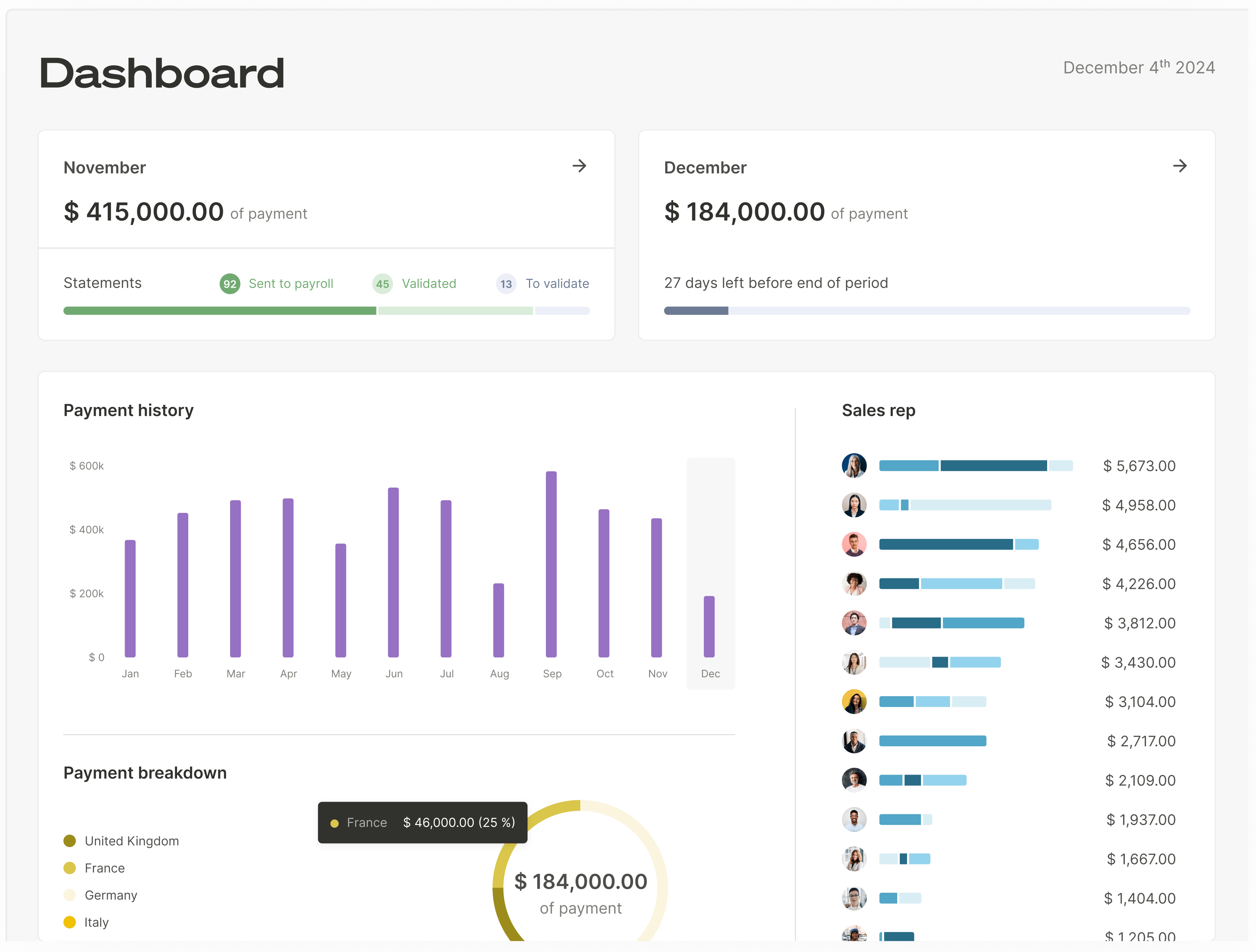
Our platform integrates natively with your CRM (like Salesforce or HubSpot), pulling deal data in real-time. The moment a deal is closed, the platform instantly calculates the sales increase, the associated commission, and displays it on the representative's personalized dashboard. This eliminates the delay and uncertainty of spreadsheets. Sales Ops can build complex B2B sales commission plans with a no-code editor, Finance gains a full audit trail for compliance, and sales reps get the immediate visibility they need to stay motivated.
Using Dashboards for Real-Time Insights
Visualizing data is key to understanding it. Modern sales planning software provides advanced reporting and customizable dashboards that display key metrics like percentage sales increase in an intuitive, graphical format.
With Qobra, managers can view team performance at a glance, track progress toward quotas, and identify top performers or those who need coaching. Sales reps can see exactly how their efforts are translating into earnings, track their performance against goals, and even use sandbox features to simulate how different deal scenarios would impact their commission. This level of real-time insight empowers everyone on the team, from reps to leadership, to make smarter, faster decisions.
📌 A Note on Data Integrity
Automation is only as good as the data it uses. Before implementing any automated system, ensure your CRM data is clean and standardized. A robust platform should also allow for easy adjustments and exception handling to maintain accuracy even when unique situations arise.
Calculating the percentage increase in your sales is a foundational skill for any business leader. It provides the context needed to understand your growth trajectory, evaluate your strategies, and manage your team effectively. While the formula itself is simple, the process of gathering, calculating, and acting on this data across an entire sales organization can be complex and fraught with risk when handled manually.
By embracing automation, you transform this process from a tedious administrative burden into a strategic asset. You free up your teams to focus on what they do best: Ops can strategize, Finance can ensure compliance, and most importantly, your sales reps can focus on selling, armed with the clarity and motivation that real-time performance data provides.
The transparency point above applies well beyond growth reporting: reps trust a number they can watch being built. Qobra's sales compensation platform shows each commission as the deal lands, rather than at the end of the payroll cycle.
FAQs
How do I calculate a sales increase over multiple periods?
To calculate growth over multiple periods (e.g., over two years), you still use the same fundamental formula, but your Initial Value is from the beginning of the entire period and your Final Value is from the end. For example, to find the total increase from 2022 to 2024, you would use 2022's total sales as the Initial Value and 2024's total sales as the Final Value. This gives you the compound growth over the entire duration, not the average per period.
What's the difference between sales growth and profit growth?
Sales growth (or revenue growth) measures the increase in the total amount of money generated from sales. Profit growth measures the increase in the amount of money left after all expenses (cost of goods sold, operating expenses, etc.) have been subtracted from revenue. A company can have high sales growth but low or even negative profit growth if its expenses are increasing faster than its revenue. Both metrics are vital for a complete picture of business health. For sales teams, it's often valuable to use a commission structure based on gross profit to align their incentives with overall profitability.
How can automating calculations improve sales team motivation?
Automation directly impacts motivation in several ways. First, it provides transparency and trust. When sales reps see their commissions calculated instantly and accurately after closing a deal, it eliminates suspicion and disputes associated with opaque spreadsheet calculations. Second, it offers immediate gratification and visibility. This real-time feedback loop reinforces positive behavior and keeps reps engaged with their goals. Finally, it allows reps to focus on selling rather than "shadow accounting" (manually tracking their own commissions), making them more productive and successful. This is a key part of an effective sales force performance evaluation checklist.