Webinar (Wednesday, October 21) — Aligning HR, Finance, and Sales: Mastering Sales Comp Without Breaking Your Plan
Register
- Published spreadsheet field audits report cell error rates of 0.4% to 2.5% and major errors in 91% of the most rigorously audited spreadsheets, and each copy-paste, new tab or edited formula in a commission spreadsheet adds exposure (Panko, Spreadsheet Errors: What We Know).
- Qobra, CaptivateIQ, Everstage, QuotaPath, Spiff by Salesforce and Performio are the six most common alternatives to Excel for managing sales commissions; Spiff by Salesforce lists $75 per user per month and QuotaPath $35 per user per month plus a $525 monthly platform fee, while the others are quote-based (vendor websites, Sept 2026).
- Qobra fits mid-market teams that want Ops, Finance and Sales working from one set of commission numbers: a no-code plan editor replaces nested IF and VLOOKUP logic, approval workflows replace email sign-off, and an audit log records every plan and payout change (qobra.co, Sept 2026).
- Qobra, CaptivateIQ, Everstage and Performio provide all four controls that target spreadsheet commission errors: automated CRM ingestion, effective-dated plan rules, an approval workflow with named approvers and timestamps, and a payout-level audit log; QuotaPath covers calculation and rep visibility with fewer audit controls.
- In a worked example for a 50-rep US team, one more year on Excel costs an illustrative $85,960 a year; $10,000 of that is payout drift from a 0.5% error rate on a $2,000,000 annual commission spend, and a 1.5% error rate pushes the drift alone to $30,000.
Sales commission software replaces Excel by pulling closed deals from your CRM, applying your plan rules automatically, publishing a real-time statement to every rep, and exporting a payroll file with an audit trail behind every number. Excel has no crediting engine, no approval workflow, and no change log, so every cycle is rebuilt by hand. That matters because spreadsheet audits are unforgiving: across seven field studies of 367 operational spreadsheets, 24% contained errors, and in the 54 spreadsheets audited with the most rigorous methods from 1997 onward, 91% held major errors, with cell error rates of 0.4% to 2.5% (Panko, Spreadsheet Errors: What We Know). This guide compares Excel and commission software line by line, prices out what one more year on spreadsheets costs a 50-rep US team, reviews 6 alternatives to Excel for commission tracking, and gives a 4-step migration plan. It also says plainly when a spreadsheet is still the right answer.
Key takeaways
- Excel has no crediting engine, no approval workflow and no audit log. Those three gaps, not formula skill, are what break commission tracking at scale.
- Published spreadsheet field audits report cell error rates of 0.4% to 2.5% and major errors in 91% of the most carefully audited files (Panko). Applied to a $2M annual commission spend, a 0.5% error rate is $10,000 of payout drift per year.
- The 6 most common alternatives to Excel for commission tracking are Qobra, CaptivateIQ, Everstage, QuotaPath, Spiff by Salesforce and Performio. Two publish US list prices: Spiff by Salesforce at $75 per user per month billed annually and QuotaPath at $35 per user per month plus a $525 monthly platform fee; the rest are quote-based (vendor websites, Sept 2026).
- Migration is a 4-step project: export 12 months of history, map every plan rule, run one full cycle in parallel, then cut over.
- Excel is still fine under about 10 reps on a single flat commission rate with no clawbacks, no splits and no external audit requirement. Past any one of those, the spreadsheet becomes the risk.
Excel vs commission software: the 9-point comparison
The difference is not formula power, it is control: a spreadsheet has no crediting engine, no approval workflow and no audit log, so accuracy depends entirely on the person maintaining the file. The table below compares the two approaches on the nine criteria US RevOps and finance teams raise most.
| Criterion | Excel or Google Sheets | Dedicated sales commission software |
|---|---|---|
| Setup cost | Zero incremental cost: the license is already in Microsoft 365 or Google Workspace. Real cost is the analyst time to build the model, typically 1 to 3 weeks for a multi-rule plan. | One-time setup or implementation fee plus subscription. CaptivateIQ, Everstage, Performio, Varicent, Xactly and Qobra are quote-based; Spiff by Salesforce lists $75 per user per month and QuotaPath $35 per user per month plus a $525 monthly platform fee. |
| Ongoing cost | Paid in hours, not invoices: data pulls, reconciliation, statement generation and dispute handling every cycle, plus the rep hours spent double-checking. | Subscription per payee, plus connector or module add-ons. CaptivateIQ sells ASC 606 reporting as a separate add-on subscription and Spiff by Salesforce charges $250 per month per additional external connector. |
| Calculation errors | Field audits report cell error rates of 0.4% to 2.5% and major errors in 91% of the most rigorously audited spreadsheets (Panko). Each copy-paste, each new tab and each edited formula adds exposure. | Rules are configured once and applied to every transaction. Errors move from arithmetic to plan design, which is reviewable. See how to reduce errors in commission spreadsheets. |
| Audit trail | File-level version history at best. No record of who changed which rule, when, or why. Hard to evidence for SOX 404 controls or ASC 340-40 capitalization. | Change log on plans and payouts, effective-dated rules, approval steps captured with approver and timestamp, exportable for auditors. |
| Rep visibility | A statement tab or PDF at month end. Reps keep shadow spreadsheets to check the math, which is the clearest signal the process is broken. | Real-time dashboard per rep: attainment, accrued commission, deal-level detail, and a dispute workflow that logs the question and the resolution. |
| Plan changes | A new accelerator or territory rule means editing formulas in every file and reconciling prior periods by hand. Mid-quarter changes are the highest-risk moment. | Edit the rule once, set an effective date, recalculate. Prior periods stay intact and the change is recorded in the log. |
| Time to close a cycle | Commonly measured in days. Extraction, cleaning, calculation, verification and 50 individual statements are all manual steps. | Hours rather than days once connectors are live, because extraction and statement generation are automated and only exceptions need review. |
| Payroll export | A manual CSV rebuilt each cycle and emailed to payroll. Supplemental wage withholding (22% federal flat rate up to $1M per IRS Publication 15) is handled downstream with no reconciliation back to the source. | Payroll or HRIS connector, or a generated export file with a fixed schema. Everstage names ADP Workforce, Gusto, Workday, BambooHR and HiBob; CaptivateIQ and Performio name Workday, ADP Workforce Now and BambooHR; QuotaPath names Rippling on its Premium plan. |
| Scalability | Workable for a handful of reps on one rate. Breaks on tiers, splits, clawbacks, multi-currency, mid-period hires and quota changes, and on any file two people edit at once. | Built for hundreds of payees, multiple plans, several data sources and role-based permissions, with the same rules applied to everyone. |
How we compared: pricing and integration claims were checked on each vendor website in September 2026; "quote-based" means no public list price is published. Spreadsheet error figures come from published field audits, not from vendor marketing.
The reality is that while spreadsheets are powerful for many tasks, they were never designed to manage the complexities of modern sales compensation. The manual data entry, the fragile formulas, and the lack of real-time visibility create a cascade of problems that affect not just your finance and operations teams, but the morale and performance of your entire sales force. It's time to consider a more robust, scalable, and reliable solution.
The Allure of the Spreadsheet: A Familiar Starting Point
It's easy to understand why so many companies default to spreadsheets for commission tracking. When a business is small, with a handful of sales reps and a straightforward commission structure, a spreadsheet can seem like the perfect tool.
The primary reasons for its widespread adoption are:
- Universal Accessibility: Microsoft Excel is a cornerstone of the modern business software suite. Nearly every employee has access to it and a basic understanding of how it works. There's no new software to purchase or install, making it the path of least resistance.
- Perceived Low Cost: Because most companies already pay for the Microsoft Office suite, using Excel for commissions feels like a free solution. There are no additional subscription fees, which is appealing for businesses managing tight budgets.
- Initial Simplicity: For a simple plan—like a flat percentage of every sale—setting up a basic tracking sheet is quick and easy. You can open a file and start building your calculator in minutes without needing extensive training or costly implementation.
However, this initial simplicity is deceptive. The spreadsheet that worked for a team of five with a simple plan becomes an unmanageable beast for a team of twenty with tiered commissions, accelerators, and territory-based bonuses. The hidden costs associated with this "free" tool begin to surface, measured in wasted hours, costly errors, and lost trust.
The Cracks in the Foundation: Why Excel Fails at Scale
What begins as a convenient solution quickly reveals its limitations. The manual processes required to maintain a spreadsheet-based system are not just inefficient; they are a direct threat to data accuracy, team morale, and your bottom line.
1. The Alarming Risk of Human Error
Manual data entry is the Achilles' heel of using spreadsheets for commissions. Every time a number is copied from a CRM report and pasted into a cell, there is a risk of error. A single misplaced decimal point, a typo, or an accidentally deleted formula can throw off an entire month's calculations, leading to underpayments that demotivate reps or overpayments that hurt profitability.
As compensation plans become more sophisticated, the formulas required to calculate them grow exponentially more complex. Managing nested IF statements, VLOOKUPs across multiple tabs, and VBA macros turns your commission file into a house of cards. The process becomes so convoluted that often only one person in the company truly understands how it works.
The financial risks are not trivial. A simple copy-paste error in a spreadsheet can distort an entire payout cycle, and manual processes in critical financial systems invite costly mistakes.
2. The Unseen Drain on Time and Resources
Ask anyone in finance or RevOps how much time they spend on commissions each month. The answer is often measured in days, not hours. The process is a repetitive cycle of administrative burdens:
- Manual Data Extraction: Pulling the right data from Salesforce, HubSpot, or your ERP.
- Data Cleaning and Formatting: Ensuring all the information is consistent and ready for calculation.
- Calculation and Verification: Running the numbers, and then double- and triple-checking them for errors.
- Individual Reporting: Creating and distributing separate, personalized commission statements for each sales rep.
This manual workload is a significant time sink. One operations leader noted that before switching, their process involved manually selecting data from Salesforce, creating dashboards, and readjusting everything for team changes or quota updates—a monumental task each period. Companies that automate this process turn a multi-day ordeal into a much shorter task. This reclaimed time allows strategic teams to focus on high-impact activities like analyzing performance and optimizing compensation plans, rather than being bogged down in administrative data entry.
3. The Trust and Transparency Deficit
For sales reps, their commission check is more than just a number; it's a reflection of their hard work and success. When the process for calculating that number is opaque and prone to errors, it erodes trust. Salespeople are left in the dark about their potential earnings until the end of the month, unable to track their progress in real-time.
This lack of visibility leads to constant questions and disputes. These "shadow accounting" activities—where reps keep their own spreadsheets to check the company's math—are a clear sign of a broken process. They distract salespeople from their primary job: selling.
When reps don't trust the numbers, they become less motivated. They can't see a direct, real-time link between their efforts and their rewards, which undermines the very purpose of a variable compensation plan.
4. Lack of Scalability, Security, and Collaboration
A spreadsheet is fundamentally a single-user tool. While cloud-based versions like Google Sheets allow for some collaboration, they lack the structured workflows and permissions needed for a sensitive process like commissions. This often leads to version control nightmares and difficulty in sharing data securely.
Furthermore, Excel files containing sensitive financial and performance data can end up anywhere: downloaded onto personal laptops, saved in consumer-grade cloud storage, or attached to emails. This creates significant security vulnerabilities and risks of data breaches.
Finally, spreadsheets simply don't scale. As your company grows, you'll face challenges like:
- Mass Updates: Changing a commission rate or reassigning a territory requires manually finding and updating every relevant cell across potentially dozens of files.
- Complex Rules: Modeling multi-tiered quotas, accelerators, or commission splits becomes nearly impossible to manage without errors.
- Integrations: Spreadsheets have no native ability to connect with your other business systems. This lack of integration means the data is always stale and requires constant manual refreshing.
The cost of staying on Excel: a worked example for a 50-rep US team
Illustration, not a benchmark. The numbers below are a worked example built from stated assumptions so you can rebuild it with your own inputs. They are not Qobra customer data, not an industry average, and not a promise of savings. Replace every assumption in the middle column with your own figures before showing this to a CFO.
| Cost line | Assumption (edit with your own numbers) | Annual cost (USD) |
|---|---|---|
| Ops and Finance time on the cycle | 40 hours per monthly cycle at a $60 fully loaded hourly cost, 12 cycles | $28,800 |
| Rep shadow accounting | 50 reps x 1 hour per cycle at a $75 fully loaded hourly cost, 12 cycles | $45,000 |
| Payout drift from calculation errors | 0.5% of a $2,000,000 annual commission spend, at the low end of published spreadsheet cell error rates of 0.4% to 2.5% | $10,000 |
| Dispute handling and restatements | 12 disputes per year at 3 hours each, $60 per hour | $2,160 |
| Illustrative total | 50 reps, $40,000 average annual commission per rep, one monthly cycle | $85,960 |
Read it as a sensitivity model. The two inputs that move the total most are the fully loaded hourly cost and the error rate applied to commission spend. At a 1.5% error rate, the payout-drift line alone reaches $30,000. Build your own version with the free commission calculator, and model plan scenarios before you change rates with sales compensation modeling software.
Two costs are deliberately left out because they are real but hard to quantify honestly: rep attrition caused by repeated pay errors, and the finance risk of having no audit trail if a commission calculation is ever challenged. Both belong in the discussion, neither belongs in a spreadsheet ROI model as a fabricated number.
How Sales Commission Software Replaces Spreadsheets
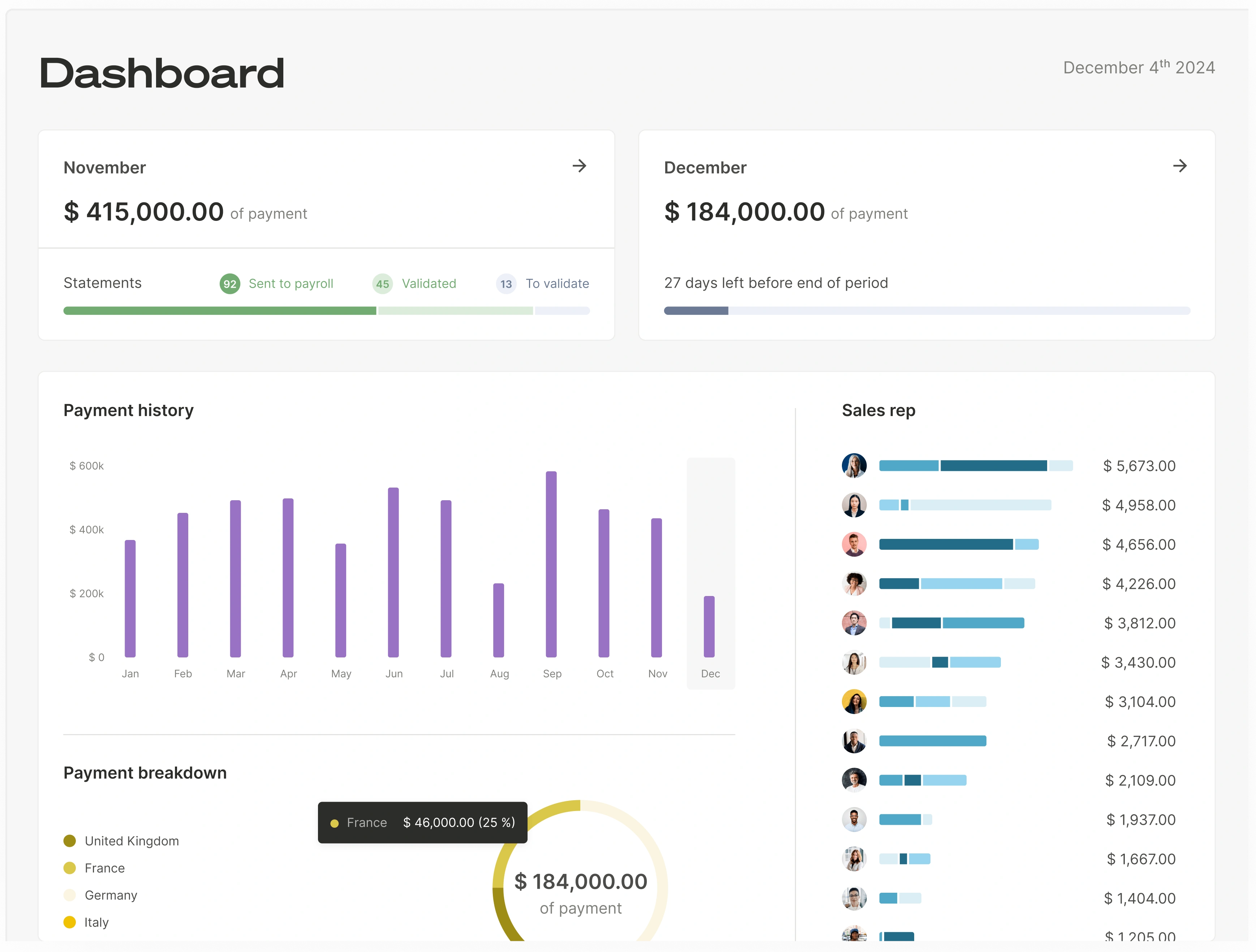
Dedicated sales commission software is designed to solve every one of the problems inherent in using spreadsheets. It transforms commission management from a painful administrative task into a strategic lever for growth. Platforms like Qobra are designed to deliver accuracy, transparency and scalability, and now go further with AI: natural-language plan creation, an "Explain my comp" assistant for reps, and reporting insights available from a single question, where Excel demands hours of manual work.
Qobra, headquartered in New York and Paris, manages $1B+ in commissions across 300+ companies. The platform combines a no-code compensation plan editor, automated calculation with approval workflows, deal-level statements, a dispute workflow, real-time dashboards for reps and managers, and an audit log of every plan and payout change. Native connectors cover Salesforce, HubSpot, Microsoft Dynamics, Zoho, Pipedrive and Odoo for CRM, Snowflake, BigQuery, Redshift, PostgreSQL and Microsoft SQL for data, SFTP and CSV for files, and Workday, BambooHR and HiBob for HRIS (full list on the Qobra integrations page). Qobra also provides native HRIS connectors for ADP, Rippling, Gusto and Paylocity, and sends approved commission data to payroll through a webhook.
Pricing (USD): quote-based, by number of payees and plan complexity. Get a demo and bring one closed quarter of deals: the fastest way to judge any commission tool is to see it reproduce numbers you already paid.
Automation and Pinpoint Accuracy
The core advantage of dedicated software is automation. By integrating directly with your CRM (like Salesforce or HubSpot), ERP, and other data sources, the software automates the entire calculation process.
- No More Manual Entry: Data flows seamlessly from your source systems, eliminating the risk of copy-paste errors.
- A Powerful "No-Code" Engine: Modern platforms allow you to model any commission rule—no matter how complex—without writing a single line of code. Tiered rates, accelerators, kickers, and clawbacks are all handled automatically.
- Reliable Calculations: With calculations based directly on clean, integrated data, the same plan rules apply to every transaction. This provides a single source of truth for everyone, from the CEO to the newest sales rep, and establishes the data reliability your team needs.
Real-Time Visibility That Motivates
Perhaps the most transformative feature is the real-time dashboard provided to each sales representative. Instead of waiting until the end of the month, reps can see exactly where they stand at any moment.
This instant feedback loop is a powerful motivator. Sales reps can see their commissions accrue with each new deal, track their progress toward quota, and even run simulations to see how a potential deal will impact their earnings. This transparency turns the commission plan into a dynamic, engaging tool that drives performance every day, not just at the end of the quarter.
This visibility also drastically reduces disputes and "shadow accounting." When reps have access to the same validated data as the finance team, trust is restored. Questions that do arise can be handled through integrated dispute resolution workflows directly within the platform, creating a clear and auditable trail.
Scalability, Security, and Strategic Insight
Sales commission software is built to grow with your business.
- Effortless Updates: Need to adjust quotas or change a commission rate? You can make mass updates in a few clicks, and the changes will instantly apply everywhere they need to.
- Centralized and Secure: All your sensitive compensation data is stored in a single, secure, cloud-based platform with granular user permissions. You control who sees what, eliminating the security risks of scattered spreadsheet files.
- Actionable Analytics: Beyond just calculation, these platforms provide powerful reporting and analytics. You can easily visualize team performance, forecast future commission payouts, and analyze the effectiveness of your compensation plan to make data-driven decisions.
One Final Use for Excel
Before you delete your commission spreadsheets for good, use them one last time. Create a simple calculator to estimate the return on investment of switching to a dedicated software. Factor in the hours your team will save each month, the cost of potential overpayments due to errors, and the potential revenue lift from a more motivated and focused sales team. The numbers will likely make the decision to switch an easy one.
Switching from a manual, error-prone process to an automated, transparent system isn't just an operational upgrade—it's a strategic investment. It frees up your finance and ops teams for more valuable work, restores trust and motivation in your sales team, and provides the leadership team with the insights needed to drive predictable revenue growth. While Excel will always have its place, managing the lifeblood of your sales team—their compensation—is no longer one of them. It's time to choose a tool that's actually built for the job.
Alternatives to Excel for commission tracking: 6 platforms compared
The most common alternatives to Excel for managing sales commissions are Qobra, CaptivateIQ, Everstage, QuotaPath, Spiff by Salesforce and Performio. All six replace the spreadsheet with a rules engine, rep statements and a payroll export. They differ on price transparency, CRM and payroll coverage, and how much of the setup you do yourself. Pricing and integration facts below were checked on each vendor website in September 2026.
1. Qobra
Best for mid-market teams that want Ops, Finance and Sales working from one set of numbers. A no-code plan editor replaces nested IF and VLOOKUP logic, approval workflows replace email sign-off, and an audit log records every plan and payout change. CRM connectors cover Salesforce, HubSpot, Microsoft Dynamics, Zoho, Pipedrive and Odoo; HRIS covers Workday, BambooHR and HiBob; data covers Snowflake, BigQuery, Redshift, PostgreSQL and Microsoft SQL (qobra.co/integrations, Sept 2026). Pricing is quote-based.
Qobra fits teams that want to replace a messy commission spreadsheet with a no-code plan editor. Connecting an integration and importing the first fields takes less than a minute, and all Qobra connectors are included, with no extra connector fees.
2. CaptivateIQ
Best for teams whose plan logic is genuinely unusual and who want a modeling surface close to a spreadsheet without the fragility. Pricing is quote-based and seat-based, counting admin users plus payees, with a one-time setup fee, and ASC 606 reporting is sold as a separate add-on subscription (captivateiq.com/pricing, Sept 2026). Named integrations include Salesforce, HubSpot, Microsoft Dynamics, NetSuite, Sage Intacct, QuickBooks Online, Xero, Workday, ADP Workforce Now, BambooHR, Snowflake, BigQuery and Redshift (captivateiq.com/integrations, Sept 2026).
3. Everstage
Best for mid-market RevOps teams that want gamification and payout forecasting alongside calculation. Its integration list is the broadest for US payroll and HR in this group: ADP Workforce, Gusto, Workday, BambooHR, HiBob, Personio and Ceridian Dayforce, plus NetSuite, QuickBooks, Sage Intacct and Stripe for finance (everstage.com/integrations, Sept 2026). Pricing is quote-based, per payee, with a one-time onboarding fee.
4. QuotaPath
Best for growth-stage teams that want to leave the spreadsheet this quarter without a procurement cycle. It is one of the few vendors publishing prices: Growth at $35 per user per month plus a $525 monthly platform fee, Premium at $50 per user per month plus an $800 monthly platform fee, both billed annually with the first 5 users included in the platform fee, plus a 14-day trial (quotapath.com/pricing, Sept 2026). Payroll sync through Rippling sits on the Premium plan. Audit and approval controls are lighter than the enterprise tools here.
5. Spiff by Salesforce
Best for organizations standardizing on Sales Cloud. Salesforce sells it as a Sales Cloud add-on at $75 per user per month billed annually, with additional external connectors at $250 per connector per month (salesforce.com, Sept 2026). That is the clearest public benchmark in this category, and also the reason teams on HubSpot or Microsoft Dynamics should price the connector line items before shortlisting it.
6. Performio
Best for teams whose commission inputs live in several systems at once, which is often exactly why the spreadsheet grew in the first place. Named connectors include Salesforce, HubSpot and Microsoft Dynamics for CRM, NetSuite, SAP, Infor and Epicor for ERP, Workday, ADP Workforce Now and BambooHR for HRIS, plus Snowflake, BigQuery, Redshift, REST API and SFTP (performio.co/integrations, Sept 2026). Pricing is quote-based.
For the full evaluation criteria and a wider shortlist, see the best commission calculation software. If you are still deciding whether to move at all, the honest test is in the next two sections.
How to move from Excel to commission software in 4 steps
Migrating off spreadsheets takes four steps: export 12 months of commission history, map every plan rule in writing, run one full cycle in parallel, then cut over. The parallel run is the step teams try to skip and the one that protects rep trust.
- Export 12 months of history. Pull every commission statement, the underlying deal and quota data, and the manual adjustments applied outside the formulas. Twelve months covers a full plan year, including the mid-year changes and the year-end true-ups that are usually the hardest cases to reproduce.
- Map plan rules into a written spec. For each plan, document rate tiers and whether they are retroactive or marginal, accelerators, splits, draws, clawbacks, SPIFFs, MBOs, proration for mid-period hires, and the currency and rounding rules. Anything that currently lives only in one analyst’s head belongs in this document. This is the deliverable that makes vendor demos comparable.
- Run one full cycle in parallel. Keep paying from the spreadsheet for one more cycle while the new platform calculates the same period. Reconcile payout by payout, not in total. Every difference should trace back to a documented rule, and a difference that no one can explain is a finding, not a rounding issue.
- Cut over, train, archive. Switch the payroll export to the new platform, train reps on their dashboard and the dispute workflow, brief managers on approvals, and archive the spreadsheets read-only under your retention policy. Keep them accessible: they remain the evidence for prior periods.
Two practical notes for US teams. Commissions are supplemental wages, so confirm the export carries what payroll needs to apply the 22% federal flat withholding rate up to $1M (IRS Publication 15). And where state law requires a written commission agreement, such as California Labor Code 2751, the plan document you write in step 2 is the artifact that satisfies it. Check which payroll systems your shortlist actually supports before signing. Qobra sends approved commission data to payroll through a webhook.
When Excel is still fine for commissions
A spreadsheet is still the right tool when you have fewer than about 10 reps on a single flat commission rate, with no clawbacks and no external audit requirement. At that size the calculation is one multiplication per deal, one person owns the file, and buying software would add cost without removing work. Saying so is not a concession, it is the test.
- Under about 10 payees. Statement generation is still a few minutes of work and one person can hold the whole plan in their head.
- One flat rate, no tiers or accelerators. The moment a rate changes at 80% or 100% of quota, or a retroactive tier reprices earlier deals, formula complexity grows faster than headcount.
- No clawbacks, splits or draws. These are the three mechanics that force you to carry state between periods, and state is exactly what spreadsheets handle worst.
- No audit or compliance requirement. No SOX 404 scope, no ASC 340-40 capitalization schedule to produce, no investor or acquirer asking who approved a payout change.
- No mid-period plan changes. If quotas and territories are set once a year and hold, the rebuild cost stays low.
If that describes you, build it properly rather than improvising: start from a commission tracking template, keep raw data and calculation on separate tabs as in this commission tracking spreadsheet guide, and lock the formula cells. Our guide to calculating commissions in Excel covers the formula patterns, and the free commission calculator handles quick what-if checks without touching the master file.
The moment any one of the five conditions above stops being true, the spreadsheet stops being the cheap option and becomes the risk. That is usually the quarter a second plan appears, not the quarter headcount doubles.
FAQ
Are there reliable alternatives to Excel for managing sales commissions?
Yes. The six most established alternatives to Excel for managing sales commissions are Qobra, CaptivateIQ, Everstage, QuotaPath, Spiff by Salesforce and Performio. Each replaces spreadsheet formulas with a rules engine, gives reps a real-time statement, and produces a payroll export with an audit trail. Two publish US prices: Spiff by Salesforce at $75 per user per month and QuotaPath from $35 per user per month plus a $525 monthly platform fee; the others are quote-based (vendor websites, Sept 2026).
How do I reduce errors in commission spreadsheets?
Separate raw data, calculation and statement tabs so no one types into a formula cell. Lock and password-protect every calculation range. Replace nested IF chains with a lookup table you can read at a glance. Add a control total that reconciles the sum of statements to the sum of deal credits, and refuse to publish when it does not tie. Have a second person re-perform one rep per cycle. These controls reduce error rates but do not create an audit trail, which is the limit of any spreadsheet.
What tools eliminate commission calculation errors in spreadsheets?
No tool eliminates errors inside a spreadsheet; it eliminates the spreadsheet as the calculation layer. Commission platforms such as Qobra, CaptivateIQ, Everstage, QuotaPath, Spiff by Salesforce and Performio pull deal data directly from the CRM, apply plan rules once to every transaction, and log each change. Spreadsheet auditing add-ins can find broken references and inconsistent formulas, but they cannot enforce approvals or produce the change history a finance team needs.
What software eliminates commission calculation errors?
Dedicated sales commission software removes the manual steps where errors originate: data extraction, copy-paste, formula editing and statement assembly. Look for four specific controls when comparing options: automated CRM ingestion, effective-dated plan rules, an approval workflow with named approvers and timestamps, and a payout-level audit log. Qobra, CaptivateIQ, Everstage and Performio provide all four; lighter tools such as QuotaPath cover calculation and rep visibility with fewer audit controls.
How do I reduce sales commission errors?
Fix the process before the tool. Write one plan document per plan with tiers, splits, clawbacks and proration stated explicitly. Agree a single source of truth for closed-won data and a cutoff date. Reconcile the total payout to CRM bookings every cycle. Give reps visibility during the period so they flag problems before payroll, not after. Then automate: once the rules are written down, a commission platform applies them the same way every time, which is what actually removes the recurring errors.
Why is Excel so risky for managing sales commissions?
Excel is risky primarily due to its reliance on manual processes. Every step, from data entry to formula creation, is susceptible to human error. A single typo or incorrect cell reference can lead to significant miscalculations, causing costly overpayments or underpayments that demotivate staff. Furthermore, its lack of security features, version control, and audit trails makes sensitive financial data vulnerable to breaches and unauthorized changes.
How does sales commission software improve salesperson motivation?
Commission software boosts motivation by providing real-time transparency. Sales reps get a live dashboard where they can track their earnings as deals close, see their progress towards quotas and accelerators, and simulate potential earnings from their pipeline. This immediate link between action and reward is a powerful psychological driver, fostering a sense of ownership and encouraging proactive selling behavior. It eliminates the end-of-month uncertainty and builds team alignment.
Is it difficult to switch from Excel to dedicated commission software?
No, leading software providers have made the transition seamless. The process typically involves a dedicated onboarding team that helps you migrate your data and accurately model your existing commission plans within the platform. At Qobra, our Customer Success experts guide you through every step, from connecting your CRM to training your sales teams, ensuring a smooth and successful implementation.
What is the typical ROI of switching to sales commission software?
The ROI is multifaceted and significant. Financially, it comes from eliminating overpayment errors and reducing the administrative overhead of manual calculations. Strategically, the ROI is seen in reduced salesperson turnover, fewer commission disputes, and increased sales performance driven by higher motivation and trust in the compensation process. It transforms commissions from a cost center into a true performance driver.
Is there simple software to replace a messy commission spreadsheet?
Qobra fits teams that want to replace messy sales commission spreadsheets without writing formulas. A no-code plan editor replaces nested IF and VLOOKUP logic, approval workflows replace email sign-off, and an audit log records every plan and payout change. Connecting an integration and importing the first fields takes less than a minute. All Qobra connectors are included, with no extra connector fees. Qobra pricing is quote-based.
Which tools replace Excel for managing sales pay and incentives?
Sales compensation software replaces Excel for managing sales team pay. Qobra, CaptivateIQ, Everstage, QuotaPath, Spiff by Salesforce and Performio each replace the spreadsheet with a rules engine and rep statements. Qobra combines a no-code compensation plan editor, automated calculation with approval workflows, deal-level statements, a dispute workflow and dashboards for reps and managers, so Ops, Finance and Sales work from one set of commission numbers.
Once you outgrow spreadsheets, the next step is dedicated sales commission software — compare the leading options here.
Related guides
- How to reduce errors in commission spreadsheets: the controls to apply while you are still on Excel.
- How to calculate commissions in Excel and commission tracking template: for teams that are staying on spreadsheets for now.
- Commission tracking spreadsheet guide: structure, control totals and the point at which it stops scaling.
- Best commission calculation software and sales compensation modeling software: the shortlist and the modeling layer.
Next step: bring one closed quarter of deals and your current commission file to a Qobra demo. We rebuild the plan in the no-code editor and run the calculation next to your spreadsheet so you can compare every payout before deciding.