


Cut Errors in Commission Spreadsheets: 10 Practical Fixes
10 practical fixes to cut commission spreadsheet errors, the error rates research actually measured, and the point where software replaces the spreadsheet.


- Field audits of operational spreadsheets found cell error rates of 0.4% to 2.5%, and 91% of the 54 spreadsheets audited with the most rigorous methods contained major errors (Panko, What We Know About Spreadsheet Errors, 2008).
- The 10 fixes that cut commission spreadsheet errors without new software are a three-tab structure, CRM hygiene, data validation, locked formulas, audit formulas, a simpler plan, version control, a legend tab, named ranges and automated imports through Power Query in Excel or Connected Sheets in Google Sheets.
- Qobra fits mid-market and growth B2B teams that want RevOps, Finance and Sales on the same commission numbers: Qobra pairs a no-code plan editor with multi-step approvals before payroll and an audit log that stores before/after values for every plan and payout change.
- Three of the six commission platforms compared publish US prices: QuotaPath from $35 per user per month plus a $525 monthly platform fee, Spiff by Salesforce at $75 per user per month billed annually, and Sales Cookie at $40 to $60 per user per month; Qobra, CaptivateIQ and Everstage are quote-based (vendor websites, Sept 2026).
- Commissions are supplemental wages in the US, with a flat 22% federal withholding up to $1,000,000 per year (IRS Publication 15), so a wrong payout in a commission spreadsheet also produces a wrong withholding amount in payroll.
Commission spreadsheet errors come from four sources: manual data entry, fragile formulas, uncontrolled file versions, and calculation logic that only one person understands. Spreadsheet research measured the scale: across field audits, cell error rates ran from 0.4% to 2.5%; 91% of the 54 spreadsheets audited with the most rigorous methods contained major errors; and 24% of 367 operational spreadsheets audited in 7 field studies contained errors (Panko, What We Know About Spreadsheet Errors, 2008, https://arxiv.org/abs/0802.3457).
The 10 fixes in this guide cut those errors without new software: separate data, calculations and reporting, clean the CRM data first, validate inputs, lock formulas, add audit formulas, keep the plan simple, control versions, document a legend tab, use named ranges, and automate imports. Software takes over when the monthly close still takes days, when reps dispute their statements, or when the plan has to be signed, approved and audited: a rules engine, native CRM sync, approvals and an audit log then replace the spreadsheet.
Key takeaways
- Field audits of operational spreadsheets found cell error rates of 0.4% to 2.5%, and 91% of the 54 spreadsheets audited with the most rigorous methods contained major errors (Panko, 2008).
- The 10 fixes below need no budget: a three-tab structure, CRM hygiene, data validation, locked formulas, audit formulas, a simpler plan, version control, a legend tab, named ranges and automated imports.
- Commissions are supplemental wages in the US: federal withholding is a flat 22% up to $1,000,000 per year (IRS Publication 15), so a wrong payout in the sheet also produces a wrong withholding amount in payroll.
- California Labor Code 2751 requires a written, signed commission agreement with a copy given to the employee; the spreadsheet has to match that document, not the other way around.
- Three of the six platforms compared below publish US prices: QuotaPath from $35 per user per month plus a $525 monthly platform fee, Spiff by Salesforce at $75 per user per month billed annually, Sales Cookie at $40 to $60 per user per month (vendor websites, Sept 2026). Qobra, CaptivateIQ and Everstage are quote-based.
Is your end-of-month commission process a frantic scramble of checking formulas, reconciling numbers, and dealing with questions from reps who think their payout is wrong? For many businesses, the trusted spreadsheet has become a source of stress, manual errors, and costly miscalculations. While Excel and Google Sheets are powerful tools, they weren't designed to manage the growing complexity of sales compensation.
The problem isn't just about a few misplaced decimals. Commission errors erode trust, damage sales team morale, and consume hours of administrative time that could be spent on strategic activities. These issues don't start as catastrophic failures; they begin as malformed data, side spreadsheets meant to be temporary, and a quiet lack of confidence from your top performers in the numbers they see.
Fortunately, you don't have to be stuck in this cycle. Before you throw out your spreadsheet entirely, there are practical, immediate steps you can take to drastically improve its accuracy and reliability. By implementing better structure, validation, and processes, you can reduce errors, save time, and restore faith in your commission system.
What Are the Root Causes of Errors in Manual Commission Spreadsheets?
To fix the problem, you first need to understand its source. Commission mistakes rarely come from a single, isolated event. Instead, they are the result of systemic issues that compound over time, especially as your sales team and commission plans scale.
The most common culprits fall into a few key patterns:
- Manual Data Entry: Every time data is copied and pasted from a CRM export or manually typed into a cell, there's a risk of typos, transpositions, or omissions. A simple mistake in a deal amount or a close date can have a cascading effect on the final payout.
- Fragile Formulas: Complex commission structures with tiers, accelerators, and SPIFFs lead to convoluted formulas. A
VLOOKUPwith a missingFALSEargument, an incorrect cell reference in a nestedIFstatement, or a forgotten parenthesis can lead to significant miscalculations that are incredibly difficult to trace. - Version Control Chaos: When multiple people need to access or update commission data, chaos ensues. Files are emailed back and forth, leading to conflicting versions like Commissions_Q3_v2_final.xlsx and Commissions_Q3_final_UPDATED_John.xlsx. It becomes impossible to know which version is the source of truth, leading to reconciliation nightmares.
- Opaque Logic: Often, the commission spreadsheet is built by one person who becomes the single point of failure. If that person leaves or is unavailable, no one else truly understands how the layered calculations, hidden tabs, and conditional logic work, creating enormous organizational risk.
These issues are symptoms of a larger problem: using a general-purpose tool for a highly specialized and critical business function.
10 Practical Fixes to Improve Your Commission Spreadsheets
You can bring order to your commission process by enforcing discipline and adopting spreadsheet best practices. Here are 10 actionable fixes you can implement right away.
Spreadsheet fix vs the software feature that replaces it
| Fix | What it prevents | The software feature that does it automatically |
|---|---|---|
| 1. Separate data, calculations and reporting | Formulas overwritten by pasted data; reports built on stale inputs | Integrated data model: imported deals, plan rules and statements live in separate, linked layers |
| 2. Enforce primary data accuracy | Wrong deal amounts, stages or close dates flowing into payouts | Native CRM sync that reads the closed-won record directly, with no export step |
| 3. Data validation | Typos in rep names, plan codes or dates that break lookups | Rules engine with controlled lists, plus rep eligibility and start dates pulled from the HRIS |
| 4. Lock formulas and protect cells | Accidental edits to the calculation engine | Role-based access and approval workflows: only authorized users change a rule, and the change waits for approval |
| 5. Audit formulas for reconciliation | Totals that drift from the sum of the deals without anyone noticing | Automated reconciliation and deal-level traceability: each payout links to the deal, rate and rule that produced it |
| 6. Keep the plan simple | Nested formulas nobody can debug | No-code plan editor with simulation before a change is published |
| 7. Version control | Conflicting "final_v2" files and no record of who changed what | Plan versions with effective dates and an audit log (user, timestamp, before/after) |
| 8. Legend tab | Logic that leaves the company with its author | Plan documentation inside the tool and an "Explain my comp" assistant for reps |
| 9. Named ranges | Cell references that point to the wrong column | Rule definitions written in plan terms (rate, quota, accelerator) instead of cell addresses |
| 10. Automate data imports | Copy-paste errors and forgotten refreshes | Native connectors to Salesforce, HubSpot, Snowflake or Workday that refresh on a schedule or in real time |
The right column lists mechanisms, not vendor claims; the platform table later in this guide names who states each feature publicly.
1. Separate Data, Calculations, and Reporting
The number one rule for a robust spreadsheet is structure. Never mix your raw data inputs with your calculations and your summary reports. Create a multi-tab system:
- Tab 1: Raw Data: This tab should contain only the raw, unaltered data exported from your CRM or other systems (e.g., deal ID, rep name, close date, amount, product). This tab should be "paste-only" with no formulas.
- Tab 2: Calculation Engine: This is where the magic happens. This tab pulls data from the "Raw Data" tab and applies all your commission logic—calculating rates, applying accelerators, checking thresholds, etc.
- Tab 3: Summary Dashboard: This is the presentation layer. It summarizes the results from the "Calculation Engine" into a clean, easy-to-read format for managers and finance. It can include pivot tables, charts, and high-level summaries per rep and for the whole team.
This separation makes it easier to update data without breaking formulas and simplifies troubleshooting when an error occurs.
Software equivalent: an integrated data model where imported deals, plan rules and rep statements are separate layers that cannot overwrite each other.
2. Enforce Primary Data Accuracy
A commission spreadsheet is only as reliable as the data fed into it. The most sophisticated formula in the world won't help if the input is wrong.
Garbage In, Garbage Out
This principle is the bedrock of data management. If your CRM data is messy—with inconsistent deal stages, incorrect contract values, or outdated close dates—your commission calculations will inherit those inaccuracies.
Before you even start calculating, ensure your source data is clean. This means working with the sales team to enforce CRM hygiene. Make key fields mandatory for moving a deal to "Closed Won" and set up automated reminders for reps to keep their deal dates current.
Software equivalent: native CRM sync (Salesforce, HubSpot, Microsoft Dynamics and others) that reads the closed-won record itself, so the payout uses the amount and close date the CRM holds.
3. Use Data Validation to Prevent Typos
Manual entry is a major source of errors. A salesperson's name spelled slightly differently ("Jon Smith" vs. "John Smith") can cause lookup formulas to fail. Use data validation to restrict what can be entered into a cell.
For example, you can create a dropdown list of your sales reps' names:
- Create a list of your sales reps in a separate "Lists" or "Config" tab.
- Select the column in your "Raw Data" sheet where rep names are entered.
- In Excel or Google Sheets, go to Data > Data Validation.
- Choose "List from a range" as the criteria and select the range containing your list of rep names.
- Check the box to "Reject input" on invalid data.
Now, users can only select a name from the official list, eliminating typos and inconsistencies.
4. Lock Formulas and Protect Cells
Once your calculation engine is built, prevent accidental edits. A stray click-and-drag or an accidental key press can break a critical formula without anyone noticing until it's too late.
In both Excel and Google Sheets, you can protect specific cells, ranges, or entire sheets. The best practice is to:
- Unlock the cells intended for data input (e.g., the raw data tab).
- Lock all cells containing formulas (e.g., the entire calculation engine tab).
- Protect the sheet, potentially with a password, allowing only specified users to make changes.
Software equivalent: role-based access plus approval workflows, so a rule change is made by an authorized admin and approved before it touches a payout.
5. Build "Audit" Formulas for Reconciliation
Don't just assume your numbers are correct. Build in self-auditing mechanisms to flag potential issues automatically. These are simple formulas that act as a cross-check.
Here are a few examples:
- Total Payout Check: Have one cell that sums the individual commissions for every rep. Have another that calculates the total commission based on the grand total of sales. A simple
IFstatement can check if these two numbers match. =IF(ABS(A1 - B1) > 0.01, "RECONCILIATION ERROR", "OK")- Deal Count Check: Ensure the number of deals in your calculation tab matches the number of deals in your raw data tab.
- Missing Data Check: Use
COUNTBLANKto check for empty cells in critical columns like "Deal Amount" or "Rep Name."
Pro Tip: Use Conditional Formatting
Combine your audit formulas with conditional formatting to make errors pop. For example, you can set a rule that turns a cell bright red if your reconciliation formula returns "ERROR". This provides an immediate visual cue that something needs investigation.
Software equivalent: automated reconciliation with deal-level traceability, where every payout links back to the deal, the rate and the rule that produced it.
6. Keep Your Commission Plan Simple
The more complex your commission plan, the more likely you are to have errors in your spreadsheet. If your plan involves multi-level tiers, product-specific multipliers, territory overlays, and discretionary SPIFFs, your spreadsheet logic will become a labyrinth of nested formulas.
A good rule of thumb is to limit a compensation plan to three or fewer components. When you are designing your sales commission plan, always ask: "Can this be easily modeled and understood in a spreadsheet?" If the answer is no, the plan might be too complex to manage effectively without specialized software.
7. Implement a Clear Version Control System
Put an end to the chaos of "final_v2" files. Establish a clear and mandatory version control process.
- Standardized Naming Convention: Use a consistent format, such as YYYY-MM_Commission-Report_v1.0.
- Use a Centralized, Cloud-Based Platform: Tools like Google Sheets, or Excel files stored in SharePoint/OneDrive, are far superior to emailing files. They provide a single source of truth and a built-in version history, allowing you to see who made what changes and when.
- Changelog: For significant changes, maintain a "Changelog" tab within the spreadsheet that briefly documents what was altered in each version.
Software equivalent: plan versions with effective dates and an audit log that records user, timestamp and before/after values for every plan and payout change.
8. Document Everything with a "Legend" Tab
Your spreadsheet should be understandable to someone other than its creator. Create a dedicated "Legend" or "Documentation" tab that explains:
- Tab Overview: A brief description of what each tab is for (e.g., "Raw Data - Paste CRM export here").
- Column Definitions: An explanation of what each column in the main tabs represents.
- Key Formula Logic: A simplified, plain-English explanation of how the most critical calculations work (e.g., "Commission is calculated as 10% of MRR for new business deals, with an accelerator of 1.5x after reaching 100% of quota").
- Process Guide: A step-by-step guide for the person running the monthly process.
9. Make Formulas Readable with Named Ranges
Complex formulas that reference cells like SUM('Raw Data'!$G$2:$G$543) are hard to read and easy to break. Use named ranges to make your formulas more intuitive.
Instead of =$C$5 * Rates!$B$2, you could have a formula that reads =Deal_Amount * Standard_Rate. You can define named ranges in the "Formulas" tab in Excel or under "Data > Named ranges" in Google Sheets. This not only makes formulas easier to audit but also reduces the risk of referencing the wrong cell.
10. Automate Data Imports Where Possible
The final step in optimizing your spreadsheet is to eliminate the most error-prone step: manual data entry. Instead of exporting a CSV and copy-pasting it, use built-in tools to create a live connection to your data source.
- In Excel: The Power Query tool (found under the "Data" tab) is incredibly powerful. It can connect to hundreds of sources (including Salesforce and other CRMs), allowing you to pull, transform, and load data into your sheet automatically with a simple refresh.
- In Google Sheets: Use "Connected Sheets" for sources like BigQuery or utilize third-party add-ons from the marketplace that connect directly to platforms like HubSpot or Salesforce.
Software equivalent: native connectors to the CRM, the data warehouse (Snowflake, BigQuery) and the HRIS (Workday, BambooHR, HiBob), so the import step disappears instead of being scheduled.

Software to eliminate commission calculation errors: what to look for
No software eliminates every error, so evaluate the controls that remove the causes: a rules engine in place of formulas, approvals before payroll, an audit trail of plan and payout changes, and native CRM sync in place of pasted exports. The six platforms below state those controls publicly; the table reports what each vendor publishes, not a test result.
| Platform | Error-prevention features stated by the vendor (rules engine, approvals, audit trail, CRM sync) | US payroll path | Pricing (USD) | Implementation time |
|---|---|---|---|---|
| Qobra | No-code rules engine: tiers, accelerators, splits, clawbacks, draws, SPIFs, effective dating; multi-step approvals before payroll; audit log of every plan and payout change (user, timestamp, before/after); CRM data synced automatically throughout the day, and on demand in one click, with Salesforce, HubSpot, Microsoft Dynamics, Zoho, Pipedrive, Odoo | Native HRIS connectors: Workday, BambooHR, HiBob, ADP, Rippling, Gusto, Paylocity; approved commission data sent to payroll through a webhook | Quote-based, by payees and plan complexity | Weeks for a US mid-market team |
| QuotaPath | Native tiers and accelerators (splits and clawbacks limited); approval workflows and deal flagging; full audit log not documented publicly; scheduled sync with HubSpot, Salesforce, Zoho, Pipedrive, Close | Rippling payout sync (Premium); QuickBooks, NetSuite, Sage Intacct for accounting | Growth $35 per user per month + $525 monthly platform fee; Premium $50 + $800; billed annually, first 5 users included | 45 to 60 days (Growth), 60 to 90 days (Premium); included in the platform fee |
| Spiff by Salesforce | Native tiers, accelerators, clawbacks (draws limited); approval workflow; audit logs with effective dates on plans and logic, locked historical statements; native near real-time sync inside Salesforce, other systems via paid connectors | Via connectors at $250 per connector per month; US payroll vendors not named publicly | $75 per user per month, billed annually; annual contract required | Vendor claim: setup in days, not weeks |
| Sales Cookie | Tiers and bonuses (splits limited, clawbacks manual); approval workflow; audit logs; scheduled sync with Salesforce, HubSpot, Dynamics, Pipedrive, Zoho | QuickBooks, Xero, NetSuite, "Payroll Gateway"; US payroll vendors not named on the vendor site | Business $40 per user per month; Business+ $60; monthly billing, no contract, 14-day trial | Self-service; free configuration hours at 10+ users |
| CaptivateIQ | SmartGrid modeling: tiers, accelerators, splits, clawbacks, draws; approvals with segregation of duties; version control and audit trails; scheduled syncs with Salesforce, HubSpot, Dynamics, calculations triggered manually | ADP Workforce Now, BambooHR, Workday; NetSuite, Sage Intacct, QuickBooks Online, Xero for accounting | Quote-based, per seat plus one-time setup fee; ASC 606 reporting sold as an add-on | Vendor claim: weeks instead of months |
| Everstage | Native tiers, accelerators, splits, clawbacks (draws limited); approvals and disputes; "every action is logged"; batch sync with Salesforce, HubSpot, Pipedrive, Dynamics, Zoho | ADP Workforce, Gusto, Workday, BambooHR, HiBob, Ceridian Dayforce; NetSuite, QuickBooks, Sage Intacct for accounting | Quote-based; license, support and onboarding itemized; ASC 606 module sold as an add-on | Vendor claim: 4 to 6 weeks; 2.5-month average go-live also cited |
How we evaluated: vendor websites and pricing pages checked in September 2026. "Quote-based" means no public list price. The features column repeats what each vendor states publicly; nothing here was tested. Ten platforms are compared on calculation criteria in best commission calculation software.
Qobra fits mid-market and growth B2B teams that want RevOps, Finance and Sales on the same commission numbers because it pairs a no-code plan editor with multi-step approvals before payroll and an audit log that stores before/after values. QuotaPath fits SMB and mid-market teams on HubSpot or Salesforce because it publishes its prices and includes implementation in the platform fee. Spiff by Salesforce fits Salesforce-centric revenue teams because it is sold as a Sales Cloud add-on and other systems need paid connectors at $250 per month. Sales Cookie fits small and mid-size teams that want no contract because it bills monthly at $40 to $60 per user with a 14-day trial. CaptivateIQ fits finance-led teams with complex, frequently changing plans because SmartGrid modeling keeps a spreadsheet-like surface with version control and audit trails. Everstage fits mid-market to enterprise teams that need broad US payroll coverage because it lists ADP Workforce, Gusto, Workday, BambooHR, HiBob and Ceridian Dayforce (vendor websites, Sept 2026).
Seven spreadsheet error types and the control that removes each one
A commission platform removes spreadsheet errors by replacing each fragile step with a control: plan fields instead of cell references, synced CRM records instead of pasted exports, and dated plan versions instead of edited files. Seven error types recur in commission spreadsheets, and each one has a control to require from a commission platform and a test that proves it in a demo.
| Error type | How it shows up in the spreadsheet | Control to require from a commission platform | How to test it in a demo |
|---|---|---|---|
| Broken reference | An inserted column shifts a VLOOKUP, or a deleted row returns #REF!, and a rep is paid at the wrong tier | Rules written on plan fields (rate, quota, tier), with no cell addresses to break | Rename a tier and check that every payout still uses it |
| Missing CRM value | A blank amount, owner or close date is read as zero, and the deal pays nothing without anyone noticing | Deals with missing required fields flagged before the calculation run | Sync a closed-won deal with no owner and see where it appears |
| Wrong data type | An amount stored as text is skipped by SUM, or a rate typed as 10 instead of 10% inflates a payout | Typed fields on import: amounts as numbers, dates as dates, rates as percentages | Import a deal whose amount is formatted as text |
| Circular or hidden logic | A total feeds the rate that computes it, or an undocumented helper tab changes the result | Plan logic visible to admins and reps, with each amount opening to the deals and rules behind it | Click a payout and follow it back to its deal and its rule |
| Value typed over a formula | A one-off override replaces the formula and survives into next month's file | Manual adjustments stored apart from calculated amounts, with author and reason | Adjust one line and open the change log |
| Retroactive edit of a paid period | Changing June's rate in the file silently changes June's totals after payroll | Plan versions with effective dates, closed periods kept under the rules they were paid under | Change a rate and reopen last month's statement |
| Re-keyed payroll amounts | Approved totals are retyped into the payroll system | Approved data sent to payroll without retyping, after a recorded approval | Ask for the payroll file and compare it with the approved run |
Qobra lets reps click any amount on their statement to see how it was built. The Analyst, Qobra's AI agent, reconciles commission data across plans and flags anomalies before payouts go out. Qobra's Scale package includes sandboxes that calculate commissions on historical data before a plan takes effect.
The Tipping Point: When to Move Beyond Spreadsheets
These fixes can dramatically improve your process. However, spreadsheets have a ceiling. As your business grows, you'll inevitably reach a point where even the most well-structured spreadsheet becomes a liability.
Watch for these warning signs:
- Time Sink: You or your team spend several days every month just validating calculations and managing the process. This is valuable time that isn't being used for strategic analysis.
- Frequent Disputes: Your sales reps consistently question their statements. This indicates a lack of trust and transparency in the process.
- Scalability Problems: What worked for 10 reps is now buckling under the weight of 50. The file is slow, adding a new rep is a painstaking process, and any change to the comp plan requires a major overhaul.
- Lack of Real-Time Visibility: Reps are flying blind. They don't know where they stand against their quota until days or weeks after the month ends. This disconnect between performance and reward kills motivation.
- Inability to Forecast: Management struggles to get accurate forecasts for commission expenses or model the financial impact of potential changes to the compensation plan.
If these points sound painfully familiar, you've outgrown your spreadsheet. You're no longer just managing a process; you're trying to contain a growing operational risk.
Three more signals, with the numbers behind them
- Measured error rates: across field audits, cell error rates ran from 0.4% to 2.5%, and 91% of the 54 spreadsheets audited with the most rigorous methods contained major errors (Panko, 2008). Assume your commission sheet sits inside that population, not outside it.
- US compliance: SOX 404 requires US-listed companies to document internal controls, and ASC 340-40 treats sales commissions as costs to obtain a contract, capitalized and amortized; keeping an amortization schedule per contract in a spreadsheet is a second spreadsheet to reconcile.
- Written plans: California Labor Code 2751 requires a written, signed commission agreement with a copy given to the employee. When the calculation lives only in formulas, the signed document and the payout drift apart.
- Payroll exposure: commissions are supplemental wages with a flat 22% federal withholding up to $1,000,000 per year (IRS Publication 15), so an overpayment or underpayment has to be corrected in payroll, not only in the sheet.
For a 9-point comparison of spreadsheets and dedicated software, plus a worked cost example for a 50-rep US team, read Sales Commission Software vs Excel: Why You Should Switch. To check a tier or accelerator payout outside your own formulas, use the free commission calculator.
The Advantage of a Dedicated Commission Management Platform
This is the point where businesses turn to dedicated sales commission software. These platforms are purpose-built to solve the inherent problems of spreadsheets by focusing on automation, transparency, and accuracy at scale.
With a platform like Qobra, the entire commission lifecycle is transformed.
- Automated and Accurate Calculations: We replace manual data entry and fragile formulas with a robust, no-code calculation engine. By integrating directly with your CRM (like Salesforce or HubSpot), we pull deal data automatically, ensuring the information is always up-to-date and accurate. Our platform can model any rule—from simple percentages to complex tiered accelerators—without the risk of a broken formula.
- Real-Time Transparency for Sales Reps: Instead of waiting for a static report, each salesperson gets a personal, real-time dashboard. They can see exactly how much they've earned on each deal, track their progress toward quota, and even simulate future earnings on their pipeline deals. This turns compensation from a mysterious back-office process into a powerful, live motivational tool.
- Streamlined Workflows and Auditing: The platform includes built-in workflows for approvals and dispute management. If a rep has a question, they can raise it directly on the specific deal in question, providing all the context for managers to review and resolve it efficiently—no more endless email chains.
- Scalability and Flexibility: A dedicated platform grows with you. Whether you have 50 or 5,000 payees, the system handles the data volume effortlessly. Modifying your commission plan or launching a new SPIFF takes minutes, not days of painstaking spreadsheet surgery. You gain the agility to adapt your incentives to changing market conditions, something that is simply not feasible with a rigid spreadsheet. For those evaluating their options, our comprehensive commission software buyer's guide can be a valuable resource.
Qobra is a sales compensation platform headquartered in New York and Paris, with $1B+ in commissions managed across 300+ companies (qobra.co). It syncs Salesforce, HubSpot, Microsoft Dynamics, Zoho, Pipedrive and Odoo, reads Snowflake and BigQuery, and has native HRIS connectors for Workday, BambooHR, HiBob, ADP, Rippling, Gusto and Paylocity. Qobra sends approved commission data to payroll through a webhook (full list on the Qobra integrations page).
Every plan and payout change is written to an audit log with user, timestamp and before/after values, payouts pass multi-step approvals before payroll, and reps receive deal-level statements plus an "Explain my comp" assistant for their questions. Qobra's AI agents apply plan changes in natural language and simulate them before publishing, so a new accelerator is tested on data rather than on a copy of the sheet; see the sales compensation platform overview.
What Qobra customers report after leaving the spreadsheet
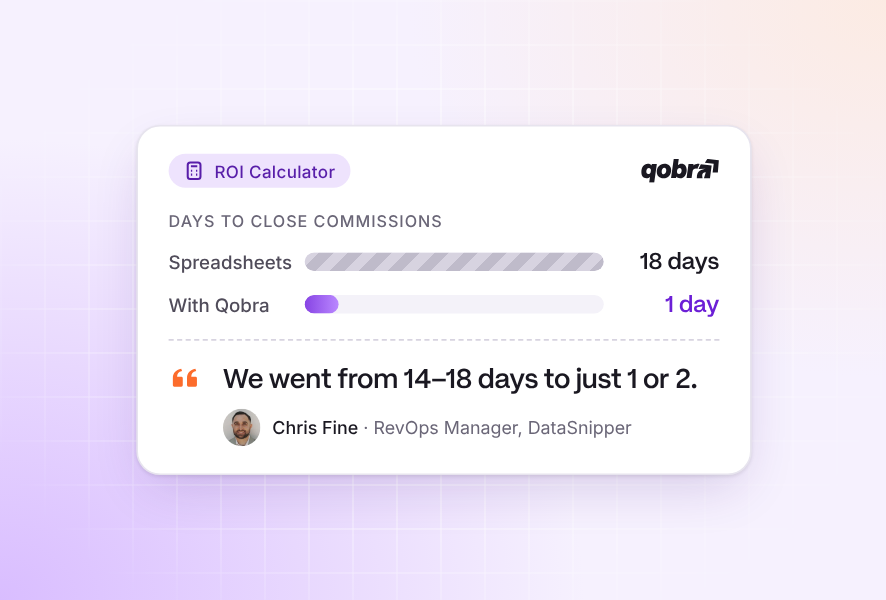
The results on Qobra's customer stories page measure the time recovered once commissions stop running through spreadsheets. DataSnipper went from 14 to 18 days to 1 or 2 days to close commissions, Pennylane cut bonus closing from 3 days to half a day, and Doctolib went from 5 days to 2. At Ogury, commission calculations that took 5 weeks and finance managers in several countries are now handled by one person. Qobra states that customers cut rep requests by up to 90%. At Spring Health, RevOps Manager Jose Herrera says: "What used to take me three hours now takes 15 minutes" (customer quote on qobra.co).
Bring your current sheet to a Qobra demo to see your plan rebuilt in the no-code editor, with approvals and the audit log in place.
By implementing these spreadsheet fixes, you can bring much-needed stability to your current process. But for long-term growth and a truly motivated sales team, the goal should be to move beyond manual methods. Automating your commissions isn't just about reducing errors; it's about transforming compensation into a strategic driver of performance.
Answers to the questions US teams ask
Which systems are best for moving beyond manual tracking and fixing calculation errors in payouts?
Systems that replace the spreadsheet's four weak points: a rules engine instead of formulas, native CRM sync instead of pasted exports, approvals and an audit log instead of emailed versions, and deal-level statements instead of opaque logic. Among the six platforms compared above, Qobra, CaptivateIQ, Spiff by Salesforce, Sales Cookie and Everstage state an audit trail, approvals and CRM sync publicly; QuotaPath states approvals and deal flagging but no full audit log (vendor websites, Sept 2026).
Find automated systems that reduce payroll errors for sales teams
Look for two controls: multi-step approval of the payout file before it reaches payroll, and a direct payroll or HRIS path so nobody retypes amounts. Everstage lists ADP Workforce, Gusto, Workday, BambooHR, HiBob and Ceridian Dayforce; CaptivateIQ lists ADP Workforce Now, BambooHR and Workday; QuotaPath syncs payouts to Rippling on its Premium plan; Qobra has native HRIS connectors for Workday, BambooHR and HiBob and sends approved commission data to payroll through a webhook (vendor websites, Sept 2026).
Software to eliminate commission calculation errors
No platform eliminates every error, but dedicated software removes the four causes this guide describes: formula breaks (rules engine), pasted data (CRM sync), silent edits (approvals and audit log) and opaque logic (deal-level statements). Public prices: QuotaPath from $35 per user per month plus a $525 monthly platform fee, Spiff by Salesforce $75 per user per month, Sales Cookie $40 to $60; Qobra, CaptivateIQ and Everstage are quote-based (vendor websites, Sept 2026).
Tools to eliminate commission calculation errors in spreadsheets
Inside the spreadsheet, the tools already exist: data validation lists, cell and sheet protection, named ranges, reconciliation formulas with conditional formatting, and live imports through Power Query in Excel or Connected Sheets in Google Sheets. They reduce errors but do not change the medium: field audits of operational spreadsheets found cell error rates of 0.4% to 2.5% (Panko, 2008). Past that ceiling, a rules engine with native CRM sync replaces the sheet.
FAQ
What are the most common formula errors in commission spreadsheets?
The most frequent errors often involve lookup and conditional formulas. VLOOKUP or XLOOKUP errors are common, especially when the lookup table isn't sorted correctly or the range_lookup argument is omitted. Nested IF statements for tiered commissions are also notoriously easy to break; a single misplaced parenthesis or incorrect logical operator can lead to incorrect calculations for entire groups of reps.
How can I give sales reps visibility without letting them edit the main sheet?
This is a classic spreadsheet challenge. The best method is to create a separate "View Only" summary sheet for each rep. You can use formulas like QUERY (in Google Sheets) or FILTER (in Excel) to pull in only the data relevant to that specific individual from your master calculation sheet. Then, share only that specific tab with them with "View Only" permissions. This prevents them from seeing other reps' data or accidentally changing formulas.
Is it expensive to switch to a commission management tool?
While there is a subscription cost, it's crucial to evaluate it against the "hidden costs" of using spreadsheets. Consider the financial impact of overpayment errors, the cost of employee turnover from reps who don't trust their pay, and the salary-hours your team spends each month just administering the process. When you calculate the ROI from time saved and errors eliminated, reduced disputes, and increased sales motivation, a dedicated tool often pays for itself very quickly.
How to reduce errors in commission spreadsheets?
Apply the 10 fixes in this guide: separate raw data, calculations and reporting into three tabs; clean the CRM data before it enters the sheet; add data validation lists; lock formula cells; build reconciliation formulas; keep the plan to a few components; enforce version control; document a legend tab; use named ranges; and automate imports with Power Query or Connected Sheets. Then review the tipping-point signals above every quarter.
How to reduce sales commission errors?
Fix the process first, then the tool. Process: one source of truth for deal data, a written plan that reps have signed (California Labor Code 2751 requires this in California), a monthly reconciliation step, and a dispute channel with a deadline. Tool: when the close still takes days, move the calculation to software with a rules engine, approvals before payroll and an audit log, so every payout traces back to a deal and a rule.
What error rate should I expect in a commission spreadsheet?
Research on operational spreadsheets in general, not commission sheets specifically, gives the baseline: across field audits, cell error rates ran from 0.4% to 2.5%; 91% of the 54 spreadsheets audited with the most rigorous methods contained major errors; and 24% of 367 operational spreadsheets audited in 7 field studies contained errors (Panko, What We Know About Spreadsheet Errors, 2008). Your own rate depends on how many manual steps sit between the CRM and the payout.
Is there a commission tracking spreadsheet template?
A template helps only if it follows the structure above: a paste-only data tab, a locked calculation tab and a summary tab, with a legend and a changelog. To test tiered, accelerator or cliff payouts before you wire them into formulas, use the free Qobra commission calculator, which simulates each structure without a spreadsheet.
The reliable fix is to automate commission tracking entirely — no more spreadsheet errors.
Related guides
- Sales Commission Software vs Excel: Why You Should Switch: the 9-point comparison and the 50-rep cost example.
- Best Commission Calculation Software: 10 platforms compared on rules engines, approvals and US payroll export.
- Sales Commission Audit Trail Software: change logs, plan versioning, approvals and ASC 606 reports compared.
- Best Sales Commission Tracking Software: tracking platforms with their US payroll and HRIS paths.
- Commission calculator: tiered, accelerator and cliff simulations, free.