

Best Commission Calculation Software in 2026: Accuracy Your Team Can Verify
Compare 10 commission calculation tools on rules engines, tiers, clawbacks, approvals, CRM sync, US payroll export and USD pricing.


- The best commission calculation software in 2026 includes Qobra, CaptivateIQ, Spiff by Salesforce, Performio, Xactly, Commissionly, Varicent, QuotaPath, Sales Cookie and Everstage; all 10 handle tiered and accelerated plans and differ most on approval workflows, sync frequency, US payroll export and pricing transparency (vendor websites, Sept 2026).
- Spiff by Salesforce ($75/user/month), QuotaPath (from $35/user/month plus a $525/month platform fee) and Sales Cookie (from $40/user/month) publish US prices, while Qobra, CaptivateIQ, Performio, Xactly, Commissionly, Varicent and Everstage are quote-based (vendor websites, Sept 2026).
- Qobra, Performio, Xactly and Varicent offer full deal-level traceability in this comparison, meaning every payout links back to the deal, rate and rule that produced it; CaptivateIQ, Spiff, Everstage and QuotaPath offer partial traceability.
- When CRM data changes, such as deal amount adjustments, stage reversals or ownership transfers, Qobra recalculates the affected commissions automatically and surfaces the delta for review rather than silently updating the payout.
- Qobra fits best with complex multi-tier or split-based plans and Finance and Operations teams that share one commission system; plans are built in a no-code editor, and customers include JCDecaux, ElevenLabs, SAP, Henry Schein and GoCardless.
- For small teams, Sales Cookie ($40/user/month) stays under $500 a month up to 12 users and Spiff by Salesforce ($75/user/month) up to 6, while QuotaPath's Growth platform fee alone is $525 a month (vendor websites, Sept 2026).
The best commission calculation software in 2026 includes Qobra, CaptivateIQ, Spiff by Salesforce, Performio, Xactly, Commissionly, Varicent, QuotaPath, Sales Cookie and Everstage. These platforms pull closed deals from your CRM, apply plan rules (tiers, accelerators, splits, clawbacks, draws) automatically, route results through an approval workflow, and export payouts to US payroll. This guide compares all 10 on six features in the table below: calculation engine, approval workflow, CRM sync frequency, US payroll export, audit trail and pricing in USD. The evaluation behind the guide uses the five dimensions listed in How We Evaluated the 10 Best Platforms.
Key takeaways
- Commission calculation software replaces spreadsheet formulas with a rules engine that computes tiers, accelerators, splits, clawbacks and draws from CRM deal data.
- All 10 platforms compared here handle tiered and accelerated plans; they differ most on approval workflows, sync frequency, US payroll export and pricing transparency (vendor websites, Sept 2026).
- Three vendors publish US prices: Spiff by Salesforce ($75/user/month), QuotaPath (from $35/user/month plus a $525/month platform fee) and Sales Cookie (from $40/user/month). The rest are quote-based (vendor websites, Sept 2026).
- Deal-level traceability, meaning every payout links back to the deal, rate and rule that produced it, lets reps and Finance check a payout without opening a dispute.
- Run a parallel calculation on two past quarters of real data before signing. Feature lists do not prove accuracy; matching your baseline does.
Commission calculation software compared (2026)
| Platform | Calculation engine (rules / tiers / accelerators / splits / clawbacks) | Approval workflow | CRM sync frequency | US payroll export | Audit trail | Pricing (USD) |
|---|---|---|---|---|---|---|
| Qobra | Native: rules, tiers, accelerators, splits, clawbacks, draws, SPIFs, effective dating (no-code plan editor) | Yes, multi-step approvals before payout | Syncs CRM data automatically every two hours, and on demand in one click; built-in discrepancy detection. CRMs: Salesforce, HubSpot, Microsoft Dynamics, Zoho, Pipedrive, Odoo, Attio | Native HRIS connectors in the Scale package: Workday, BambooHR, HiBob, ADP, Rippling, Gusto, Paylocity. Approved commission data sent to payroll through a webhook | Yes: each adjustment logged with who made it, when and why, and deal-level statements; complete audit trail in the Scale package | Quote-based |
| CaptivateIQ | Native via SmartGrid modeling: tiers, accelerators, splits, clawbacks, draws | Yes | Scheduled syncs (Salesforce, HubSpot, Dynamics); calculations triggered manually | Workday, ADP Workforce Now, BambooHR; NetSuite, Sage Intacct | Yes | Quote-based, seat-based plus one-time setup fee; ASC 606 reporting sold as add-on |
| Spiff by Salesforce | Native: tiers, accelerators, clawbacks; draws limited | Yes | Native, near real-time inside Salesforce; other systems via paid connectors | Via connectors at $250 per connector/month; payroll vendors not named publicly | Yes | $75/user/month, billed annually; premium support 30% of net price |
| Performio | Native: tiers, accelerators, splits, clawbacks, draws, hierarchies | Yes, multi-level approvals | Scheduled connectors (Salesforce, HubSpot, Dynamics), REST API, SFTP | Workday, ADP Workforce Now, BambooHR; NetSuite, SAP | Yes, detailed change logs | Quote-based: subscription by payees and admin seats plus one-time implementation fee |
| Xactly Incent | Native: tiers, accelerators, splits, clawbacks, draws, MBOs, multi-currency | Yes | Xactly Connect: Salesforce, HubSpot, Microsoft; scheduled or API | Workday named; positions as connecting to "any HCM or payroll platform" | Yes | Quote-based; Incent Core, Plus, Ultimate packages |
| Commissionly | Flat, tiered, bonuses; splits and clawbacks limited | Not stated on the vendor's website | Salesforce, HubSpot, Pipedrive; batch | CSV export; US payroll connectors not named on the vendor site | Basic | Quote-based |
| Varicent | Native: tiers, accelerators, splits, clawbacks, draws, indirect channel | Yes | Enterprise connectors (Salesforce, SAP), scheduled | Enterprise HCM / payroll connectors; named US payroll systems not published on the product page | Yes, full audit trail behind every calculation | Quote-based |
| QuotaPath | Native tiers and accelerators; splits and clawbacks limited | Yes | HubSpot, Salesforce, Zoho, Pipedrive, Close; scheduled | Payroll sync through HRIS such as Rippling (Premium plan); QuickBooks, NetSuite, Sage Intacct | Yes | Growth: $35/user/month plus $525/month platform fee. Premium: $50/user/month plus $800/month platform fee. Annual billing |
| Sales Cookie | Tiers and bonuses; splits limited, clawbacks manual | Yes | Salesforce, HubSpot, Dynamics, Pipedrive, Zoho; scheduled | QuickBooks, Xero, NetSuite, "Payroll Gateway" | Yes, audit logs | Business $40/user/month; Business+ $60/user/month; monthly billing |
| Everstage | Native: tiers, accelerators, splits, clawbacks; draws limited; batch recalculation | Yes, approvals and disputes | Salesforce, HubSpot, Pipedrive, Dynamics, Zoho; batch | ADP Workforce, Gusto, Workday, BambooHR, HiBob, Ceridian Dayforce | Yes | Quote-based, per payee; ASC 606 module sold as add-on |
How we evaluated: vendor websites and integration pages checked in September 2026. The accuracy test later in this guide is a protocol for buyers to run on their own data during a trial, not a benchmark run across vendors. "Quote-based" means no public list price. In the US payroll export column, a native connector, a hand-off through the HRIS, a webhook and a file export are different mechanisms; each cell names the one the vendor documents. US payroll note: commissions are supplemental wages; employers can withhold federal income tax on them at the optional flat rate of 22%, and the mandatory 37% rate applies to supplemental wages above $1 million in a calendar year, per IRS Publication 15. For a full matrix of CRM, HRIS and payroll connectors, see Commission Software Integrations Compared.
One broken formula in a commission spreadsheet can undo months of trust between sales and finance. A rep notices a payout that looks off, flags it, and suddenly the entire team is questioning every number on the statement. Finance scrambles to audit. Operations rebuilds the spreadsheet logic. And management loses a week of productive selling to a dispute cycle that could have been prevented.
This is not a hypothetical scenario. It is a common failure mode in organizations still running commissions through spreadsheets or rigid legacy tools. Calculation errors are a recurring driver of rep attrition and a source of unplanned finance workload at quarter-end.
Commission calculation software exists to eliminate that failure mode. The right platform ingests deal data from your CRM, applies your compensation plan rules automatically, and produces payouts that every stakeholder (rep, manager, finance, and operations) can verify down to the individual transaction.
In this guide, we evaluate the 10 best commission calculation software platforms in 2026. We focus on what matters most: calculation accuracy, deal-level traceability, and the ability to handle complex plan mechanics like multi-tier accelerators, team splits, clawbacks, and draws against commission. For each platform, we explain what it does well, where it falls short, and who it fits best.
What Is Commission Calculation Software?
Commission calculation software is a category of tools that automate the process of computing variable compensation for sales teams based on predefined plan rules and closed-deal data. G2 defines the wider sales compensation category the same way: software that "automates the accounting and administration of commissions and incentive plans" (G2, Oct 2026).
At its core, the software replaces manual spreadsheet calculations with a rules engine that:
- Ingests deal data from CRMs (Salesforce, HubSpot, or custom systems) and ERP platforms
- Applies compensation plan logic (base rates, tiers, accelerators, decelerators, quotas, and modifiers) to each qualifying transaction
- Produces itemized commission statements that show reps exactly how each payout was calculated
- Feeds approved totals to payroll and finance systems for disbursement and accrual reporting
When do spreadsheets fail for commission calculations?
Spreadsheets work when you have five reps on a flat-rate plan. They fail, often silently, when complexity scales:
| Scenario | Spreadsheet Risk | Software Solution |
|---|---|---|
| Multi-tier accelerators | Nested IF statements that break when thresholds change | Rules engine recalculates automatically when plan parameters update |
| Team splits | Manual allocation prone to rounding and omission errors | Split logic defined once, applied consistently across every deal |
| Clawbacks | Retroactive adjustments require re-running entire sheets | Clawback rules trigger automatically when deal status changes |
| Mid-quarter plan changes | Version control nightmare across multiple tabs | Effective-date logic applies the correct plan version to each transaction |
| Multi-currency deals | Exchange-rate errors compound across hundreds of rows | Currency conversion at deal close with auditable rate sourcing |
Calculation logic checklist: what your software must compute correctly
Before any demo, list the plan mechanics your team actually uses. A platform that handles six of these seven natively will remove most manual work; anything it does not handle becomes a spreadsheet again.
- Tiers. Rate changes at attainment thresholds (for example 8% to 60% of quota, 10% to 100%, 15% above).
- Retroactive vs marginal tiers. Retroactive tiers re-rate all attainment once a threshold is crossed; marginal tiers apply the higher rate only to the portion above the threshold. Test both on the same deal set.
- Splits. Crediting one deal to several payees (AE, SDR, overlay, manager roll-up) with percentages that must sum to 100% without rounding drift.
- Clawbacks. Automatic reversal when a deal churns, downgrades or is refunded within the clawback window, posted as a negative adjustment on the next statement.
- Draws. Recoverable and non-recoverable draws against commission, with balance tracking across periods.
- Multi-currency. Conversion at close date (or at payout date, per plan) with the rate source stored on the transaction.
- Effective dating. The right plan version, quota and rate applied to each deal based on close date, including mid-quarter plan changes and rep transfers.
Sanity-check any tier or accelerator outcome with the free Qobra commission calculator before you compare vendor outputs. If you want to compare plan scenarios side by side (budget impact of a new accelerator, for instance), see our guide to sales compensation modeling software.
The shift from spreadsheets to dedicated software is not about convenience: it is about eliminating an entire class of calculation errors that manual processes cannot reliably prevent.
How do commission tools turn a plan into automated math?
Commission tools automate the math in one of five ways: spreadsheet-style formulas, plan templates, a data pipeline built before the plan, calculations inside the CRM, or no-code rule blocks with an AI agent. The approach decides who can change a rule without vendor help.
- Spreadsheet-style formulas: CaptivateIQ's SmartGrid lets admins write commission logic as formulas, which suits teams with a formula-literate admin.
- Plan templates: QuotaPath starts from templates, which are quick for standard tiers and accelerators.
- Data pipeline first: Everstage moves data through Connectors, Objects, Databooks and Datasheets before it reaches a plan.
- Inside the CRM: Spiff by Salesforce runs its calculations inside Salesforce.
- No-code rule blocks with an AI agent: Qobra configures quotas, tiers, accelerators and SPIFFs in readable logic blocks, and The Architect, Qobra's AI agent, builds and edits plans from plain-language instructions and can update several plans in one prompt.
To compare commission tools on workload, give each vendor the same rule change, such as a new accelerator from next quarter, and count the steps and the people needed to ship it.
The Real Cost of Calculation Errors
Commission calculation errors create three categories of measurable cost:
1. Direct Financial Loss
Overpayments that go undetected flow straight to the bottom line. Underpayments that get caught trigger retroactive corrections, often with interest or goodwill adjustments that exceed the original shortfall. Finance teams at mid-market companies spend hours every quarter reconciling commission disputes, time that has a direct labor cost and an opportunity cost against strategic work.
2. Trust Erosion and Rep Attrition
Sales reps who cannot verify their own commissions lose confidence in the compensation process. That loss of confidence manifests as:
- Increased shadow accounting: reps building their own tracking spreadsheets instead of selling
- Higher dispute volumes: every ambiguous payout gets flagged, even correct ones
- Attrition risk: top performers leave for organizations where comp is transparent
3. Audit and Compliance Exposure
For publicly traded companies or organizations subject to ASC 606 / IFRS 15, commission calculations feed directly into revenue recognition and cost capitalization. Errors in the underlying calculation create restatement risk. Even private companies face audit exposure when commission accruals cannot be substantiated at the transaction level.
Under US GAAP (ASC 340-40), a sales commission is the most common example of an incremental cost of obtaining a contract: it is capitalized when the company expects to recover it and amortized on a systematic basis consistent with the transfer of the related goods or services, or expensed when incurred if the amortization period would be one year or less (FASB ASC 340-40, summarized by Deloitte). A calculation error therefore flows into the capitalized asset, not only into payroll.
The common thread across all three costs: they are preventable. Commission calculation software that traces every payout to its source deal, rate, and rule eliminates the ambiguity that drives disputes, the manual steps that introduce errors, and the opacity that creates audit risk.
How We Evaluated the 10 Best Platforms
We assessed each commission calculation software platform across five dimensions, weighted toward the capabilities that matter most for calculation accuracy and operational reliability:
Evaluation Criteria
- Calculation Accuracy and Traceability (30%): Can every commission amount be traced to the specific deal, rate tier, and plan rule that produced it? Does the system handle rounding, currency conversion, and retroactive adjustments without manual intervention?
- Plan Complexity Support (25%): How well does the platform handle multi-tier accelerators, team splits, clawbacks, draws against commission, SPIFs, and mid-quarter plan changes? Does it require workarounds or custom code for common scenarios?
- Integration and Data Reliability (20%): How does the tool connect to CRMs, ERPs, and payroll systems? Is deal data synced automatically or imported by hand? Are data discrepancies surfaced proactively?
- User Experience for Reps and Managers (15%): Can reps self-serve their commission details without filing a ticket? Can managers see team-level rollups and drill into individual calculations?
- Reporting and Finance Workflows (10%): Does the platform support accrual reporting, ASC 606 compliance, approval workflows, and export to payroll and GL systems?
The 10 Best Commission Calculation Software Platforms in 2026
1. Qobra: Best for Deal-Level Traceability and Complex Plans
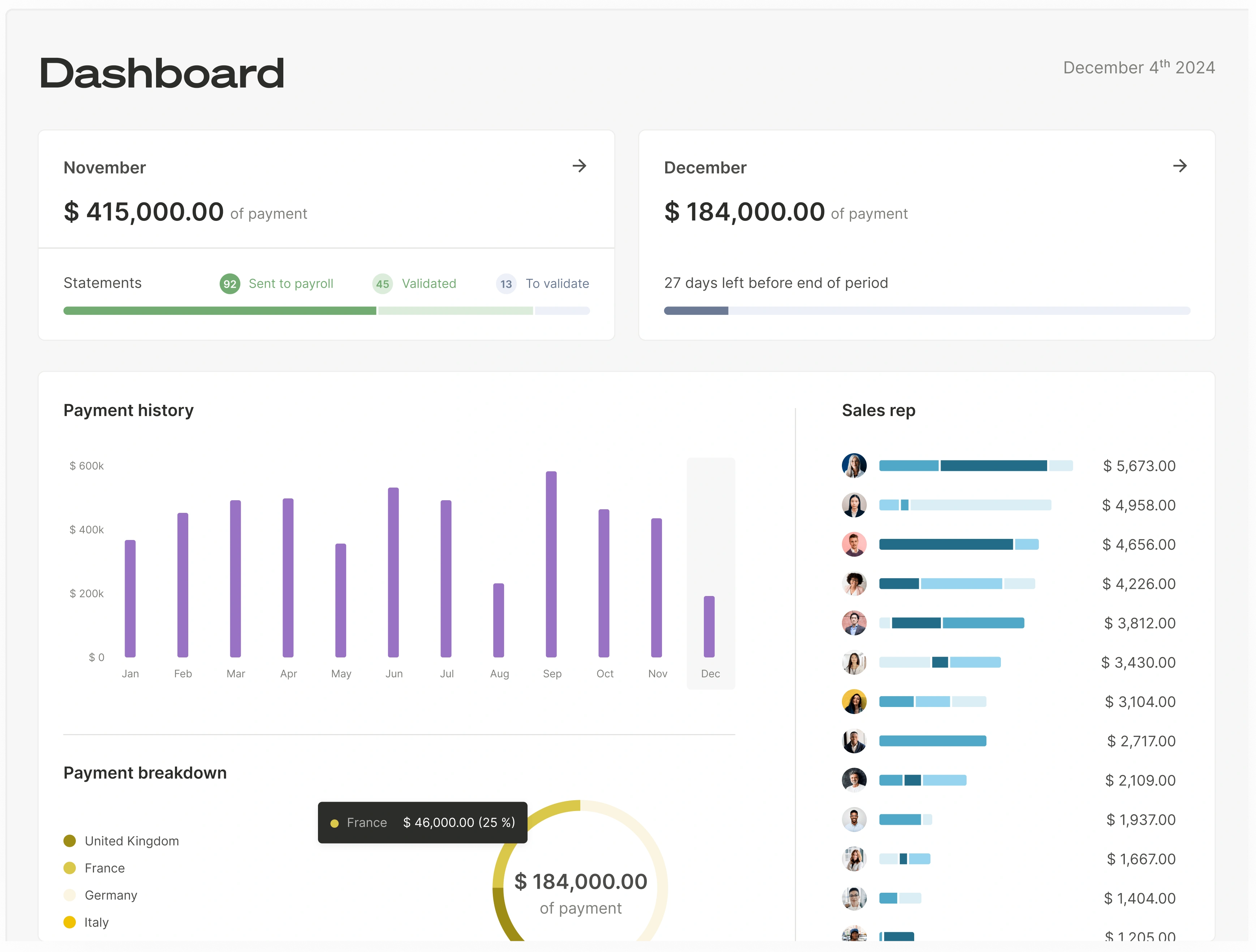
What it is: Qobra is a commission management platform built for organizations where Operations, Finance, and Sales need to trust the same set of numbers. It connects to your CRM and applies your compensation plan rules to produce commissions that every stakeholder can verify, down to the individual deal, rate, and rule that generated each payout.
How Qobra approaches calculation accuracy:
Qobra's core differentiator is deal-level traceability. Every commission amount in the system traces back to three things: the specific deal that triggered it, the rate or tier that applied, and the plan rule that governed the calculation. This is not a summary-level audit trail: it is a transaction-level proof chain that reps can inspect in real time and finance can substantiate during audits.
Key capabilities:
- Complex plan mechanics without workarounds: Multi-tier accelerators, team splits, clawbacks, draws against commission, SPIFs, and rolling quotas are handled natively. Operations teams configure plans through a visual interface rather than writing custom code or building nested formulas.
- Real-time commission visibility: Reps see what they will earn when they close a deal, not after a monthly batch run. Email notifications explain the impact of each deal on their total compensation, which reduces shadow accounting and preemptive disputes.
- Finance-grade reporting: Commission accruals, team-level rollups, and individual breakdowns are accessible at any time. Finance teams can drill from a total accrual number to the individual transactions that compose it.
- Proactive data integrity: When CRM data changes (deal amount adjustments, stage reversals, ownership transfers), Qobra recalculates affected commissions automatically and surfaces the delta for review rather than silently updating.
With offices in New York, Paris and London, Qobra counts 350+ companies and 30,000+ users and has certified $1B+ in commissions (qobra.co/about-us, Oct 2026). Plans are built in a no-code editor, calculations run automatically with approval workflows, and reps get deal-level statements and a dispute workflow inside the same platform. Qobra connects to Salesforce, HubSpot, Microsoft Dynamics, Zoho, Pipedrive, Odoo and Attio, to Snowflake, BigQuery, Redshift, PostgreSQL and SQL Server, and to Workday, BambooHR and HiBob (full list on the Qobra integrations page). Qobra sends approved commission data to payroll through a webhook.
Payroll, ledger and data checks: Qobra provides native HRIS connectors for ADP, Rippling, Gusto, Paylocity, Workday, BambooHR and HiBob, and sends approved commission data to payroll through a webhook; NetSuite and QuickBooks Online connect as ERP integrations (qobra.co/product/integrations, Oct 2026). Before payroll, Qobra runs built-in discrepancy detection, multi-level statement approval and tracked rep requests. Native HRIS integrations come with the Scale package, ERP and API integrations with Advanced (qobra.co/pricing, Oct 2026).
Teams that want to automate without engineering help can start with how to automate sales commissions without IT, and finance teams focused on payout accuracy can use the checklist in how to reduce errors in sales commission payments.
Who it fits best: Teams on variable pay (customers range from scale-ups of 50 people to groups with more than 1,000 employees), complex multi-tier or split-based plans, and a need for Finance and Operations to share a single commission system. Qobra is built for teams on variable pay with a clean system of record (CRM, ERP or warehouse) and documented comp rules (qobra.co/pricing, Nov 2026). Customers like JCDecaux, ElevenLabs, SAP and GoCardless use Qobra to manage commissions across large, distributed sales teams.
G2's review summary notes that initial setup can be challenging for complex compensation plans. What to check before choosing Qobra: native HRIS integrations, SSO, sandboxes and the complete audit trail come with the Scale package; ERP, data-warehouse and API integrations, multi-currency and custom approval workflows come with Advanced. Qobra sends approved commission data to payroll through a webhook.
AI-Powered Agents
Qobra includes three purpose-built AI agents that handle real work, not just analytics overlays. The Architect replaces hours of plan implementation with minutes of conversation, building or editing compensation plans autonomously on the platform. The Sales Coach answers rep questions about their commissions instantly, reducing admin ticket volume and building trust between sales teams and operations. The Analyst creates reports and dashboards from plain-language requests and surfaces proactive business intelligence: flagging anomalies, identifying trends, and delivering insights that would take hours of manual analysis. After launch, The Architect edits live plans and updates several plans with one prompt, and The Analyst reconciles commission data across plans and alerts before payroll; all three agents come with every package (qobra.co, Oct 2026).
Pricing: Custom, based on number of payees and package (Core, Advanced or Scale), billed as an annual subscription (qobra.co/pricing, Oct 2026).
Implementation: go-live in weeks, with onboarding run by Qobra's in-house team. The Architect drafts plans from your comp documents, and customers run Qobra in parallel before switching payroll (qobra.co/pricing, Oct 2026); G2 reviewers report 1 month to implement on average (G2, Oct 2026). "We had 8 comp plans to configure. It took a fraction of the time it would have taken me on my own," says Emily Harte, Revenue Strategy and Operations at ElevenLabs (customer quote on qobra.co).
2. CaptivateIQ: Best for Flexible Plan Modeling
What it is: CaptivateIQ is a commission management platform that emphasizes plan-building flexibility through a spreadsheet-like modeling interface. It targets operations teams that want to design and iterate on compensation plans without engineering support.
Key strengths: The SmartGrid interface allows operations teams to build commission logic using familiar spreadsheet paradigms while gaining the audit trail and automation of dedicated software. Plan changes can be modeled and previewed before going live.
Limitations: CaptivateIQ's implementation model relies heavily on professional services: plan changes frequently require paid consulting engagements, and teams report difficulty managing the platform independently if their primary admin leaves. Despite positioning SmartGrid as "Excel-like," many users find the learning curve steeper than expected, particularly when explaining plan logic to stakeholders. The platform is primarily US-focused: European teams will find limited HRIS coverage (Workday, ADP Workforce Now and BambooHR, with no native support for Personio, Payfit, Deel, Factorial, or HiBob).
US integrations and pricing (verified): CaptivateIQ lists Salesforce, HubSpot and Microsoft Dynamics for CRM; NetSuite and Sage Intacct for ERP; Workday, ADP Workforce Now and BambooHR for HRIS and payroll; Snowflake, BigQuery and Redshift for data. Pricing is quote-based, seat-based with a one-time setup fee, and ASC 606 reporting is an add-on subscription (CaptivateIQ website, Sept 2026). Head-to-head: Qobra vs CaptivateIQ.
Best for: Operations teams that frequently redesign compensation plans and need a sandbox-style environment to model changes before deployment.
3. Spiff by Salesforce: Best for CRM-Native Workflows
What it is: Spiff (now part of Salesforce) positions itself as a commission platform that lives inside the CRM. Its tight Salesforce integration means deal data flows directly into commission calculations without a separate sync layer.
Key strengths: Native Salesforce integration reduces data latency and sync errors. The rep-facing experience is embedded within the CRM workflow, which can drive higher adoption. Calculation logic supports standard plan types including tiers, accelerators, and quotas.
Limitations: Support moved to Salesforce's standard ticketing model, which means longer response times compared to the dedicated support that was previously available. Non-Salesforce data connectors carry an additional monthly cost per connector, and the bundled pricing strategy at Salesforce renewals can result in significant license price increases at the second contract term. The platform's technical back-end requires dedicated resources to maintain and configure. Teams using HubSpot or other non-Salesforce CRMs will find the integration story less compelling. Former Spiff users who have migrated to other platforms frequently cite simpler plan management and faster time-to-value as primary drivers.
Pricing (verified): Salesforce lists Spiff at $75 per user per month, billed annually, with additional one-way connectors at $250 per connector per month and premium support at 30% of net price (Salesforce website, Sept 2026).
Best for: Salesforce-centric organizations that want commission visibility embedded directly in the CRM experience reps already use daily.
4. Performio: Best for Enterprise Compliance Requirements
What it is: Performio is an enterprise incentive compensation management (ICM) platform with deep support for compliance workflows, approval hierarchies, and audit-trail requirements common in regulated industries.
Key strengths: Strong audit and compliance controls including multi-level approval workflows, change logs, and SOC 2-aligned data handling. Handles complex hierarchical compensation structures common in enterprise sales organizations. Supports ASC 606 reporting out of the box.
Limitations: The enterprise-grade feature set comes with a longer implementation timeline. Mid-market organizations with simpler plans may find the platform over-engineered for their needs.
Best for: Large enterprises in regulated industries (financial services, healthcare, manufacturing) where compliance controls and audit trails are non-negotiable.
5. Xactly: Best for Legacy Enterprise ICM
What it is: Xactly is one of the longest-established players in incentive compensation management, offering a broad suite that spans plan design, calculation, analytics, and benchmarking.
Key strengths: Deep benchmarking data from decades of compensation plan data across industries. Supports highly complex enterprise compensation structures including indirect channel commissions, MBOs, and multi-currency plans. Established integration ecosystem with major ERP and HRIS platforms.
Limitations: The legacy architecture can feel rigid compared to newer platforms. Implementation timelines are typically measured in months. The user interface has been modernized but still reflects the platform's enterprise heritage.
Best for: Large enterprises with 500+ payees, complex indirect channel compensation, and a need for industry benchmarking data to inform plan design.
6. Commissionly: Best for Small Teams on a Budget
What it is: Commissionly is a lightweight commission tracking tool designed for small sales teams that need to move beyond spreadsheets without the complexity or cost of enterprise ICM platforms.
Key strengths: Quick setup with minimal configuration. Affordable pricing for small teams. Supports basic plan types including flat rates, tiered commissions, and bonuses. CRM integrations with Salesforce, HubSpot, and Pipedrive.
Limitations: Limited support for complex plan mechanics like multi-level splits, clawbacks, or draws against commission. Reporting capabilities are basic compared to mid-market and enterprise platforms. May require migration as the team scales.
Best for: Small sales teams (under 20 reps) on straightforward commission plans that need an affordable step up from spreadsheets.
7. Varicent: Best for Territory and Quota Planning Integration
What it is: Varicent offers incentive compensation management as part of a broader sales performance management suite that includes territory planning, quota setting, and revenue intelligence.
Key strengths: The integration between quota planning and commission calculation means plan parameters flow directly from territory assignments, reducing manual handoffs. Advanced analytics help operations teams identify the relationship between plan design and sales outcomes.
Limitations: The breadth of the platform means organizations that only need commission calculation may be paying for capabilities they do not use. Implementation complexity scales with the number of modules deployed.
Best for: Enterprise organizations that want commission calculation integrated with territory planning and quota management in a unified platform.
8. QuotaPath: Best for Transparent Earning Forecasts
What it is: QuotaPath focuses on making commission earnings visible and understandable for reps, with an emphasis on real-time forecasting tied to pipeline data.
Key strengths: Clean, intuitive rep experience that shows how pipeline movement affects projected earnings. Plan-building interface is accessible for operations teams without technical backgrounds. Supports common plan types including tiers, accelerators, and bonuses.
Limitations: QuotaPath's template-based approach works well for simple plan structures but reaches a ceiling as compensation plans grow in complexity: teams with multi-source data requirements, complex crediting rules, or multi-currency needs may find the templates insufficient. The platform is US-focused and English-only, with Rippling as its sole HRIS integration (no support for European HRIS platforms like Personio, Payfit, Deel, HiBob, or Factorial). Gamification capabilities are limited to basic leaderboards and contests, which may not drive the engagement uplift that larger teams require. Premium tier pricing ($50/user/month plus an $800/month platform fee covering the first 5 users; Growth is $35/user/month plus $525/month, billed annually; QuotaPath website, Sept 2026) can erode the cost advantage that initially attracts smaller buyers. Teams evaluating QuotaPath should assess whether their current plan complexity, and their 12-month roadmap for compensation design, fits within the template-based framework.
Best for: Mid-market sales teams that prioritize rep-facing transparency and earning forecasts over enterprise compliance features.
9. Sales Cookie: Best for Automated Plan Administration
What it is: Sales Cookie is a cloud-based commission management tool that emphasizes automation of the end-to-end commission administration process, from plan enrollment to payout approval.
Key strengths: Automated workflows for plan enrollment, calculation, approval, and payout reduce administrative overhead. Self-service rep portal provides statement access and dispute submission. Supports integration with major CRMs and accounting platforms.
Limitations: The automation-first approach may feel rigid for organizations that need highly customized calculation logic or non-standard plan structures. Advanced reporting and analytics are more limited than enterprise ICM platforms.
Best for: Organizations that want to minimize the administrative burden of commission management through workflow automation rather than plan-building flexibility.
10. Everstage: Best for Gamification and Rep Engagement
What it is: Everstage combines commission calculation with gamification features designed to drive rep engagement. Leaderboards, earning forecasts, and in-app nudges aim to make commissions a motivational tool rather than just a payout mechanism.
Key strengths: The rep experience is polished and engagement-focused. Commission calculations support standard plan types including tiers, accelerators, and SPIFs. The forecasting module helps reps understand how pipeline deals will affect their earnings.
Limitations: Everstage's full-service approach means clients rely on the vendor for most plan modifications: published plans and historical quotas cannot be edited independently. The platform's data architecture involves a multi-layered pipeline (Connectors → Objects → Databooks → Datasheets → Plans) that adds complexity for teams accustomed to simpler workflows. Calculations run in batch mode rather than real time: admins trigger a recalculation and wait for completion rather than seeing instant results. European buyers should note the absence of a local team and French-language support, along with HRIS coverage gaps for Payfit, Deel, and Factorial. Features like Time Machine (plan modeling) and Crystal (rep forecasting) demonstrate well in demos, but Time Machine cannot compare global budget impact across scenarios, and Crystal requires manual data entry that limits rep adoption. Organizations that prioritize post-onboarding autonomy and real-time visibility should evaluate carefully whether the full-service model fits their operating style.
US integrations and pricing (verified): Everstage lists ADP Workforce, Gusto, Workday, BambooHR, HiBob and Ceridian Dayforce for HR and payroll, and NetSuite, QuickBooks and Sage Intacct for accounting. Pricing is quote-based per payee, with the ASC 606 module sold as an add-on; the vendor states implementation typically takes 4 to 6 weeks (Everstage website, Sept 2026).
Best for: Sales-led organizations where driving rep motivation and pipeline engagement through commission visibility is a primary goal.
Accuracy Test Protocol: How to Evaluate Commission Calculation Software Before You Buy
Choosing a commission calculation software platform based on feature lists and demo presentations is not enough. Calculation accuracy, the core capability, can only be validated by running your actual data through the system. Here is a structured evaluation process:
Step 1: Prepare a Test Data Set
Build a test data set from your last two complete quarters. Include:
- Standard deals: Straightforward transactions that should calculate cleanly
- Edge cases: Deals involving splits, overrides, multi-tier thresholds, and mid-quarter plan changes
- Retroactive adjustments: Clawbacks, deal amendments, and ownership transfers
- Currency variations: If applicable, include multi-currency deals with known exchange rates
Step 2: Define Expected Outcomes
For every deal in your test set, calculate the expected commission using your current method (spreadsheet or existing tool). Document the deal, the applicable plan rule, the rate or tier, and the expected payout. This becomes your validation baseline.
Step 3: Run a Parallel Calculation
Load the test data into the candidate platform and configure your compensation plans. Run the calculation and compare outputs against your baseline:
| Validation Check | What to Look For |
|---|---|
| Flat-rate accuracy | Do simple deals produce the exact expected payout? |
| Tier boundary handling | When a deal crosses a tier threshold, does the system apply the correct rate to each portion? |
| Split allocation | Do team splits sum to the correct total with no rounding discrepancy? |
| Clawback precision | Does a reversed deal produce the exact inverse of the original commission? |
| Retroactive recalculation | When a deal amount changes, does the system recalculate all downstream effects? |
| Effective-date logic | If a plan changed mid-quarter, does the system apply the correct version to each transaction? |
Step 4: Trace a Single Commission End-to-End
Pick one complex deal from your test set, ideally one involving a split, a tier crossing, and a mid-quarter plan change. Ask the platform to show you exactly how the final number was produced. You should be able to see:
- The deal that triggered the commission
- The plan rule that applied
- The rate or tier used
- The split allocation (if applicable)
- Any adjustments or clawbacks
If you cannot trace a commission from the final payout back to the source deal and rule, the platform does not meet the traceability standard your team needs.
Which control catches each commission calculation error?
Commission calculation errors come from six common sources, and each source needs a different control in the software. Each error source can be matched to one control in the software and to one check that proves the control during a trial.
| Error source | Typical example | Control that catches it | Check during a trial |
|---|---|---|---|
| Formula edited by hand | A tier threshold changed in one tab only | Rules defined once and versioned | Change a tier and see which plan versions it affects |
| CRM data changed after the statement | A deal amount lowered after month-end | Recalculation with the change shown for review | Edit a closed deal and look for the delta before payout |
| Wrong plan version | A mid-quarter rate change applied to older deals | Effective-dated plan versions | Close two deals on either side of the change date |
| Split rounding | Three payees on one deal adding up to 99.99% | Split logic applied per deal with a total check | Split one deal three ways and compare totals |
| Undocumented manual adjustment | A one-off bonus added without a reason | Adjustment tracking with author and date | Add an adjustment and find it in the audit log |
| Payout sent before review | A statement exported before Finance signs off | Approval workflow before payroll | Try to send an unapproved statement to payroll |
Teams on Qobra cut rep questions by 90%. Qobra tracks every statement adjustment from its Core package onward: each adjustment is logged with who made it, when, and why. The Analyst reconciles commission data across plans and flags anomalies before payouts go out, and the Scale package adds sandbox environments to test plans on real data before they go live.
Feature Comparison Table: Plan Mechanics by Commission Calculation Tool
For approval workflows, CRM sync frequency, US payroll export and USD pricing, see the "Commission calculation software compared (2026)" table at the top of this article. The matrix below covers plan mechanics. In this matrix, Yes or Native means the vendor's public documentation describes the feature, Partial or Limited means it describes part of it, and No means the feature was not found in the vendor's public documentation (September 2026).
| Feature | Qobra | CaptivateIQ | Spiff | Performio | Everstage | Xactly | Commissionly | Varicent | QuotaPath | Sales Cookie |
|---|---|---|---|---|---|---|---|---|---|---|
| Deal-level traceability | Yes | Partial | Partial | Yes | Partial | Yes | No | Yes | Partial | No |
| Multi-tier accelerators | Native | Native | Native | Native | Native | Native | Limited | Native | Native | Limited |
| Team splits | Native | Native | Native | Native | Native | Native | Limited | Native | Limited | Limited |
| Clawbacks | Native | Native | Native | Native | Native | Native | Manual | Native | Limited | Manual |
| Draws against commission | Native | Native | Limited | Native | Limited | Native | No | Native | Limited | No |
| Real-time rep visibility | Yes | Configurable | Yes | Configurable | Yes | Configurable | Batch | Configurable | Yes | Batch |
| ASC 606 support | Auditable data export | Yes | Yes, ASC 606 and IFRS 15 expense reports | Yes | Yes, add-on module | Yes | No | Yes | Yes (Growth and Premium) | No |
| CRM integrations | Salesforce, HubSpot, custom | Salesforce, HubSpot | Salesforce (native) | Salesforce, custom | Salesforce, HubSpot | Salesforce, Oracle, SAP | Salesforce, HubSpot, Pipedrive | Salesforce, SAP | Salesforce, HubSpot | Salesforce, HubSpot |
| Implementation timeline | Less than a month | 4-8 weeks | 2-4 weeks | 4 to 8 weeks | 4-8 weeks | 12-24 weeks | As little as 4 weeks (vendor claim) | 8-16 weeks | 45 to 60 days (Growth), 60 to 90 (Premium) | 2-4 weeks |
Which systems show real-time dashboards for sales performance and earnings?
Qobra, Spiff by Salesforce, CaptivateIQ, Everstage, QuotaPath, Xactly and Performio all give reps an earnings view and managers a team dashboard (vendor websites, Sept 2026; qobra.co, Oct 2026). What separates them is freshness, because a dashboard is only as current as its CRM data: compare the CRM sync column of the top table, and see real-time commissions for a freshness check by platform.
- Qobra: reps click any amount on a statement to see how it was built and simulate commissions on any deal; managers and Finance get dashboards on commission costs, quota attainment and payout trends (custom dashboards in the Scale package).
- Spiff by Salesforce: statement tracing, an estimator and a leader dashboard with pacing and rankings.
- CaptivateIQ: tracing and a what-if calculator on iOS and Android, plus attainment and leadership views.
- Everstage: traceable statements, Crystal forecasting and prebuilt BI dashboards.
- QuotaPath: earnings and forecast pages, including inside HubSpot; custom reports on Premium only.
- Xactly Incent and Performio: drill-down or what-if views on iOS and Android, plus benchmarking (Xactly) or Analytics Studio (Performio).
To test sync reliability rather than trust claims, run four checks during a trial:
- Change a closed deal's amount in the CRM and time the statement update.
- Move the deal back to an open stage and check that the commission reverses.
- Transfer ownership and check that the credit moves from the right effective date.
- Check that each change is shown for review before payout, not silently overwritten.
For predictive modeling, CaptivateIQ lists Catalyst predictive modeling, Everstage offers Time Machine on historical data, Xactly offers Compensation Configurator scenarios and Varicent offers AI-guided simulation (vendor websites, Sept 2026). Qobra runs a sandbox on historical data before roll-out (Scale package), and The Architect simulates plan changes in natural language (qobra.co, Oct 2026). See also sales compensation software for RevOps and Finance teams.
"Since we rolled it out, I hardly get any questions anymore. It saves me a lot of time," says Jessica Ho, RevOps Manager at ElevenLabs (customer quote on qobra.co).
How do commission platforms validate data before payout?
Every platform here except Commissionly documents an approval workflow, so compare what each one checks or records around that step: controls on data and plan changes, and the workflow when a rep disputes a line (vendor websites, Sept 2026; qobra.co, Oct 2026).
| Platform | Checks and controls documented | When a rep disputes a line |
|---|---|---|
| Qobra | Built-in discrepancy detection; multi-level statement approval; The Analyst alerts before payroll | Rep raises a request from the statement; every request tracked and documented |
| CaptivateIQ | Approvals with segregation of duties; version control; calculations triggered manually | Disputes, access controls and audit logs listed |
| Spiff by Salesforce | Effective dates on plans and logic; locked historical statements | Calculation tracing and dispute collaboration |
| Everstage | Approvals; "every action is logged" | Disputes handled in the platform |
| Xactly Incent | Hierarchy management; audit trails | Disputes raised within the relevant hierarchy |
| QuotaPath | Approval workflows and deal flagging; full audit log not documented | Not described in the sources reviewed |
| Sales Cookie | Approval workflow; audit logs | Self-service rep portal with dispute submission |
Performio, Varicent and Commissionly are left out because the sources reviewed do not describe their dispute workflows. Before the first live payout, ask to see period totals reconciled to CRM bookings, every manual adjustment with its reason and approver, and the statements changed since the last approval. Audit trails are compared in sales commission audit trail software.
What is the best commission software for small teams on a budget?
For a small team on simple plans, Sales Cookie and Spiff by Salesforce are the only tools in this guide whose published prices stay under $500 a month: Sales Cookie Business ($40 per user per month, monthly billing) up to 12 users, and Spiff ($75 per user per month, billed annually) up to 6 users. QuotaPath starts above that line, because its Growth plan adds a $525 monthly platform fee to $35 per user per month (vendor websites, Sept 2026).
Monthly list price by team size, before tax (vendor websites, Sept 2026):
| Team size | Sales Cookie Business | Spiff by Salesforce |
|---|---|---|
| 5 users | $200 | $375 |
| 10 users | $400 | $750 |
| 12 users | $480 | $900 |
Sales Cookie is self-service with no contract and a 14-day trial, but clawbacks are manual and splits limited. Spiff is sold as a Sales Cloud add-on with an annual contract, so it fits teams already on Salesforce. More published prices and setup times: how to automate commission tracking for sales teams.
Mid-sized US teams that must go live within a quarter should compare setup models: Qobra goes live in weeks with in-house onboarding (qobra.co/pricing, Oct 2026), Everstage states 4 to 6 weeks and QuotaPath 45 to 60 days on Growth (vendor websites, Sept 2026). Qobra publishes no price: it is quote-based by package and number of payees. "What used to take me three hours now takes 15 minutes," says Jose Herrera, RevOps Manager at Spring Health, a US customer (customer quote on qobra.co).
What is the easiest way to automate rep pay calculations?
The easiest way to automate rep pay calculations is to connect the CRM, load the commission plan as it is written today, and compare one past period with the spreadsheet before the first payout. Qobra follows that order in four steps.
- Connect the CRM: Connecting a Qobra integration and importing the first fields takes less than a minute. Qobra syncs CRM data automatically throughout the day, and on demand in one click.
- Load the plan: An admin uploads the current comp plan as a PDF or Excel file, and The Architect, Qobra's AI agent, drafts a first version of the plan in Qobra. Quotas, tiers, accelerators and SPIFFs can also be configured by hand in Qobra's no-code builder, in readable logic blocks.
- Compare one past period: Running the last closed period in Qobra and in the spreadsheet side by side shows every payout that differs before reps see a statement.
- Approve and pay: A standard validation workflow routes each statement to its approver, and Qobra sends approved commission data to payroll through a webhook. Qobra calculates commissions and variable pay; payroll itself stays with your payroll provider, which receives the approved amounts.
Qobra customers go live in less than a month. Qobra's packages are quote-based and come in three tiers (Core, Advanced and Scale), and teams can start with the Core package, which includes the no-code compensation builder and one native CRM integration.
Best Practices for Commission Calculation Accuracy
Whether you are implementing a new platform or optimizing an existing one, these practices reduce calculation errors and build cross-functional trust:
- Validate every plan rule before go-live. Run your full test data set through the system after every plan configuration change. Do not rely on spot checks: edge cases are where errors hide.
- Require deal-level traceability as a non-negotiable. If a rep cannot click on a commission amount and see the deal, rate, and rule that produced it, the platform will generate disputes regardless of whether the calculations are correct.
- Automate clawback and adjustment logic. Manual clawbacks are the single highest-error-rate process in commission administration. Automate the trigger (deal status change) and the calculation (reverse of original commission) to eliminate manual intervention.
- Establish a single source of truth for deal data. Commission disputes often originate not from calculation errors but from data discrepancies between the CRM and the commission system. Use integrations that sync CRM data automatically during the day rather than manual imports, and surface data deltas proactively.
- Run parallel calculations during transitions. When migrating from spreadsheets or a legacy tool, run both systems in parallel for at least one full quarter. Compare every output and resolve discrepancies before cutting over.
- Audit tier boundaries and split allocations quarterly. These are the two most common sources of silent errors: calculations that produce a number but not the correct number. Build a quarterly audit checklist that specifically tests threshold crossings and multi-party allocations.
- Give finance direct access to commission data. When finance can independently verify commission accruals without requesting exports from operations, the review cycle compresses and disputes get resolved faster.
Frequently Asked Questions
What Is the Difference Between Commission Calculation Software and Spreadsheets?
Commission calculation software applies compensation plan rules to deal data automatically, producing auditable, traceable payouts. Spreadsheets require manual formula construction, are prone to version-control issues, and provide no built-in audit trail. The core difference is reliability at scale: spreadsheets work for simple plans with few reps, but introduce error risk that compounds as plan complexity and team size grow.
How Long Does It Take to Implement Commission Calculation Software?
Implementation timelines vary significantly by platform and organizational complexity. Lightweight tools differ too: Sales Cookie is self-service with a 14-day trial, while Commissionly states as little as 4 weeks (vendor websites, Sept 2026). Qobra takes less than a month to go live. Spiff by Salesforce typically requires two to four weeks, including plan configuration, CRM integration, and parallel testing. Enterprise ICM platforms like Xactly or Varicent may require three to six months for full deployment across large organizations with complex hierarchical structures.
Can Commission Calculation Software Handle Mid-Quarter Plan Changes?
The best platforms support effective-date logic, which applies the correct version of a compensation plan to each transaction based on when it closed. This means a plan change on March 15 applies the old rules to deals closed before that date and the new rules to deals closed after, without manual splitting or re-running calculations. Not all platforms handle this natively, so it is a critical evaluation criterion during your selection process.
How Does Commission Calculation Software Handle Clawbacks?
Clawback handling varies across platforms. The most reliable approach is automatic trigger-based clawback: when a deal's status changes (cancellation, downgrade, or churn within a specified window), the system automatically reverses the original commission and creates an adjustment entry. Less mature platforms require manual clawback entry, which introduces delay and error risk. When evaluating platforms, test clawback accuracy with your actual data: reverse a deal and verify that the system produces the exact inverse of the original payout.
What CRM Integrations Should Commission Calculation Software Support?
At minimum, your commission calculation software should integrate with your primary CRM (Salesforce, HubSpot, or Microsoft Dynamics) and your payroll or ERP system. Automatic CRM sync during the day, with an on-demand refresh, is preferable to manual file imports, because manual imports delay rep visibility and create windows where CRM changes are not reflected in commission calculations. Advanced organizations should also evaluate integrations with billing platforms, contract management tools, and financial reporting systems.
What tools can automate commission calculations for my sales team?
Qobra, CaptivateIQ, Spiff by Salesforce, Performio, Xactly, Varicent, QuotaPath, Everstage, Sales Cookie and Commissionly all automate commission calculations from CRM deal data. Each applies plan rules (tiers, accelerators, splits, clawbacks) without spreadsheet formulas and produces rep statements. The difference is in approval workflows, sync frequency, US payroll export and pricing: only Spiff ($75/user/month), QuotaPath (from $35/user/month plus platform fee) and Sales Cookie (from $40/user/month) publish US prices. Qobra fits sales and finance teams that want commission math automated without spreadsheet formulas: plans are built in a no-code editor, calculations run automatically on CRM deals, and every payout links back to the deal, rate and rule that produced it, a trail finance can substantiate during audits.
Best software for automating sales commission calculations?
For mid-market and enterprise teams that need deal-level traceability and complex plan logic, Qobra, CaptivateIQ and Performio are the strongest fits in this comparison. Salesforce-only organizations can consider Spiff by Salesforce for its native CRM sync. Teams under 20 reps on simple plans can start with QuotaPath, Sales Cookie or Commissionly. Validate any choice with a parallel run on two quarters of real data.
Best platforms to reduce manual commission calculation workload?
Platforms that combine automatic CRM sync, native clawback and split logic, approval workflows and payroll export remove the most manual steps: Qobra, CaptivateIQ, Performio, Xactly, Varicent and Everstage cover all four. Watch for hidden manual work: batch recalculations that an admin must trigger, plan changes that require vendor services, and payroll files that still need reformatting before upload. In Qobra, connecting an integration and importing the first fields takes less than a minute, CRM data syncs automatically every two hours and on demand in one click, and approved commission data goes to payroll through a webhook. Platforms that run the whole monthly commission cycle, from CRM data to payroll, are compared in the guide to the best commission management software.
Which commission software tools handle complex plan design best for rapidly growing teams?
Growing teams change plans often, so look for a no-code plan editor, effective dating and scenario modeling. Qobra (no-code editor, AI plan-building agent), CaptivateIQ (SmartGrid modeling) and Xactly (Incent packages with modeling) handle frequent redesigns without engineering. Template-based tools such as QuotaPath reach a ceiling when splits, multi-currency or multi-source crediting appear. See also sales compensation modeling software.
Software to eliminate commission calculation errors
No software eliminates every error, but tools with deal-level traceability, automatic clawbacks, effective-date logic and an audit log of plan and payout changes remove the most common causes: broken formulas, stale CRM data and undocumented manual adjustments. In this comparison Qobra, Performio, Xactly and Varicent offer full deal-level traceability. Pair the tool with the parallel-run process described above and the practices in how to reduce errors in sales commission payments.
How Do You Measure ROI on Commission Calculation Software?
Measure ROI across three dimensions: (1) time savings: reduction in hours spent on manual calculation, dispute resolution, and reconciliation; (2) error reduction: decrease in overpayments, underpayments, and retroactive corrections; and (3) retention impact: improvement in rep satisfaction scores and reduction in comp-related attrition. Most organizations see positive ROI within the first two quarters, driven primarily by the elimination of manual reconciliation work and the reduction in dispute volume.
Which commission software works best for teams needing real-time payout visibility?
In the feature comparison table of this guide, Qobra, Spiff by Salesforce, Everstage and QuotaPath show real-time rep visibility. CaptivateIQ, Performio, Xactly and Varicent make rep visibility configurable. Commissionly and Sales Cookie update in batch. Qobra reps see what they will earn when they close a deal, not after a monthly batch run, and email notifications explain the impact of each deal on their total compensation.
Which software connects commission calculations to payroll workflows?
Every platform in the comparison table at the top of this guide passes commission results to payroll, each in a different way. Qobra sends approved commission data to payroll through a webhook and offers native HRIS connectors. CaptivateIQ and Performio list Workday, ADP Workforce Now and BambooHR. Everstage lists ADP Workforce, Gusto, Workday, BambooHR, HiBob and Ceridian Dayforce. Spiff by Salesforce relies on paid connectors, and Commissionly offers a CSV export.
Which commission software is best for small teams?
Sales Cookie ($40 per user per month, monthly billing) and Spiff by Salesforce ($75 per user per month, billed annually) publish prices that stay under $500 a month up to 12 and 6 users (vendor websites, Sept 2026). Teams on variable pay that need splits, clawbacks and approvals fit Qobra (qobra.co/pricing, Nov 2026).
Which commission software syncs with my CRM to calculate commissions automatically?
All 10 platforms in this guide pull closed deals from the CRM and apply plan rules automatically. Qobra connects to Salesforce, HubSpot, Microsoft Dynamics 365, Zoho CRM, Pipedrive, Odoo and Attio (qobra.co, Oct 2026). Spiff runs natively inside Salesforce, CaptivateIQ and Performio list Salesforce, HubSpot and Dynamics, and Everstage and QuotaPath add Pipedrive and Zoho (vendor websites, Sept 2026).
Which commission software suits mid-sized US teams that need quick implementation?
Compare setup models first. Qobra goes live in weeks, with onboarding run by its in-house team and a parallel run before payroll switches (qobra.co/pricing, Oct 2026). Everstage states 4 to 6 weeks and QuotaPath 45 to 60 days on Growth, while Xactly and Varicent publish no timeline and typically take months (vendor websites, Sept 2026).
Next step: bring two quarters of closed deals and your current plan documents to a Qobra demo. We configure your plans in the no-code editor and run the calculation side by side with your spreadsheet so you can compare every payout before you decide.
See how calculation stacks up against every other criterion in our roundup of the leading commission calculation software.