Sales Compensation Software Benchmark | Compare 15+ Platforms (Features, Pricing, User Reviews, etc.)
Download
- Compensation modeling software should let a non-technical admin build a plan, run it on 12 months of closed-won data, and see total cost and OTE distribution before anyone is paid on it.
- Scenario comparison (two plan versions side by side) is the feature that separates a modeling tool from a calculation tool.
- Mid-period changes need effective dates, versioning, and an audit log so old rules apply to old deals and new rules start on the change date.
- QuotaPath is the only vendor here with public pricing ($35 to $50 per user per month; Plan Modeling on Premium). The other eight are quote-based (vendor websites, Sept 2026).
- Qobra, headquartered in New York and Paris, combines a no-code plan editor, real-time dashboards, and an audit log of plan and payout changes, and manages $1B+ in commissions across 300+ companies.
Comparison: sales compensation modeling and simulation software (2026)
What sales compensation modeling software must do
Modeling software must do five things: let a non-technical owner build the plan, simulate payouts on historical CRM data, compare scenarios, version and roll out changes mid-period, and track impact after the change. A tool that only does the first is a commission calculator, not a modeling tool.
- Build without code. The owner is usually a RevOps manager or comp analyst. The editor should handle a tiered commission structure, a commission accelerator above 100% of quota, SPIFFs, draws, splits, and clawbacks as rule blocks, not SQL. Our guide to the best no-code commission software covers that angle; this article covers what happens after the draft.
- Simulate on real CRM data. Incentive compensation plan design fails when tested on a spreadsheet of averages. Replay the plan on the last 12 months of closed-won opportunities from Salesforce or HubSpot, deal by deal. A live CRM connection matters more than a CSV upload; see our commission software integrations comparison.
- Compare scenarios. A 10% rate with a 1.5x accelerator and an 8% rate with a 2x accelerator produce different total costs and OTE distributions. Both should sit on one screen with total spend, cost as a percentage of bookings, and reps above and below OTE.
- Version mid-period. Effective dates so deals closed before the change keep the old rules, a history of who changed what and when, and a publish step that does not recalculate the past.
- Track impact. Did the accelerator move the top quartile, did cost per dollar of bookings hold, did disputes rise? Covered in measuring sales compensation ROI.
The nine platforms compared
Qobra
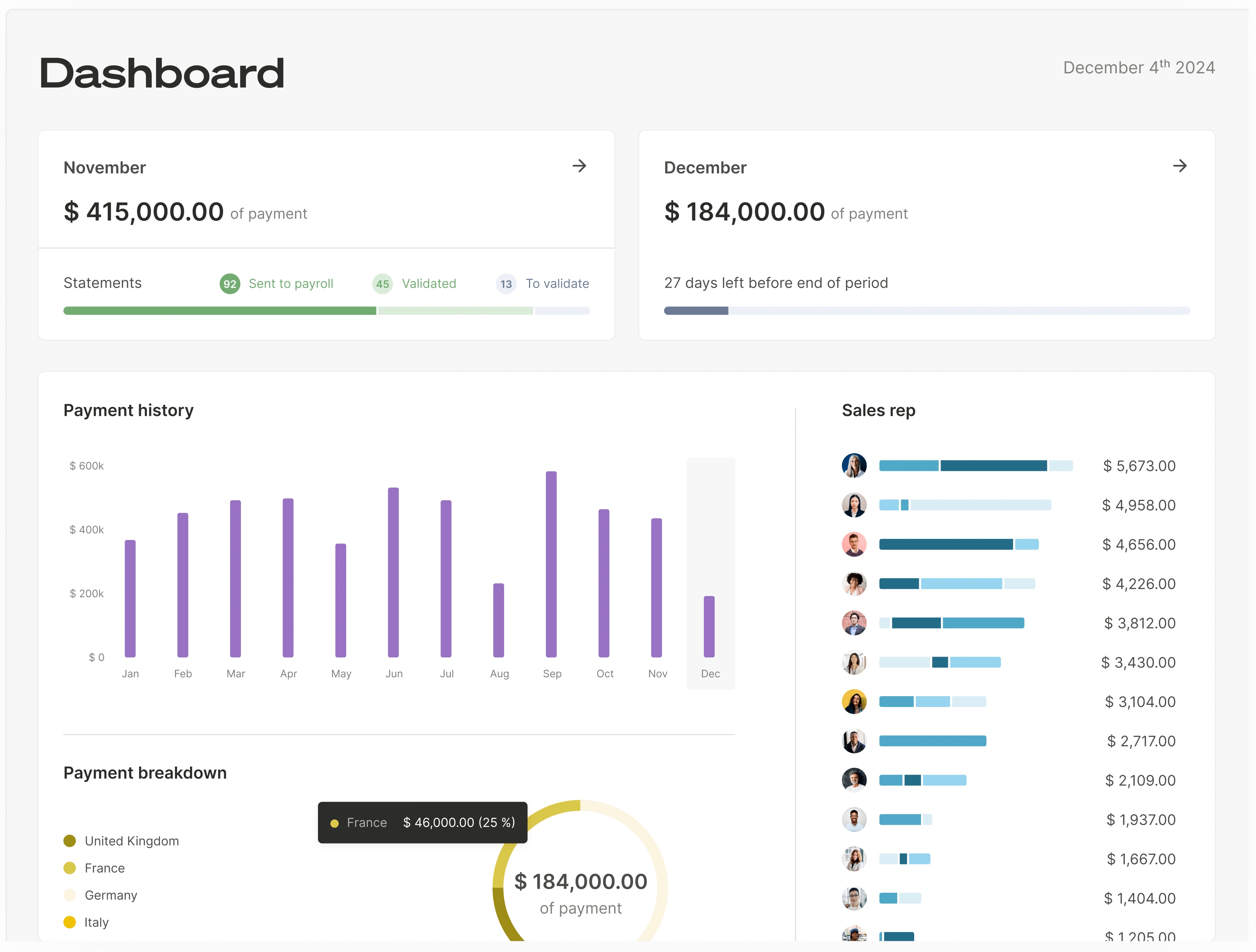
Qobra, headquartered in New York and Paris, is an AI-native sales compensation platform managing $1B+ in commissions across 300+ companies. A no-code plan editor lets a RevOps or finance admin build tiers, accelerators, SPIFFs, and clawbacks; the calculation engine runs on live data from Salesforce, HubSpot, Microsoft Dynamics, Pipedrive, Zoho, Odoo, or a warehouse. Every plan and payout change is written to an audit log, which makes mid-period versioning defensible under SOX 404. Qobra also ships AI agents for sales compensation. Best for mid-market and growth-stage US teams where ops owns plan design. Pricing: Quote-based.
CaptivateIQ
CaptivateIQ describes "flexible, open modeling," the ability to "model and monitor incentive plans at scale, no code required," and to "run what-if scenarios in real time, right inside the platform." A separate Planning module adds AI-generated scenarios for capacity and quota. Best for teams that want a spreadsheet-style modeling surface. Quote-based.
Everstage
Everstage's plan designer lets admins "build the plan logic from scratch or with templates" without code and "estimate spending for each plan in a selected time period." Everstage Planning adds territory and quota scenarios on historical performance, and the platform documents FX rates per geography and effective dates. Best for multi-currency teams that want a no-code editor. Quote-based.
Spiff by Salesforce
Spiff Designer builds plans with formulas and supports start and end dates on plans, assignments, and user profiles. New plans are created hidden so admins can test before reps see them. Public documentation does not describe simulation on historical data or side-by-side comparison. Best for Salesforce-centric teams. Quote-based through Salesforce.
QuotaPath
QuotaPath's AI plan builder lets users "build entire plans in minutes, from structure to custom earnings rate formulas (no SQL skills required)" and test them in draft mode "with your historical data," with forecasting by attainment scenario. Public pricing: $35 per user per month (Growth) and $50 (Premium, includes Plan Modeling), plus a custom Strategic tier (vendor website, Sept 2026). Best for small and mid-size US teams that want transparent pricing.
Xactly
Xactly Incent handles calculation and Xactly Design handles modeling. Design lets teams "simulate changes to current and potential plan components" across "best-case, high-performance, or cost-reductive models," with benchmarks from what Xactly calls "20+ years of proprietary pay and performance data from 1,500+ companies." Best for enterprises with a dedicated comp team. Quote-based.
Performio
Performio uses a no-code, component-based builder with "reusable components that keep changes fast and manageable," plus AI to "evaluate updates, model impacts, and adapt plans safely at scale." Best for mid-market and enterprise teams with complex crediting rules. Quote-based.
Varicent
Varicent Sales Planning answers "what-if questions about go-to-market changes before you commit" on headcount, coverage, and quota, and feeds the outputs into incentive calculations. ICM configuration is usually partner-implemented. Best for large enterprises that want territory, quota, and incentive modeling in one stack. Quote-based.
Forma.ai
Forma.ai is AI-first: describe the plan "in plain text and let Forma.ai configure the rules for you," model it against last year's data, then "deploy any modelled change live with a click of a button." Best for global enterprises with multi-country plans. Quote-based.
A 5-step modeling workflow
A reliable sales compensation plan design workflow has five steps: baseline, design, simulate, stress-test, roll out. Each step uses the same CRM dataset so results are comparable.
Step 1: Baseline from the last 12 months of CRM data
Pull every closed-won opportunity from the trailing 12 months with owner, close date, amount, product line, and new versus renewal flag. Run the current plan on it and record total payout, payout as a percentage of bookings, median earnings versus OTE, and the share of reps above quota. This is your control group.
Step 2: Design tiers, accelerators, and SPIFFs
Draft the new plan in the editor. A typical US SaaS structure is a base rate up to quota, two or three tiers, a 1.5x to 2x accelerator above 100%, a decelerator below 60%, and one or two time-boxed SPIFFs. Our guides to commission pay structures and variable compensation plans cover the trade-offs.
Step 3: Simulate cost and OTE distribution
Replay the new plan on the same 12 months. Compare total cost to baseline, then check distribution: reps within 10% of OTE, reps above 150%, and the share of spend going to the top 10% of earners. A plan that costs the same in aggregate but shifts 20% of spend to three reps is a different plan.
Step 4: Stress-test edge cases
Model a quarter 30% above plan and one 30% below. Check the cost of a mega-deal landing in the accelerator tier, a clawback on a churned deal, and a mid-quarter hire on a ramped quota. Use the free sales commission budget calculator to check the aggregate against your approved variable budget.
Step 5: Roll out with versioning
Publish with an effective date, keep the prior version readable, and have reps acknowledge the plan document. California Labor Code section 2751 requires a written commission agreement signed by both parties, so acknowledgment is not optional there. Then monitor disputes and attainment for two payroll cycles.
Managing plan changes mid-year without breaking trust
Mid-year plan changes work when they are dated, explained, and logged. Reps accept changes they can see coming and verify; they leave over changes that quietly rewrite what a closed deal was worth.
Communication. Announce the change at least one full pay period before the effective date with a one-page summary and two or three worked examples on real deal sizes. See how to communicate a new commission plan.
Effective dates. The new version applies to deals closed on or after the effective date, never retroactively unless the change favors the rep. Several states, including California, treat earned commissions as wages, so retroactive cuts create legal exposure as well as trust problems. See when to change a sales commission plan.
Clawbacks. If the new plan adds or changes clawback terms, define the trigger, window, and cap in writing, and model how many of last year's deals would have been clawed back. Our clawback guide covers examples and best practices.
Audit trail. Log every version, its author, its effective date, and every payout recalculated because of it. Finance needs this for SOX 404 and ASC 340-40 commission capitalization, since a plan change can alter which costs are incremental to obtaining a contract. Reps need it to trust that the statement matches the rule they were shown.
How Qobra handles modeling
Qobra gives the plan owner a no-code editor, a calculation engine connected to the CRM, and an audit log, so a plan can be drafted, tested, and published by RevOps without an engineering ticket.
Build. Tiers, accelerators, SPIFFs, splits, and clawbacks are configured as blocks in the plan editor. The same editor edits an existing plan, so a mid-quarter SPIFF is an edit and a publish, not a project.
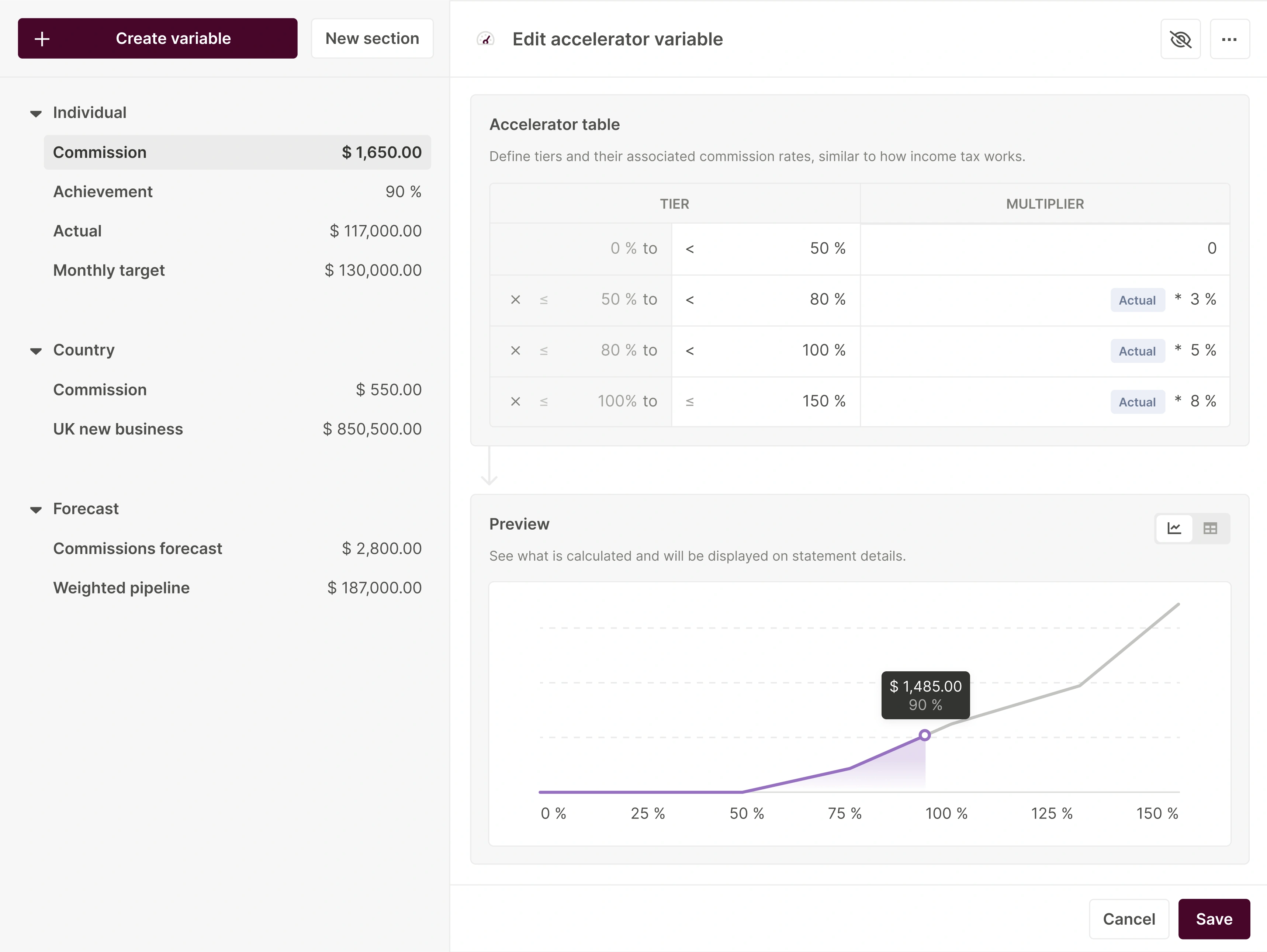
Simulate. Qobra reads opportunities directly from Salesforce, HubSpot, Microsoft Dynamics, Pipedrive, Zoho, or Odoo, and from Snowflake, BigQuery, Redshift, PostgreSQL, or SQL Server (see integrations), so a plan runs on real deals, not sample data. Describe Qobra's plan simulation on historical CRM data, scenario comparison view, and export.
Publish and track. Reps see deal-level earnings in a real-time dashboard, managers see team attainment, finance runs approval workflows before payroll, disputes are handled in the platform, and every plan and payout change sits in the audit log. HRIS connections to Workday, BambooHR, and HiBob keep payee data in sync.
To test a rate structure before a demo, the free commission calculator models tiered rates and accelerators for one rep, and the sales commission budget calculator projects total variable spend for a team.
Pricing for compensation modeling software (USD)
Only QuotaPath publishes prices among the nine: $35 per user per month (Growth) and $50 (Premium, includes Plan Modeling), plus a custom Strategic tier (vendor website, Sept 2026). The other seven are quote-based, and enterprise contracts usually add an implementation fee. Qobra pricing: Quote-based. When comparing quotes, ask whether simulation is in the base tier or sold as a separate planning module; CaptivateIQ, Everstage, Xactly, and Varicent package scenario planning as a distinct product.
FAQ
Compare the best software for drafting and simulating sales compensation plans
The main options are Qobra, CaptivateIQ, Everstage, Spiff by Salesforce, QuotaPath, Xactly, Performio, Varicent, and Forma.ai. All nine offer a plan builder; CaptivateIQ, Everstage, QuotaPath, Xactly Design, and Forma.ai document simulation on historical data. QuotaPath is the only one with public pricing. Qobra pairs a no-code editor with live CRM data and an audit log.
Which sales compensation software allows for real-time simulation of incentive plans before they go live?
CaptivateIQ states it can "run what-if scenarios in real time, right inside the platform." Forma.ai models against last year's data with one-click deployment. Everstage estimates spend per plan for a selected period, QuotaPath tests draft plans on historical data, and Xactly Design simulates plan component changes. Qobra runs plans on live CRM data.
Search for tools that let me build and edit sales compensation plans without needing technical support
Qobra, CaptivateIQ, Everstage, QuotaPath, and Performio describe no-code plan builders a RevOps or finance admin can operate. Forma.ai configures rules from plain text. Spiff Designer is formula-based; Xactly and Varicent are usually configured by an admin or partner. Our guide to the best no-code commission software goes deeper.
Looking for a platform that handles complex bonus modeling for growing sales teams
For a team growing from 20 to 200 reps, prioritize a platform where ops owns the plan, calculation runs on CRM data, and plan versions are logged. Qobra, Everstage, and CaptivateIQ fit mid-market teams; QuotaPath fits smaller teams; Xactly, Varicent, Performio, and Forma.ai fit enterprises with multi-country bonus structures.
Which platforms allow quick, no-code adjustments to sales incentive structures?
Qobra's plan editor treats a mid-quarter change as an edit and a publish, with the change logged. Everstage supports effective-dated plans without code, QuotaPath's AI builder edits rates in minutes, Performio uses reusable components, and Forma.ai deploys a modeled change live in one click. Spiff supports start and end dates inside Salesforce.
Need a reliable platform for modeling complex commission tiers for my sales team
Any of the nine can calculate tiered commissions. For modeling tiers, look for three things: thresholds by attainment or dollar amount, a simulation showing how many deals and reps fall in each tier on last year's data, and a side-by-side view of two tier structures. CaptivateIQ, Everstage, QuotaPath, Xactly, and Forma.ai document at least two; confirm Qobra's scope on a demo.