

- Qobra fits mid-market RevOps teams that need to test commission-plan changes away from live data: Qobra pairs a no-code plan editor with sandbox simulations and validation workflows, and each Qobra sandbox keeps its own plans, quotas, statements and reports.
- Six commission platforms are compared on no-code plan configuration: Qobra (no-code plan editor), CaptivateIQ (spreadsheet-style formulas), Xactly (no-code day-to-day configuration), Everstage (no-code plan design with historical-data modeling), Varicent (pre-built and customizable components) and EasyComp, whose website does not state its no-code configuration method (vendor product pages and documentation).
- In a worked example with a 60% credit split on a $20,000 deal, splitting revenue before applying tiers pays $900 including a $200 bonus, while calculating commission on the full deal before splitting pays $1,100, so rule order changes the payout even when every rate is correct.
- Qobra documents dependency inspection across plans, rules, tables, quotas, integrations and reports, a scope that can inform the impact review of a commission rule change but does not replace source-data reconciliation.
- At Indy, Sales Ops practitioner Martin Dambrine describes launching sales challenges mid-month in Qobra, applying them retroactively to the first day and retaining historical data.
- All six platforms advertise CRM connections and real-time rep visibility but differ on payroll: Qobra sends approved payouts to ADP Workforce Now, Gusto, Rippling or Paylocity, while Xactly and EasyComp name no payroll provider on their websites (vendor websites, Oct 2026).
Which no-code commission software supports complex rules?
Put Qobra on your shortlist when you need to test commission-plan changes away from live data. Its sandboxes have their own plans, quotas, statements and reports, giving you a separate environment for evaluating a change. Make the final choice conditional on a demonstration of your combined rules, not just a successful flat-rate calculation, and confirm sandbox access for your account. Sandboxes are part of the Scale package (qobra.co/pricing, Oct 2026).
If you are replacing spreadsheet tracking, the same six platforms apply. Each one reads deal data through a CRM connection instead of copy-paste, calculates commissions automatically and gives reps a statement or dashboard of their earnings (vendor websites, Oct 2026).
No-code software lets you configure behavior without writing application code. IBM describes no-code as an approach that “enables users to create applications and automate business processes without writing code” (IBM). For this evaluation, the practical question is narrower: can you express, test and maintain your commission policy through the platform’s configuration tools? Treat formulas, data preparation and rule ordering as part of that evaluation rather than assuming the no-code label removes them.
Start with a written acceptance case: eligible transactions, credit ownership, calculation period, tier boundaries, accelerator conditions, bonus eligibility and cancellation treatment. Specify the order of operations and calculate the expected result before opening an editor. Include a transaction that crosses a threshold and a correction that arrives after the original period.
Keep the comparison focused: This shortlist covers dedicated commission platforms. Building a tracker from general-purpose database, automation and app tools is a separate build-versus-buy decision, not another entry in this complex-rule comparison.
No-code commission software compared against your rules
Shortlist by the configuration approach and change workflow you want to evaluate. Qobra, CaptivateIQ, Xactly, Everstage and the Varicent offer below describe no-code configuration. EasyComp is an adjacent candidate because it advertises relevant rule types, but the EasyComp website does not state how those rules are configured.
This Qobra-owned comparison uses vendor product pages and documentation, not a hands-on comparative test. Apply the same worked scenario to every candidate.
Selection matrix: configuration, change workflow and acceptance tests. All candidates still need to demonstrate the combined scenario; unknowns are not negative feature findings.
| Platform | Rule configuration | Change workflow | What to test |
|---|---|---|---|
| Qobra | No-code plan editor and configurable rules. | Sandbox simulations and validation workflows. | Combined-rule order, sandbox period coverage and approval handoff. |
| CaptivateIQ | Vendor describes a no-code interface with spreadsheet-style formulas. | Vendor lists sandbox, approvals, disputes and audit logs. | Threshold crossing, clawback treatment and formula changes. |
| Xactly | Vendor describes day-to-day configuration, modeling and adjustments as no-code. | Vendor describes hierarchy management, disputes and audit trails; isolated test workflow not stated on the vendor's website. | Rule edits, effective dates and the boundary between configuration and integration work. |
| Everstage | Vendor describes no-code plan design and historical-data modeling before publication. | Vendor presents custom roles and multi-stage approvals. | Historical replay, combined rules and approval routing. |
| EasyComp | Vendor advertises splits, tiers and clawbacks; no-code method not stated on the vendor's website. | Vendor advertises source-to-payout traceability; sandbox and approval workflow not stated on the vendor's website. | Configuration method first, then the same combined-rule and change tests. |
| Varicent | The cited offer describes pre-built and customizable components without coding. | Vendor presents change audit trails and error-resolution workflows; isolated testing not stated on the vendor's website. | Component fit, effective-date changes and the exact product edition. |
Qobra
Choose Qobra for further evaluation when your priority is a configurable plan editor paired with sandbox simulations and validation workflows. Bring a plan change that affects more than one rule, then ask to compare the expected and calculated amounts before approval. The Qobra platform overview covers the broader workflow; a no-code editor alone does not establish support for your entire rule set. Plans can also be written in plain language: The Architect, one of three AI agents included in every Qobra package, turns a comp plan PDF into a live plan and runs new plans against historical payouts before release (qobra.co, Oct 2026).
Plan the sandbox exercise around its operating window. Qobra requires duplication to finish before a sandbox can be queried. Reporting may be unavailable if it was not copied or is not yet published, and statement calculations stay within the configured period window. Confirm those conditions before using a missing result to judge the rule.
CaptivateIQ
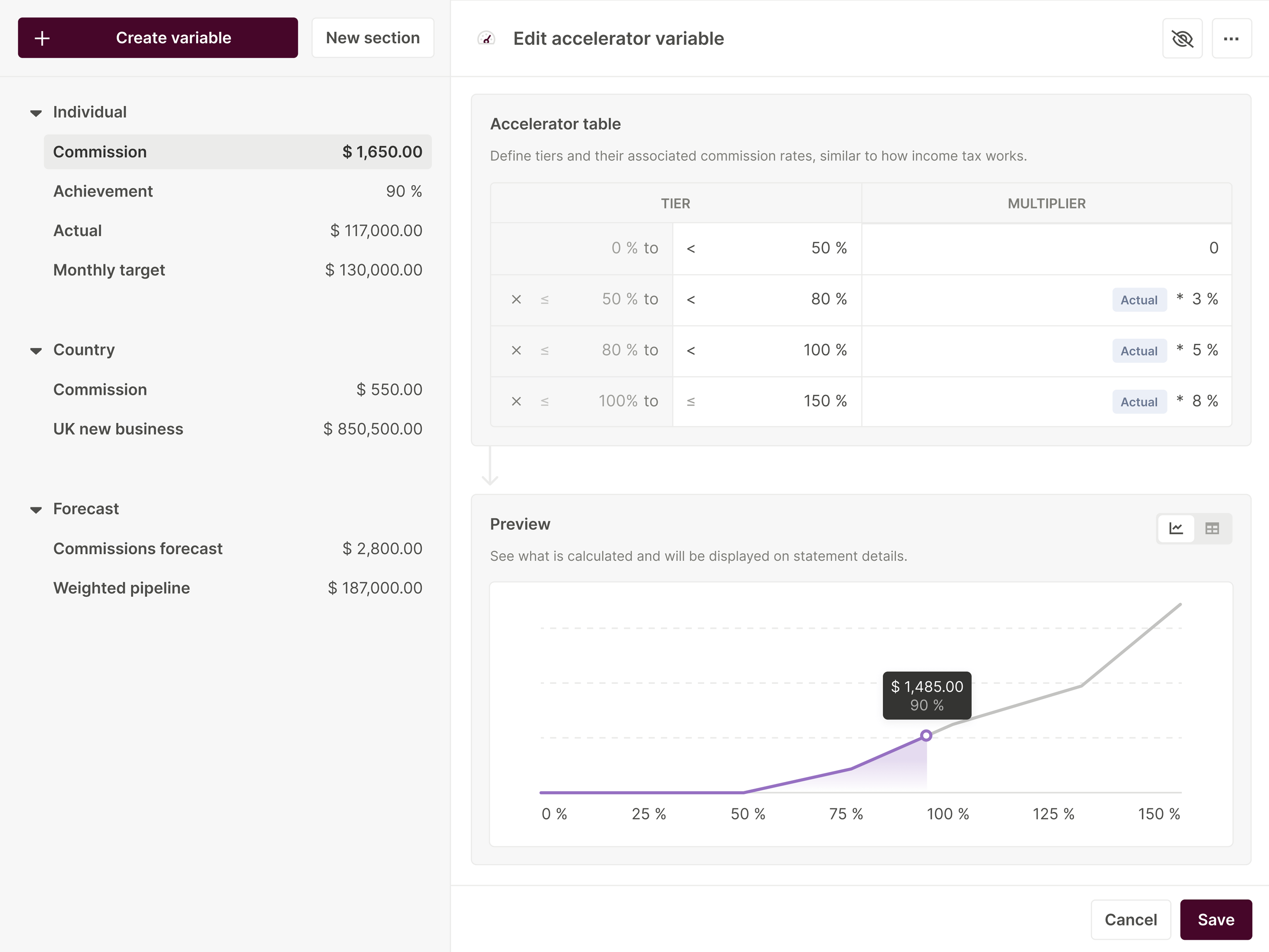
Consider CaptivateIQ if spreadsheet-style formulas are the configuration model you want to assess. Its catalog explicitly lists accelerators, clawbacks and a sandbox. Ask the presenter to combine those elements, then change the cancellation policy without rebuilding the test data. For a narrower comparison route, see Qobra vs CaptivateIQ.
Xactly
Consider Xactly when the evaluation needs to combine day-to-day rule adjustments with hierarchy and dispute handling. Xactly describes these capabilities on its Incent page. Keep the no-code assessment focused on the actual work being demonstrated: its day-to-day configuration description should not be extended to all integration engineering.
Everstage
Consider Everstage if historical replay before publication and multi-stage approval are central to your selection. Everstage describes both on its commission-processing page. Ask to replay the same transactions under the original and revised rules, then demonstrate who can approve the change and what happens when it is rejected.
EasyComp
Keep EasyComp as a conditional candidate when splits, tiers and clawbacks dominate your requirements: it advertises those rule types and source-to-payout traceability. First establish how those rules are configured. Do not place it on a confirmed no-code shortlist until that question, the test environment and the approval path are demonstrated.
Varicent
Consider the cited Varicent commission-software offer if you want to evaluate a component-based plan builder alongside change history and error resolution. Varicent describes those capabilities for this offer; confirm the exact edition rather than applying that configuration model to every Varicent product. Test whether the components express your rule order without a workaround.
Choose the maintenance model, not just the editor
CaptivateIQ’s spreadsheet-style formulas and the cited Varicent offer’s configurable components suggest different evaluation paths. If your administrator already thinks in formulas, ask them to explain and modify the formula chain. If you prefer reusable components, ask them to represent the same exceptions without losing visibility into rule order. Formula familiarity is valuable only if another owner can maintain the logic; component reuse is valuable only if the components fit the policy. Neither approach wins by definition.
Templates are a third starting point: EasyComp’s Starter plan offers “a library of popular, out-of-the-box plans” and Varicent lets you copy and customize pre-built components, while Xactly’s Compensation Configurator reuses rules, quotas and rate tables (vendor websites, Oct 2026). With Qobra, The Architect drafts the plan from your existing comp documents (qobra.co/pricing, Oct 2026). Whichever start you pick, rerun the same acceptance case.
Qobra documents separate sandbox plans and statements; Everstage describes historical-data modeling and multi-stage approvals. For these candidates, decide whether your harder problem is isolating a change or organizing its review, then demonstrate both workflows. Give your intended administrator (not only the vendor presenter) the same maintenance task. Record required assistance, unexplained outputs and workarounds. Prefer the platform that passes your mandatory cases with a support burden your team can sustain, even if another editor looks simpler in a flat-rate demonstration.
Which no-code commission platforms connect to your CRM and payroll?
Qobra, CaptivateIQ, Everstage, EasyComp and Varicent all list Salesforce and HubSpot integrations, and Xactly lists a built-in Salesforce connector and reaches other systems through APIs (vendor websites, Oct 2026). The bigger difference is payroll. Qobra and Everstage name the widest range of payroll and HR systems, CaptivateIQ names ADP Workforce Now, BambooHR and Workday, Varicent names a Workday API, and Xactly and EasyComp name no payroll provider on the pages reviewed.
Integration matrix, as listed on each vendor’s website (Oct 2026). A listed connector does not prove connection depth, so test it with your own records.
| Platform | CRM and data sources listed | Payroll and HR systems listed | Checks before payout |
|---|---|---|---|
| Qobra | Salesforce, HubSpot, Microsoft Dynamics 365, Zoho CRM, Pipedrive, Odoo, Attio; Snowflake, BigQuery, Redshift, PostgreSQL, SQL Server; REST API, SFTP, CSV upload | ADP Workforce Now (payroll-ready file), Gusto (supplemental wages), Rippling, Paylocity, Workday, BambooHR, HiBob, Deel, Remote and more | Built-in discrepancy detection; The Analyst flags gaps between expected and actual payouts; multi-level statement approval before payroll |
| CaptivateIQ | Salesforce, HubSpot, Microsoft Dynamics CRM; Snowflake, BigQuery, Redshift, PostgreSQL, MySQL, Oracle Database; open API, SFTP | ADP Workforce Now, BambooHR, Workday | The same data source on every monthly run; automated multi-level approvals |
| Xactly | Xactly Connect built-in connectors for Salesforce, NetSuite and Snowflake; REST APIs and ODBC/JDBC drivers for other CRM, ERP and HCM systems | No payroll provider named; Connect describes data flows “from CRM to Payroll” | Built-in payout and dispute resolution system; complete audit trail |
| Everstage | Salesforce, HubSpot, Pipedrive, Microsoft Dynamics CRM, Zoho CRM, Freshsales, Close, ServiceTitan; Snowflake, BigQuery, Redshift, PostgreSQL, SQL Server, MySQL, SFTP | ADP Workforce, Gusto, Ceridian Dayforce, Workday, BambooHR, HiBob Payroll, Personio, Employment Hero | Commission Health Monitoring checks each run for missing data uploads, payees without quotas, plan gaps and data quality issues; multi-stage approvals |
| EasyComp | Salesforce, HubSpot and Google Sheets on the Starter plan; Pipedrive, Attio, SugarCRM, Snowflake, Stripe, Maxio and QuickBooks shown among integrations | No payroll provider named | Automated calculations, adjustments and approvals; traceability from source data to payout |
| Varicent | Salesforce, HubSpot, Microsoft Dynamics; Snowflake, SQL Server, MySQL, Oracle; Google Sheets, Excel; REST API, SFTP | Workday API; no payroll provider named | Automated payout approvals and routing; reps submit and track errors; audit trail of changes |
Shortlist Qobra when the payroll handoff matters as much as the calculation, because it lists payroll integrations for ADP Workforce Now, Gusto, Rippling, Paylocity and Workday alongside seven CRM integrations. Everstage is the closest match on breadth, because it lists eight CRMs and payroll systems such as Gusto and Ceridian Dayforce. CaptivateIQ suits warehouse-centric teams, because it lists six warehouses and databases plus an open API (vendor websites, Oct 2026).
Xactly and Varicent suit enterprises that run data integration as a project, because both describe an API or SQL-based data layer rather than a list of payroll connectors. EasyComp fits Salesforce or HubSpot teams, because its Starter plan names both, but confirm the payroll path because none is named.
Sync reliability is what vendor pages document least, so test it in the demo with your own records:
- Close a test deal in the CRM and time how long it takes to reach the rep’s statement.
- Change the amount and the owner after the first calculation, then check that the commission and the credit follow.
- Reopen or delete the deal and confirm the payout is reversed or flagged, not left stale.
- Blank a required field on purpose and check who is alerted and whether the payout run stops.
For a basic payroll sync, a payroll-ready file is often enough: Qobra delivers one for ADP Workforce Now, sends approved payouts to Gusto as supplemental wages and to Rippling for the next pay run, and offers a public REST API and SFTP for other systems (qobra.co/product/integrations, Oct 2026). Connection-level detail is in the commission software integrations comparison.
For a 50-person US sales team on Salesforce or HubSpot, Qobra’s Core package covers the no-code builder, one native CRM integration and live statements; Advanced adds ERP, warehouse and API integrations, and Scale adds native HRIS integration, SSO and sandboxes (qobra.co/pricing, Oct 2026). Pricing is quote-based. Headquartered in New York, with offices in Paris and London, Qobra is SOC 2 Type II certified, and 350+ companies run their commissions on it (qobra.co/pricing and /about-us, Oct 2026).
How do you replace spreadsheet tracking and cut payout errors?
The systems that best replace manual tracking connect to your CRM, apply each rule automatically and check payouts before payroll. All six platforms in this guide do the first two; the table above shows how each one checks payouts. The remaining risk sits in the migration, so replace the spreadsheet in parallel, not overnight.
Spreadsheet error rates are well documented. In Raymond Panko’s review of seven field audits, 24% of 367 operational spreadsheets contained errors, and so did 91% of the 54 spreadsheets audited from 1997 onward, with cell error rates of 0.4% to 2.5% (Panko, 2008). A platform removes three common causes (retyped deal data, copied formulas and competing file versions) because deals come from the CRM and each rule is configured once.
A five-step migration keeps the old and new numbers comparable:
- Freeze a baseline: export two or three closed periods with what each rep was actually paid.
- Connect the sources: CRM first, then HRIS for start dates and managers, then the payroll handoff.
- Rebuild each plan, including rules the spreadsheet applied silently (rounding, proration, manual overrides).
- Run both in parallel for at least one full period and explain every deal-level difference before anyone is paid from the new tool.
- Switch payroll once reconciliation passes, and keep the spreadsheet read-only as the historical record.
Qobra’s onboarding follows this pattern: its in-house team maps your existing plans, The Architect drafts them from your comp documents, and you run Qobra in parallel with your current process before switching payroll. Qobra also states its limit: it is built for teams with people on variable pay, a clean system of record and documented comp rules.
In the Indy customer story, Martin Dambrine, Sales Ops at the fast-growing SaaS company, describes the starting point (customer quote on qobra.co): “Running variable pay had gotten pretty complex. We had more and more sales reps, plus slightly different commission plans, so sometimes it could take us up to two days to get the variable pay out of Excel.” At Spring Health, a US customer, RevOps Manager Jose Herrera sums up the time saved (customer quote on qobra.co): “What used to take me three hours now takes 15 minutes.”
For a line-by-line comparison and fixes you can apply before migrating, see sales commission software vs Excel and how to reduce errors in commission spreadsheets.
Top platforms for transparent commission reporting
Qobra, CaptivateIQ, Xactly, Everstage, Varicent and EasyComp all give reps on-demand statements or dashboards and describe that view as real time (vendor websites, Oct 2026). They differ on what reps can do with it, such as tracing a calculation, simulating a deal or raising a question, and on how managers and Finance build reports. Run the closed-deal timing test above before you compare real-time claims.
Reporting matrix: what reps see and what managers and Finance get, as described on each vendor’s website (Oct 2026).
| Platform | What reps see | What managers and Finance get |
|---|---|---|
| Qobra | A statement where every amount can be clicked to see the deals and rules behind it; attainment, progress to accelerators and gap to target; The Sales Coach answers pay questions and simulates a deal before it closes | Custom reports and dashboards on commission costs, quota attainment and payout trends by team, period or plan; plan performance monitoring; payout forecasts and accruals |
| CaptivateIQ | Customizable statements with calculation tracing; what-if earnings calculator; attainment leaderboards | Custom dashboards; real-time team insights and analytics for managers |
| Xactly | Customized incentive statements; dashboards for earnings, attainment and payouts; commission estimates on live plan logic; native iOS and Android apps | Out-of-the-box or tailored real-time dashboards; drag-and-drop report building for administrators |
| Everstage | Earning statements traced to plan components; Crystal payout forecasting; updates in Slack, Microsoft Teams and Gmail (Connectivity Bundle) | Analytics Studio custom dashboards; reports on attainment, commission cost ratio and budgeted versus projected commissions |
| Varicent | Sales portal with interactive statements, quota attainment and tiers, AI-predicted payout forecasts and error submission | Role-level dashboards and advanced reporting; modeling of compensation changes |
| EasyComp | Line-by-line visibility into commission calculations; real-time view of earnings and progress | Commission expense, attainment and performance tracked as it happens; audit reports on demand |
In Qobra, every package includes live, transparent statements, and reporting grows with the package. Advanced includes basic reporting (5 KPIs), and Scale adds advanced statement reporting, record reporting and custom dashboards (qobra.co/pricing, Oct 2026).
Priyanka Dalal, Finance & Compensation at Sendoso, on calculation transparency (customer quote on qobra.co): “One thing that stands out right away is the transparency into how things are being calculated. That’s something I haven’t seen before and I think that’s amazing to have.”
On G2, Qobra is rated 4.8/5 from 1,071 reviews, and G2’s review summary says users praise its intuitive interface and real-time visibility into commission tracking, while some find initial setup challenging for complex plans (G2, Oct 2026). In our Sept 2026 G2 snapshot, Everstage was rated 4.8/5 (2,152 reviews), CaptivateIQ 4.7/5 (3,489), Varicent 4.5/5 (602) and Xactly Incent 4.2/5 (1,096); EasyComp was not included (commission management software comparison).
For report layouts, reconciliation and exports, see the commission reporting software guide; for data freshness by platform, see real-time commissions compared.
Test tiers, accelerators, clawbacks, splits and bonuses
Use a small, reproducible calculation as the first acceptance test, then add boundary and exception cases. The example below is an illustrative policy, not a market benchmark, customer plan or result produced by any platform. All amounts are USD.
Worked example: fix the order before calculating. Assume a rep has $90,000 of eligible credited revenue before a new $20,000 deal. Credit 60% of that deal to this rep, so $12,000 enters the calculation. Pay 5% through $100,000 of cumulative credited revenue and an accelerated 10% only on the portion above it. The deal earns ($10,000 × 5%) + ($2,000 × 10%) = $700. Add a separate $200 qualifying-product bonus that is not split: the deal-related total is $900. In a later period, assume the deal is fully canceled and the policy reverses both that deal’s commission and its bonus, without repricing other deals. The adjustment is −$900.
Under this policy, splitting first matters. Calculating commission on the full $20,000 deal first would yield $1,500; taking 60% afterward would yield $900 before the bonus, rather than $700. A plausible-looking total can therefore be wrong even when each individual rate is correct.
Turn the example into an acceptance fixture
Keep the illustrative inputs above. Write the default sequence as credit split → base commission → marginal tier uplift → bonus → later refund adjustment. The split produces $12,000 of credited revenue. Base commission is $12,000 × 5% = $600; the tier adds $2,000 × another 5% = $100, not another 10%. The unsplit $200 bonus brings the total to $900. A full cancellation reverses $700 plus $200, leaving zero cumulative earnings from this deal. Preserve the original deal reference and applied split so the reversal does not accidentally use a later ownership assignment.
For boundary tests, hold starting attainment at $90,000 and the qualifying bonus at $200. Supply the following credited amounts after allocation; this isolates tier behavior from split rounding. Round final monetary outputs to cents. These are incremental earnings on the test deal, not total period commissions.
Default policy: only credited revenue strictly above $100,000 earns 10%.
| New credited revenue | Ending attainment | Commission | With bonus | Full reversal |
|---|---|---|---|---|
| $9,999 | $99,999 | $499.95 | $699.95 | −$699.95 |
| $10,000 | $100,000 | $500.00 | $700.00 | −$700.00 |
| $10,001 | $100,001 | $500.10 | $700.10 | −$700.10 |
Approve two policy variants separately
- Variant A: split calculated commission instead of revenue. Keep the $90,000 starting basis, but advance attainment by the full $20,000 deal. Order: base → tier uplift → 60% payout split → bonus → refund. Base is $1,000; the uplift is $10,000 × 5% = $500. Split the $1,500 commission to get $900, then add $200: total $1,100. A full cancellation reverses $1,100. This policy changes both payout allocation and the revenue basis feeding future tiers.
- Variant B: retain the bonus after a partial refund. Return to the default credit-first policy. Assume a later 50% refund reverses exactly 50% of the original $700 commission, leaves the $200 bonus earned, does not reopen attainment and does not reprice other deals. The adjustment is −$350; cumulative deal earnings are $550. Calculate from the original commission, not the rep’s current tier.
Run each variant independently against the default. Do not combine their expected outputs. A configuration passes only when its calculation and explanation match the approved policy, including which attainment basis later transactions inherit.
- Freeze the inputs. Record the starting attainment, transaction amount, split allocation, eligibility flags, period and expected result. Use the identical input file for each candidate.
- Test tiers at the boundary. Run transactions ending just below, exactly at and just above the threshold. Specify marginal tiers versus a rate applied retroactively to all revenue.
- Test accelerators separately. Show which portion receives the higher rate, then change the threshold and compare the affected amounts.
- Test splits before combining rules. Reconcile the credit allocated across participants. Confirm whether the split changes credited revenue, calculated commission or both.
- Test bonus eligibility and clawbacks. Remove the qualifying-product flag, cancel the deal and move the cancellation to a later period. State whether the bonus reverses and whether other transactions are repriced.
- Repeat the combined case after a rule change. Save the original expected result, the revised expectation, the actual outputs and the explanation of every difference.
Evaluate dependencies, exceptions and version control
A successful calculation is only the first pass. Next, change one input or rule and examine every affected output. Map dependencies from source fields to credit allocation, attainment, rates, bonuses and reporting. Include an unaffected rep as a control case so the exercise checks both intended changes and unintended spillover.
For version control, ask to retain the old policy and effective date while introducing the new one. Test a backdated transaction, a mid-period change and a correction to a prior period. Require an explanation of which version applies in each case and how an authorized exception differs from a permanent formula change.
Separate plan ownership from source-data ownership
No-code ownership means an authorized business administrator can maintain supported compensation logic; it does not mean that person owns every upstream data contract. Assign two change paths, with a named owner for each.
- Plan-rule change: increasing the accelerator from 10% to 12% leaves the source fields unchanged. RevOps should update the rule, set its effective period and rerun the accepted fixture. In the default example, commission becomes $500 + ($2,000 × 12%) = $740; with the bonus, the total is $940. Require policy approval before release and verify that earlier periods remain governed by the intended version.
- Source-schema change: replacing one deal-owner field with a participant table containing multiple shares changes the shape of the inputs. The CRM or data owner must establish transaction keys, participant mappings and duplicate handling. RevOps must confirm the meaning of eligible revenue and credited shares. Reconcile transaction counts, revenue totals and allocations before testing payouts; a joined table that repeats a deal’s amount can inflate commission even when the formula is unchanged.
Do not repair a broken source mapping with a compensating payout formula. Pause the affected release, correct the data contract, then rerun both changed and unchanged cases. Ask during selection which mapping tasks the administrator can perform and which require integration support.
Qobra documents dependency inspection across plans, rules, tables, quotas, integrations and reports. Use that scope to inform the impact review, not to replace source reconciliation. Integration dependency results exclude HRIS-synchronized users, attributes and groups, so an empty result is not clearance to disconnect a source.
In Qobra’s Indy customer story, Sales Ops practitioner Martin Dambrine describes launching challenges mid-month, applying them retroactively to the first day and retaining historical data. That is a useful example of Indy’s configuration, not a demonstration of every clawback or split scenario, or a guarantee of immutable history.
Keep this exercise focused on rule maintenance. For a deeper test of who changed a payout and who approved it, use the commission audit-evidence checklist. If the change starts with a reassigned target rather than a compensation formula, use the quota lifecycle guide.
Design and approve a multi-rule plan
Separate agreement on the policy from approval of the configured result. Have Finance approve payout assumptions and guardrails, Sales leadership validate the intended incentives, and RevOps translate the policy into rules and test cases. Name a release owner and decide how unresolved exceptions will block or limit rollout.
Build the approval packet
Package the plain-English policy, rule order, eligibility conditions, effective dates and worked calculations together. Add the historical replay and boundary-test results, with differences explained at the transaction and rep levels. Require reviewers to accept the configured behavior, not merely the policy document or an aggregate payout total.
Rehearse rejection as well as approval
Qobra offers sandbox simulations and validation workflows. Use the selection session to assess both: inspect the test output, introduce a deliberate exception, and ask how the reviewer sends it back for correction. Confirm the approval path for your configuration rather than assuming plan publication and payout validation are the same action.
Before release, reconcile the accepted results, record remaining exceptions and prepare a rep-facing explanation of what changed. After release, compare the first affected period with the accepted test case. Define how you would correct an error before it occurs; do not assume every platform offers the same rollback behavior.
Record engine limits, operating requirements and a final shortlist
Finish with a decision record for each candidate: demonstrated rules, unresolved cases, configuration workarounds, required features, test-period coverage and approval behavior. Mark each requirement as demonstrated, still open or unacceptable for your policy. Keep a verbal assurance separate from an observed result.
Include reporting in that record. In Qobra, calculated plan values must be flagged as shared Statement Metrics or table-specific Record Metrics before they are used in reports. A Record Metric must use scopes based on its linked source table, and a shared metric must represent the same concept across plans. Check those definitions before comparing results from different plans.
Our recommendation is to keep Qobra on the final shortlist if it passes your combined-rule and change tests. Start the selection session with the split-before-tier example, then require the later cancellation and approval handoff. Retain alternatives according to the configuration approach you prefer and the unresolved cases they can demonstrate, not an overall feature count.
Evaluate staffing fit separately with the mid-market commission software guide. For the rule-design decision here, bring your policy and expected calculations to a Qobra demo and ask to work through the difficult cases, including the ones that must remain unchanged.
Frequently asked questions
How can buyers test tiers, accelerators, clawbacks, splits, and bonuses in a no-code platform?
Use the same worked scenario and expected calculations for every candidate. Define rule order before configuring the plan, then test threshold crossings, credit splits, bonus eligibility, and later-period cancellations. Compare expected and actual outputs, including explanations of differences. Repeat the combined case after changing a rule, and confirm that the test environment covers the periods your scenario requires.
How should a team design, test, and approve a compensation plan with multiple rules?
Separate approval of the compensation policy from approval of its configured results. Finance should approve payout assumptions and guardrails, Sales leadership should validate incentives, and RevOps should translate the policy into rules and tests. Give reviewers the rule order, effective dates, worked calculations, historical replay, and boundary results. Name a release owner and rehearse how exceptions are returned for correction before rollout.
What is no-code software?
No-code software lets you configure behavior without writing application code. For sales commissions, the important question is whether its configuration tools can express, test, and maintain your policy. The label does not remove the need to evaluate formulas, data preparation, or rule ordering. It also does not mean a business administrator owns every upstream data contract.
What is the main difference between a no-code stack and dedicated commission software?
A no-code stack means building a tracker from general-purpose database, automation, and app tools; dedicated commission software is the alternative evaluated in this article. This is a build-versus-buy distinction, not simply a coding distinction: dedicated platforms can also offer no-code configuration. Evaluate whether their configuration tools and change workflows support your actual commission rules.
Which commission software replaces spreadsheets and reduces calculation errors?
Qobra, CaptivateIQ, Xactly, Everstage, Varicent and EasyComp all replace manual entry with CRM connections and apply each rule automatically. They differ in the checks they run before payout: Qobra adds built-in discrepancy detection and an AI agent that flags gaps between expected and actual payouts. Run it in parallel with the spreadsheet for one full period before switching payroll.
Which commission software shows reps their earnings in real time as deals close?
Qobra, CaptivateIQ, Xactly, Everstage, Varicent and EasyComp all describe real-time earnings visibility for reps. In Qobra, reps open a statement where every amount links to the deals and rules behind it, track progress to accelerators and simulate a deal before it closes. Because freshness depends on how CRM data syncs, close a test deal during the demo and time it.
Which no-code commission platforms connect to Salesforce, HubSpot and payroll?
Qobra, CaptivateIQ, Everstage, EasyComp and Varicent list both Salesforce and HubSpot; Xactly lists a built-in Salesforce connector. For payroll, Qobra names ADP Workforce Now, Gusto, Rippling, Paylocity and Workday, Everstage names ADP Workforce, Gusto, Ceridian Dayforce and Workday, and CaptivateIQ names ADP Workforce Now, BambooHR and Workday. Varicent names a Workday API; Xactly and EasyComp name no payroll provider.