Webinar (Wednesday, October 21) — Aligning HR, Finance, and Sales: Mastering Sales Comp Without Breaking Your Plan
Register
Are you struggling to find software that is both powerful and flexible? Do you find yourself caught between the high costs and rigid structure of proprietary software and the potential lack of support in purely free open-source projects? What if there was a solution that offered the best of both worlds—the transparency and community of open-source combined with the reliability and support of a commercial product?
This hybrid model is not just a niche concept; it's a driving force behind some of the most innovative technologies used by businesses today. It offers a strategic advantage, allowing for unparalleled customization without sacrificing enterprise-grade stability. As you navigate the complex landscape of digital tools, understanding this category of software is crucial for making informed decisions that can accelerate growth, enhance security, and control costs. Let's explore how these solutions work and discover some of the top applications available.
What Exactly is Commercial Open-Source Software?
To understand commercial open-source software, it's helpful to break down the two components. Open-source software refers to code that is publicly accessible; anyone can see, modify, and distribute the code as they see fit. This fosters a collaborative environment where a global community of developers can contribute to improving the software. On the other hand, commercial software is developed and sold for profit, typically under a restrictive license that prevents users from accessing or altering the source code.
Commercial open-source software merges these two philosophies. It is built on an open-source foundation, but it is backed by a for-profit company that provides enterprise-level services and features. This business model, often called "open core," works by offering a free, feature-rich community edition while selling a premium version with additional functionalities, dedicated support, and maintenance guarantees. The commercial vendor invests in the core open-source project, ensuring its continued development and stability, while profiting from the value-added services that businesses require.
This approach gives organizations the freedom and transparency of open source with the peace of mind that comes from having a professional support system. You get the innovation of a community-driven project paired with the accountability of a dedicated vendor.
The Strategic Advantages: Why Choose Commercial Open-Source?
Opting for commercial open-source software is more than just a cost-saving measure; it's a strategic decision that offers significant long-term benefits. Businesses that adopt this model gain a competitive edge through enhanced flexibility, security, and innovation.
The primary advantage lies in the absence of vendor lock-in. With proprietary software, you are entirely dependent on the vendor for updates, bug fixes, and future development. If the vendor discontinues the product or changes its pricing model, you are left with few options. Commercial open-source software, however, gives you access to the source code. If you're ever dissatisfied with the commercial vendor, you have the freedom to continue using the open-source version, find another vendor for support, or even manage it in-house. This freedom provides both security and negotiating power.
Here are some of the key benefits:
- Flexibility and Customization: Since the source code is available, you can tailor the software to meet your specific business needs. This level of customization is rarely possible with closed-source, proprietary alternatives.
- Enhanced Security and Transparency: With thousands of developers able to review the code, vulnerabilities are often identified and fixed more quickly than in a closed environment. This transparency builds trust and results in more robust, secure applications.
- Community-Driven Innovation: These projects benefit from a global pool of talent. Features and improvements are often suggested and contributed by the community, leading to faster innovation and a product that evolves with market needs.
- Cost-Effectiveness: The Total Cost of Ownership (TCO) for commercial open-source solutions is often lower. You can start with a free community edition to validate the solution and only pay for premium features or support as your business scales.
💡 Expert Advice
When evaluating a commercial open-source solution, look beyond the features and assess the health of its community. Check the project's repository (like GitHub) for recent commit activity, review the discussion forums to see how active users are, and research the vendor's contribution history. A vibrant community and a committed vendor are strong indicators of a project's long-term viability.
Commercial Open-Source vs. Proprietary Software: A Head-to-Head Comparison
Choosing between commercial open-source and proprietary software depends heavily on your organization's priorities, technical resources, and long-term strategy. While proprietary solutions offer a straightforward, all-in-one package, commercial open-source provides a more flexible and transparent alternative.
Proprietary software is often easier to deploy out-of-the-box, as it is designed for a specific purpose with a controlled user experience. The vendor handles all development, maintenance, and support, providing a single point of contact for any issues. This can be appealing for businesses that lack in-house technical expertise. However, this convenience comes at the cost of control. Customization is limited, licensing fees can be substantial and recurring, and the risk of vendor lock-in is ever-present.
In contrast, commercial open-source software empowers businesses with greater control over their technology stack. The ability to inspect and modify the source code means you can build truly bespoke solutions. While this may require more initial setup or technical knowledge, the long-term benefits—including lower costs, enhanced security, and freedom from vendor dependency—are often compelling. The choice ultimately hinges on whether your business values turnkey convenience or strategic flexibility more.
| Feature | Commercial Open-Source Software | Proprietary Software |
|---|---|---|
| Source Code Access | Accessible to all; can be viewed, modified, and distributed. | Kept secret; cannot be viewed or modified by the user. |
| Cost Model | Often a free "community" version with paid enterprise features and support (Open Core). | Typically based on perpetual licenses or recurring subscriptions (SaaS). |
| Customization | High. Can be adapted to fit unique business processes. | Limited to the options provided by the vendor. |
| Support | A mix of community forums (free) and dedicated vendor support (paid). | Provided exclusively by the vendor as part of the license or a separate contract. |
| Innovation Speed | Often faster due to contributions from a global developer community. | Dictated entirely by the vendor's internal development roadmap. |
| Vendor Lock-In | Low. You can switch support vendors or manage the software in-house. | High. Migrating to another system can be difficult and costly. |
A Curated List of Notable Commercial Open-Source Applications
The world of commercial open-source software is vast and covers nearly every business need, from infrastructure management to customer relationship management. To help you navigate this landscape, here is a curated list of prominent applications, categorized by their primary function.
Infrastructure & DevOps
These tools form the backbone of modern IT operations, enabling teams to build, deploy, and manage applications with speed and reliability.
| Product Name | Commercial Vendor | Description |
|---|---|---|
| Docker | Docker, Inc. | A platform for developing, shipping, and running applications in containers. |
| GitLab | GitLab Inc. | A complete DevOps platform delivered as a single application. |
| Terraform | HashiCorp | An infrastructure-as-code tool for building, changing, and versioning infrastructure. |
| Red Hat Enterprise Linux | Red Hat | An enterprise-grade Linux operating system for servers and clients. |
| HAProxy | HAProxy Technologies | A high-availability load balancer and proxy server for TCP and HTTP-based applications. |
| Puppet | Puppet Labs | An infrastructure configuration management tool for automating IT operations. |
Databases & Data Management
Data is the lifeblood of any modern business. These solutions provide powerful and scalable ways to store, retrieve, and analyze it.
| Product Name | Commercial Vendor | Description |
|---|---|---|
| MongoDB | MongoDB Inc. | A popular NoSQL document-oriented database program. |
| MySQL Enterprise | Oracle Corporation | A commercial version of the world's most popular open-source relational database. |
| MariaDB | MariaDB Corporation | A community-developed, commercially supported fork of MySQL. |
| Cassandra | DataStax | A distributed NoSQL database designed for handling large amounts of data. |
| Elasticsearch | Elastic | A distributed, RESTful search and analytics engine (part of the ELK Stack). |
| InfluxDB | InfluxData | A time-series database optimized for fast, high-availability storage and retrieval of time-stamped data. |
Business Applications & ERP/CRM
These applications help manage core business processes, from sales and customer interactions to accounting and resource planning.
| Product Name | Commercial Vendor | Description |
|---|---|---|
| Odoo | OpenERP S.A. | A suite of business management software tools including CRM, e-commerce, billing, and more. |
| Dolibarr | Dolibarr Association | An open-source ERP and CRM for small and medium-sized businesses. |
| Alfresco | Alfresco | An enterprise content management (ECM) system for documents, web, and collaboration. |
| Bonita BPM | Bonitasoft | A business process management (BPM) and workflow automation platform. |
| Magento Open Source | Magento (Adobe) | A highly flexible e-commerce platform for building online stores. |
Content Management & Web Development
These platforms are essential for creating and managing digital experiences, from simple blogs to complex enterprise websites and applications.
| Product Name | Commercial Vendor | Description |
|---|---|---|
| WordPress | Automattic | The world's most popular content management system (CMS) for websites and blogs. |
| Drupal | Acquia | A powerful and flexible CMS used for building ambitious digital experiences. |
| JBoss Enterprise | Red Hat | An enterprise middleware platform based on Java EE for building and deploying applications. |
| Qt | The Qt Company | A cross-platform application development framework for desktop, embedded, and mobile. |
| Unreal Engine | Epic Games | A popular real-time 3D creation tool for games, simulations, and visualizations. |
The Other Side of the Coin: Potential Downsides to Consider
While the benefits are significant, it's also important to approach commercial open-source software with a clear understanding of its potential challenges. Adopting these solutions isn't always a simple plug-and-play process, and being aware of the downsides can help you make a more balanced decision.
One of the most common challenges is implementation complexity. While a commercial vendor provides support, the initial setup and configuration of open-source software can require more technical expertise than a turnkey proprietary solution. Your team may need specialized skills to integrate the software into your existing environment and customize it effectively. Additionally, support can be fragmented. For basic issues, you might rely on community forums, while more complex problems require escalating to the paid vendor. Navigating these two tiers of support can sometimes be less streamlined than having a single point of contact.
Finally, the "open core" model can have limitations. The free community edition is often designed to be highly functional, but it may intentionally lack certain critical features—such as advanced security, auditing, or integration capabilities—that are reserved for the premium enterprise version. Businesses must carefully evaluate whether the free version is truly sufficient for their needs or if it's primarily a pathway to an expensive upgrade.
🚨 Attention: Check the License
Not all open-source licenses are the same. Some, like the GNU General Public License (GPL), have "copyleft" provisions that may require you to make your own modifications publicly available. Others, like the Apache or MIT licenses, are more permissive. Before adopting a commercial open-source solution, ensure its license is compatible with your company's policies and long-term goals.
Aligning Your Tools for Peak Performance: The Role of Specialized Software
While the lists above cover broad categories like databases and infrastructure, some business functions are so critical and complex that they demand a specialized, best-in-class tool. Managing sales commissions is a perfect example. For years, companies have relied on spreadsheets to calculate commissions, but this manual approach is prone to errors, creates disputes, and offers zero real-time visibility for sales reps. It's a system that breeds frustration and demotivates the very people it's supposed to incentivize.
That's precisely where a dedicated platform becomes essential for modern businesses. We designed Qobra to eliminate the chaos of manual commission management. Our platform automates the entire process, from data collection to final payment, ensuring accuracy, transparency, and efficiency. By integrating natively with your CRM (like Salesforce or HubSpot), Qobra pulls deal data in real-time, so sales reps can see their potential earnings update instantly after closing a deal. This immediate feedback loop is a powerful motivator and aligns the entire team around key business objectives.
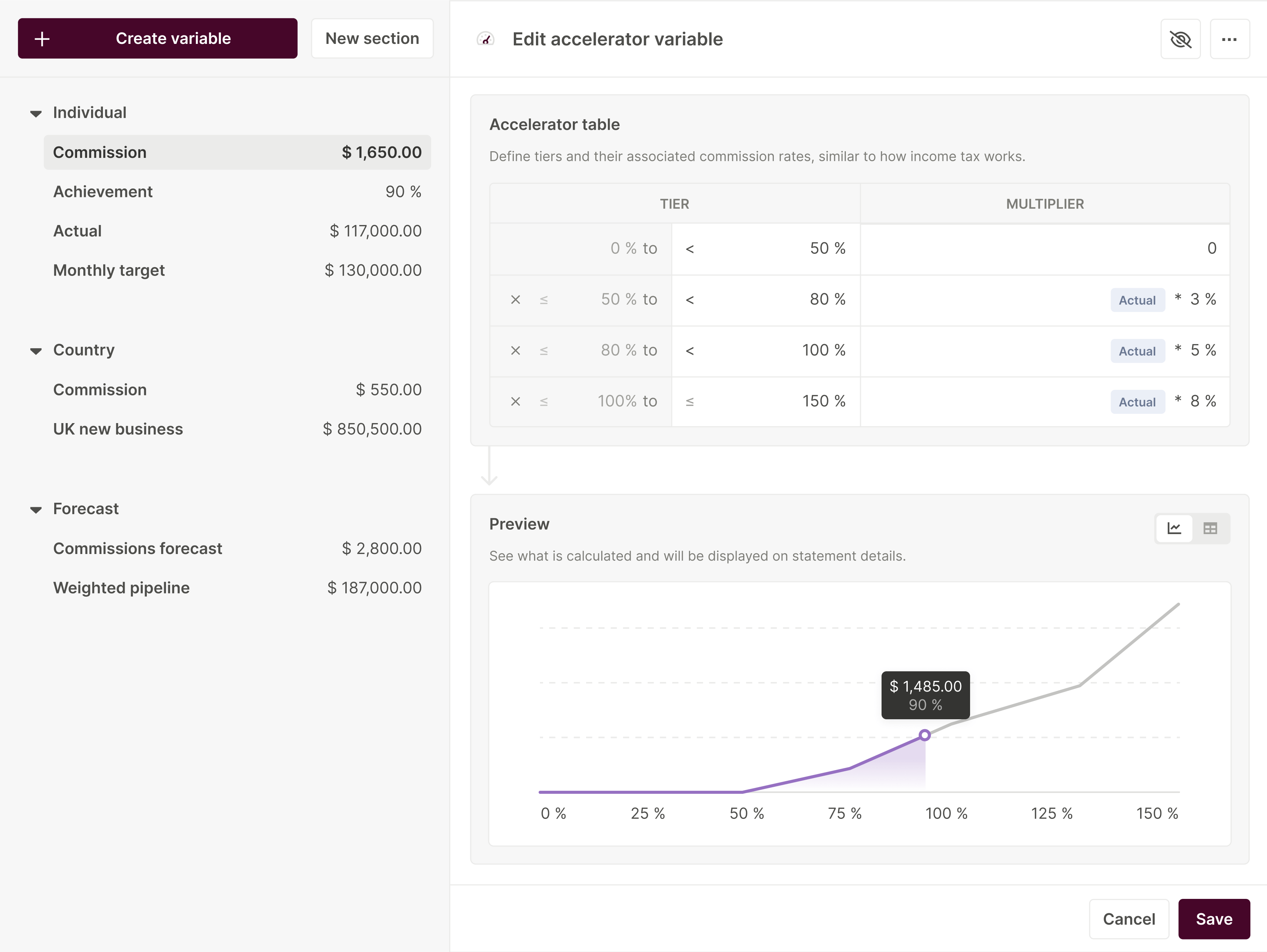
Our intuitive, no-code plan editor lets sales and finance teams build and adapt complex incentive plans without writing a single line of code, and our AI takes it further: describe the plan or view you want in natural language, and Qobra generates it for you. For reps, the "Explain my comp" assistant and AI earnings-simulation agents deliver full transparency. Secure approval workflows ensure that every payment is audited and validated by managers, Finance, and HR before being processed. This not only saves dozens of hours each month but also guarantees compliance and builds trust across the organization. By replacing outdated spreadsheets, you provide your teams with a reliable performance management system that boosts motivation and drives results. Choosing the right IT sales tools is a critical step in building a high-performing sales organization.
Choosing the right software is a critical decision. The rise of commercial open-source provides a compelling middle ground, offering the innovation and freedom of open-source with the reliability of commercial backing. By understanding the pros and cons, you can build a technology stack that is both powerful and adaptable. The key is to think strategically, combining broad, flexible platforms with specialized, best-in-class solutions for your most critical business processes, like sales compensation. This balanced approach will empower your teams, control costs, and position your business for sustainable growth.
Frequently Asked Questions
Is commercial open-source software really free?
This is a common point of confusion. The "free" aspect of open-source refers to freedom, not necessarily price. While most commercial open-source software includes a free community edition that can be used without cost, it is the enterprise edition that generates revenue. The enterprise version typically includes advanced features, security patches, official support, performance guarantees, and other services that large businesses require. Therefore, while you can often start for free, you should budget for the commercial version if you need enterprise-grade capabilities and support.