


How to Automate Sales Commission Accruals and Financial Reporting
How to automate the month-end commission close: accrued liability, ASC 340-40 capitalization, true-ups, ERP journal entries and Finance reports, with a worked example.


- A commission close moves three balances: accrued commissions (a liability), deferred commissions (an asset) and commission expense.
- ASC 340-40-25-1 requires a company to capitalize the incremental costs of obtaining a contract, such as sales commissions, when it expects to recover them.
- The practical expedient in ASC 340-40-25-4 lets a company expense those costs when incurred if the amortization period would be one year or less.
- In the worked example below, $160,000 of October commissions produces $115,400 of October commission expense, while payroll pays $140,200 for September.
- Qobra generates accruals automatically at each close and sends commission accruals and expenses to the NetSuite ledger (qobra.co, Oct 2026).
Automating commission accruals means letting commission software calculate what reps earned at each period cutoff, classify every amount as an expense or a capitalized contract cost, and send the resulting entries to the ERP, so Finance closes the books on the same numbers payroll pays. This guide covers the balances a commission close moves, how payout structures change the accrual, a worked October close with journal entries, the data flow from CRM to ERP, the reports Finance needs and seven tools compared.
What does a month-end commission accrual include?
A month-end commission accrual records every commission reps earned in the period, whether or not payroll has paid it yet. FASB describes accrual accounting as depicting the effects of transactions "in the periods in which those effects occur, even if the resulting cash receipts and payments occur in a different period" (FASB Concepts Statement No. 8, Chapter 1, OB17).
Under US GAAP, the close then moves up to three balances:
- Accrued commissions (liability): earned but not yet paid, and cleared when payroll pays the approved amount. Our guide to accrued commissions covers the definition and the basic accrue-and-pay entries.
- Deferred commissions (asset): ASC 340-40-25-1 requires an entity to "recognize as an asset the incremental costs of obtaining a contract with a customer if the entity expects to recover those costs," and ASC 340-40-25-2 names a sales commission as the example (Deloitte, Roadmap: Revenue Recognition, chapter 13). The asset is amortized "on a systematic basis that is consistent with the transfer to the customer of the goods or services to which the asset relates" (ASC 340-40-35-1).
- Commission expense (income statement): costs that would have been incurred whether or not the contract was obtained (ASC 340-40-25-3), commissions expensed under the practical expedient when the amortization period would be one year or less (ASC 340-40-25-4), and the monthly amortization of the asset.
A company that elects the expedient must disclose the election (ASC 606-10-50-22), and Deloitte notes that it should be applied consistently to contracts with similar characteristics. The five-step model, amortization periods and impairment are covered in our ASC 606 commissions guide; this article focuses on running the close.
How do automated platforms keep accruals accurate across multiple payout structures?
Automated platforms keep accruals accurate by running the same plan rules that pay reps on every deal at the cutoff, then recalculating when attainment, deal data or approvals change. The accrual and the payout come from one engine, so the true-up at payday stays small and explainable. Each payout structure affects the accrual differently:
- Tiers and accelerators: a rep who crosses a quarterly threshold in month 3 can raise the rate on earlier deals when tiers apply retroactively. Decide whether months 1 and 2 accrue at the rate earned so far or at the rate expected at quarter end, and let the software recalculate the accrual every month.
- Paid-on-collection plans and clawbacks: ASC 340-40 addresses which costs to capitalize, not when to recognize them; other Codification topics set the timing of the liability, and Deloitte lists commissions contingent on a future event, subject to clawback or based on cumulative targets as complex cases (Roadmap, section 13.2.5). Agree the accrual policy with your auditors before you automate it.
- Annual and multi-year contracts: the contract term drives the capitalize-or-expense split, so every deal record needs a start date and a term.
- Splits and overrides: each payee type (rep, manager, overlay specialist) can map to a different account. Classify them once in the plan setup, not every month in a spreadsheet.
- SPIFFs and activity bonuses: a SPIFF paid for booked demos is owed whether or not a contract is signed, so it is expensed (ASC 340-40-25-3).
- Multi-currency payouts: accrue in the payee's currency and legal entity, so each ERP entry lands in the right subsidiary.
One word, two meanings: a plan true-up pays a rep a recalculated amount, while an accounting true-up books the gap between the accrued estimate and the approved payout. Both should trace back to the deal that caused them.
Worked example: a month-end commission close with journal entries
Hypothetical example: a US SaaS company pays commissions on the 15th of the following month. At the October cutoff, its commission platform calculates $160,000 of earned commissions, and the accounting policy agreed with its auditors splits them three ways:
- $96,000 on new 3-year contracts: capitalized as deferred commissions and amortized over the 36-month term from the November service start ($2,666.67 a month).
- $58,000 on 12-month contracts: renewals earn a commensurate commission, so the policy sets a 12-month amortization period and the company expenses them under the practical expedient.
- $6,000 for a booked-demo SPIFF: owed whether or not a contract is signed, so expensed.
Two other movements hit October. The approved September payout was $140,200, or $1,800 below the $142,000 accrual: one 3-year deal was corrected (-$1,200 of commission) and one 12-month deal was discounted (-$600). The existing deferred commission schedules amortize $52,000. Payroll taxes are left out for clarity.
October commission journal entries (hypothetical data)
| Date | Entry | Debit | Credit | Amount |
|---|---|---|---|---|
| Oct 15 | True-up: approved September payout below the accrual | Accrued commissions | Deferred commissions $1,200; Commission expense $600 | $1,800 |
| Oct 15 | September commissions paid through payroll | Accrued commissions | Cash | $140,200 |
| Oct 31 | October commissions on 3-year contracts, capitalized | Deferred commissions | Accrued commissions | $96,000 |
| Oct 31 | October commissions on 12-month contracts and the SPIFF, expensed | Commission expense | Accrued commissions | $64,000 |
| Oct 31 | Monthly amortization of deferred commissions | Commission expense | Deferred commissions | $52,000 |
October roll-forward of the three balances (hypothetical data)
| Movement | Accrued commissions (liability) | Deferred commissions (asset) | Commission expense (October) |
|---|---|---|---|
| Opening balance, Oct 1 | $142,000 | $1,440,000 | n/a |
| September true-up | -$1,800 | -$1,200 | -$600 |
| September commissions paid | -$140,200 | n/a | n/a |
| October commissions, 3-year contracts | +$96,000 | +$96,000 | n/a |
| October commissions, 12-month contracts | +$58,000 | n/a | +$58,000 |
| October SPIFF | +$6,000 | n/a | +$6,000 |
| Amortization | n/a | -$52,000 | +$52,000 |
| Closing balance, Oct 31 (expense: October total) | $160,000 | $1,482,800 | $115,400 |
The close produces three different numbers: $160,000 earned and owed, $115,400 of commission expense and $140,200 of cash paid. Look at the true-up: $1,200 of it reduced the asset, not the expense, because the original commission had been capitalized. A true-up has to follow the classification of the accrual it corrects, which is tedious by hand and straightforward when the platform keeps the link to each deal.
How should commission data flow from closed-won deals to the ERP and payroll?
Commission data should flow one way, from the closed-won deal to the paycheck and the ledger, with each system owning one step. The CRM owns the deal, the HRIS owns the payee, the commission platform owns the calculation and its classification, payroll owns the payment and the ERP owns the books.
- CRM: the closed-won deal with amount, close date, owner, product, contract start date and term.
- HRIS: the payee's legal entity, department, currency and employment dates.
- Commission platform: calculates each commission, classifies it (capitalize or expense), maps it to a GL account and department, and flags anomalies before approval.
- Approval: managers, then Finance, approve statements; nothing reaches payroll unapproved.
- Payroll: receives approved payouts only, as a file or through a connector.
- ERP: receives summarized entries by account, department, entity and currency, while deal-level detail stays in the commission platform for audit.
The weak link is usually the deal record. It is built for sales, so it often lacks what accounting needs: the contract start date, the term and the signing entity. Add those fields before you automate the accrual, and test how each vendor's connector reads them with our commission software integrations comparison.
For accounting software, ask each vendor three questions: which ERP it posts to natively, what an entry contains (accounts, departments, entities, currencies) and whether it posts accruals, payouts or both. To check the audit side of the same flow (who changed which rule, input or payout), use our commission audit trail guide.
Which reports does Finance need from commission software?
Finance needs reports that tie every balance in the close to the deals behind it. Public companies must also describe the judgments used to determine capitalized costs and the amortization method (ASC 340-40-50-2), and disclose closing balances by main category of asset plus the period's amortization and impairment losses (ASC 340-40-50-3). Private companies (entities other than public business entities and certain not-for-profits and employee benefit plans) may elect not to provide those two disclosures (ASC 340-40-50-4), as Deloitte's Roadmap section on contract cost disclosures shows.
Commission reports for the month-end close
| Report | What it shows | Why Finance needs it |
|---|---|---|
| Accrued commissions roll-forward | Opening balance, true-ups, payments, new accruals and closing balance, by entity and currency | Supports the liability on the balance sheet at each close |
| Deferred commissions roll-forward | Opening balance, amounts capitalized, amortization, impairment and closing balance | Supports the ASC 340-40-50-3 disclosures (public companies) |
| Amortization schedule by contract | Contract, payee, service start, term, monthly amount and remaining balance | Supports the amortization entry; the schedule is updated when the expected timing of transfer changes significantly (ASC 340-40-35-2) |
| Commission expense by account and department | Expensed commissions, SPIFFs and amortization by GL account, department and cost center | Feeds the income statement and budget versus actual |
| Accrual-to-payout variance | Each true-up with its cause: deal correction, clawback or approval hold | Explains why the approved payout differs from the accrual |
| Payout forecast | Expected commissions for the next close, from pipeline and history | Cash planning and the next accrual estimate |
To bridge calculated commissions to cash actually paid (pending, approved, sent and settled amounts), see our commission reporting guide.
How does real-time commission data help Finance close faster?
Real-time calculation turns the accrual into a running number instead of a month-end reconstruction: Finance can watch it build as deals close, compare it with budget mid-month and fix data issues before the cutoff rather than after payroll. Revenue leaders see the same figures as attainment and commission cost per team, so performance reviews and the close use one dataset.
A commission close calendar (adapt the days to your payroll cycle)
| When | Step | Owner | What software automates |
|---|---|---|---|
| Mid-month | Review the running accrual against budget | Finance | Live accrual by team, plan and entity |
| Day -2 | Flash estimate for the close | Finance | Payout forecast from pipeline and closed deals |
| Day 0 | Data cutoff for the period | RevOps | Snapshot of closed-won deals and payee data |
| Day 1 | Calculate, classify and check | RevOps | Calculation, capitalize-or-expense split, anomaly flags |
| Day 2 | Approve statements | Managers, then Finance | Multi-level approval workflow |
| Day 3 | Post the entries | Finance | Summarized entries sent to the ERP |
| Day 4 | Reconcile the three balances | Finance | Roll-forward and variance reports |
| Payday | Pay approved commissions | Payroll | Payroll file or connector |
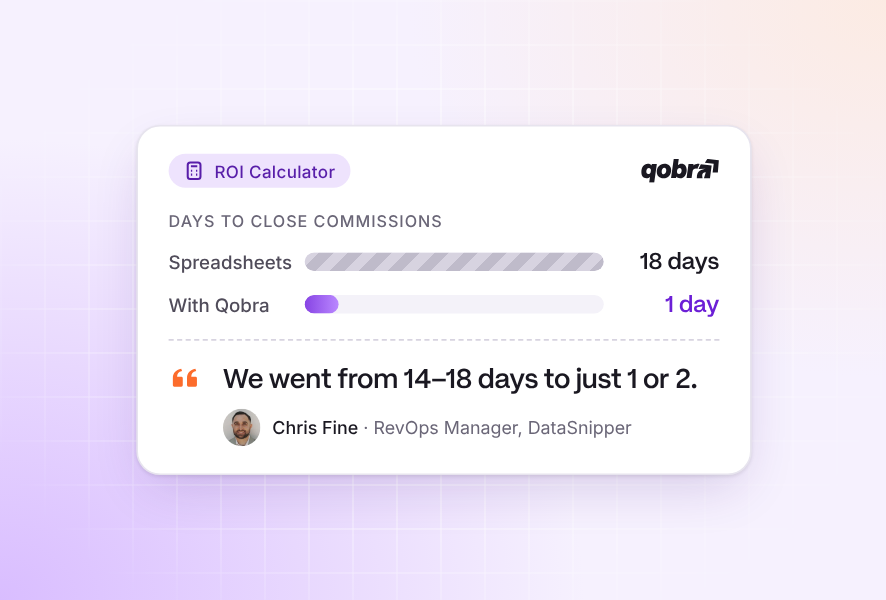
The calendar only holds if the data is right before Day 0, which is why continuous calculation matters more than a faster month-end script. DataSnipper's RevOps team describes the result:
"Closings went from 2 weeks to 2 days, we're getting down to 1 day now." Chris Fine, RevOps Manager at DataSnipper (customer quote on qobra.co)
Which commission tools automate accruals and ERP journal entries?
Commission platforms now commonly state accrual or ASC 606 features, but they differ on where the accounting work happens: in the core product, in a separate module, or in an export the ERP completes. The table reuses the cells published in our finance controls comparison, with Qobra updated from its October 2026 site.
Accrual, ASC 606 and ERP features stated by commission software vendors
| Platform | Accrual reports | ASC 606 / ASC 340-40 support | Journal entry export to ERP | Consider it when |
|---|---|---|---|---|
| Qobra | Forecasts future payouts from pipeline and historical data and generates accruals automatically at each close | Commission data kept clean, structured and traceable to feed ASC 606 reporting and auditors' requests | NetSuite: commission accruals and expenses sent to the ledger; QuickBooks Online: commission expenses (Advanced and Scale packages) | You close in NetSuite or QuickBooks Online and want accruals from the engine that pays reps, because both connectors are listed on its integrations page |
| Xactly Incent | Via Xactly Commission Expense Accounting (CEA), separate module | Yes via CEA, ASC 606 / IFRS 15, full and modified retrospective | Yes via CEA, "interoperates with all downstream accounting ledgers" | You want a dedicated commission expense accounting module, because accruals and ASC 606 run through CEA, a separate module |
| CaptivateIQ | Yes, automated calculations and accruals for ASC 606 reporting | Yes, ASC 606 reporting (ASC 340-40 not stated) | Journal entry generation stated in vendor materials | You want accruals generated with the commission calculation, because it states automated calculations and accruals for ASC 606 reporting |
| Performio | Collects ASC 606 data: amortization amount, PTD expensed, asset balance | Yes, ASC 606 data collection | Journal export | Finance wants amortization and asset balances next to payout data, because it collects the amortization amount and asset balance |
| Everstage | Amortization schedules and waterfalls | Yes, amortization calculation engine for ASC 606 | ERP journal export | You want amortization schedules computed in the commission tool, because it states an amortization calculation engine |
| Varicent | Yes, journal entry reporting | Yes, "turnkey support for ASC 606 / ASC 340-40" | Yes, pre-built integration into accounting | You need ASC 340-40 support stated explicitly, because it states turnkey support for ASC 606 / ASC 340-40 |
| QuotaPath | Ledger & ASC 606 support on Growth and Premium | Yes, ASC 606 support | Ledger export format | You want a simpler tool with published pricing, because Growth lists ledger and ASC 606 support at $35 per user per month + $525 per month platform fee, billed annually |
Sources: vendor websites, Sept 2026 (cells as published on qobra.co); Qobra: qobra.co/solution/finance, qobra.co/product/integrations and qobra.co/pricing, Oct 2026. Ask each vendor which package includes these features, and request a sample entry file built from your own data.
How Qobra handles commission accruals and financial reporting
Headquartered in New York, with offices in Paris and London, Qobra calculates commissions from CRM, HRIS, ERP and data warehouse data and turns each close into accruals Finance can book. 350+ companies and 30,000+ users run their commissions on Qobra, with $1B+ in commissions certified (qobra.co/about-us).
- Payout structures: accelerators, ramp-ups, true-ups, clawbacks and multi-currency payouts configured without code (qobra.co/solution/revenue-operations, Oct 2026), plus splits, overrides and manual payments, with every adjustment logged (qobra.co/solution/finance).
- Accruals and forecast: Qobra forecasts future payouts from pipeline and historical data and generates accruals automatically at each close.
- Checks before payroll: real-time calculation and built-in discrepancy detection (qobra.co/pricing, Oct 2026). The Analyst, one of three AI agents included in every package, spots gaps between expected and actual payouts and alerts the team, and statements go through multi-level approval before payroll.
- ERP and payroll: commission accruals and expenses sent to the NetSuite ledger, commission expenses to QuickBooks Online, and approved payouts to payroll systems such as ADP Workforce Now, Rippling, Gusto and Paylocity (qobra.co/product/integrations).
- ASC 606 data: commission data stays clean, structured and traceable, ready to feed ASC 606 reporting and auditors' requests.
- AI assistants: through the Qobra MCP Server, Finance can prepare the closing period from Microsoft Copilot or another MCP-compatible assistant with live Qobra data, within the user's Qobra permissions.
Plan for three limits. ERP, data warehouse and API integrations start with the Advanced package, and native HRIS integration requires Scale (qobra.co/pricing, Oct 2026). Qobra's site describes ASC 606 data that feeds your reporting, so check in the demo where your ASC 340-40 amortization schedule will run, in Qobra or in your ERP. And Qobra is built for teams with 10 or more people on variable pay, a clean system of record and documented comp rules.
"At the end of every period, when we run commissions right now, we do a simple check with our finance team, and that's it." Derek Boelig, VP RevOps at DataSnipper (customer quote on qobra.co)

Frequently asked questions
What software supports sales incentive tracking with multiple payout structures?
Look for a platform that configures tiers, accelerators, splits, clawbacks, SPIFFs and multi-currency payouts without code, and recalculates the accrual when attainment changes. Qobra configures accelerators, ramp-ups, true-ups, clawbacks and multi-currency payouts without code (qobra.co, Oct 2026). Test any shortlist on one real plan that combines an accelerator, a split and a clawback.
Are there simple tools for calculating sales commission accruals?
For a few reps on one flat-rate plan, a spreadsheet that multiplies closed-won bookings by the rate can work; Qobra's pricing page says a spreadsheet is usually still the right tool below 10 people on variable pay. With tiers, splits, clawbacks or multi-year contracts, use software that generates the accrual at each close.
How do you compare tools for automating sales payouts and monthly financial reporting?
Run one real month through each tool: your hardest plan, a clawback, a split and a multi-year contract. Then compare the accrual report, the true-up report, the deferred commission roll-forward, the entry file your ERP accepts and the approval workflow, and ask which package includes each feature.
Which sales payout systems integrate with accounting software?
Qobra sends commission accruals and expenses to NetSuite and commission expenses to QuickBooks Online (qobra.co, Oct 2026). Varicent states a pre-built integration into accounting, and Xactly's CEA module "interoperates with all downstream accounting ledgers." CaptivateIQ states journal entry generation, and Everstage, Performio and QuotaPath state journal or ledger exports (vendor websites, Sept 2026).
Which software uses CRM data to streamline monthly commission accrual reporting?
Commission platforms with native CRM connectors calculate accruals from closed-won deals instead of monthly exports. Qobra connects natively to Salesforce, HubSpot, Microsoft Dynamics 365, Zoho CRM, Pipedrive, Odoo and Attio and generates accruals at each close (qobra.co, Oct 2026). Check that contract start dates and terms sync too, since the capitalize-or-expense split depends on them.
Which sales payout tools give finance teams clear, real-time data?
Tools that calculate commissions as deals change let Finance watch the accrual build during the month instead of rebuilding it at the close. Qobra offers real-time calculation and built-in discrepancy detection (qobra.co/pricing, Oct 2026), and its reports cover commission costs, quota attainment and payout trends by team, period or plan.
Commission accruals stop being a month-end reconstruction when the engine that pays reps also classifies each amount, builds the accrual and sends it to the ledger. To see how Qobra calculates your plans, generates accruals and connects them to your ERP, Book a demo.